How to Measure ROI From AI in Business Operations
If you cannot show the impact in AED, you do not have an ROI case yet.
I’d keep it simple. To measure ROI from AI in business workflows, I would:
- pick one workflow
- tie it to one business outcome
- set a 90-day baseline
- convert time, errors, and speed changes into AED
- include full deployment cost, not just software fees
- review results at 90 days and again at 12 months
The article’s point is direct: most AI projects fail on measurement, not software. It says only 37% of UAE finance leaders report positive AI ROI, while 95% of generative AI pilots fail to show measurable ROI when teams skip proper tracking.
In other words: value sits in the workflow, not in the bot.
What I’d take from it:
- Efficiency is usually the easiest place to start
- Risk reduction can also be priced in AED
- Growth impact needs more careful attribution
- Saved time only counts when it cuts cost, avoids hiring, or clears backlog
- Integration and cleanup costs can change the whole case
- Dashboards need a baseline, current result, and AED value side by side
A few figures in the article make the point fast:
- invoice handling can drop from about AED 48 per document to under AED 4.40
- one freight workflow cut approval time from 4.5 days to 3.8 hours
- monthly admin cost in that case fell from AED 22,000 to AED 4,500
- document AI often pays back in 6 to 11 months
Or put another way: before you scale anything, I’d want to answer three questions:
- What exact workflow changed?
- What did it cost in AED?
- Did the gain still hold after 90 days and 12 months?
If that line is clean, the ROI case is much easier to defend with finance, ops, and leadership.
Step 1: Define the use case, goal and baseline
Choose one workflow and link it to one business outcome
The mistake here is simple: teams start with a broad AI idea instead of a job that needs doing.
Pick one workflow, tie it to one business outcome, and set one baseline. Don’t start with a vague capability. Start with a workflow that leads to a measurable result.
Go for a workflow that is:
- high-volume
- rule-based
- still being handled by people
If it happens fewer than 50 times per week, it’s often not worth the build cost [3].
Then map that workflow to one main value type:
- time saved
- errors cut
- speed improved
- revenue added
Three examples that make sense in UAE operations:
- An AI sales assistant qualifying inbound leads, with the outcome being a lower cost per qualified lead.
- An AI recruiter screening CVs and scheduling interviews, with the outcome being a shorter time-to-hire.
- An AI operations assistant processing invoices and flagging exceptions, with the outcome being a faster invoice cycle time and lower cost per document.
That straight line from workflow to profit driver is what helps you defend the ROI case with finance and the board.
Set baseline metrics before deployment
Don’t use guesses. Use the last 90 days of ERP, CRM or helpdesk data.
A logged 20 hours versus a checked 37.5 hours can swing the whole ROI case [2][9].
Record these inputs before launch so your before-and-after view stays clean.
| Metric category | What to record |
|---|---|
| Efficiency | Hours spent per task, cycle time from trigger to result, monthly volume |
| Quality | Error rate, rework cost, exception rate requiring human review |
| Financial | Fully loaded labour cost in AED (salary + benefits + overhead) |
| Workforce | Hours on routine tasks vs strategic work per FTE |
Use fully loaded labour cost, not gross salary.
In the UAE, salary on its own can understate savings. Benefits, visa fees, housing allowances and overhead often sit outside base pay [8]. If you skip those, the maths looks better than the business case actually is.
Assign owners for data, finance and workflow review
If no one owns the baseline, it drifts.
A metric gets counted a different way. Headcount shifts after a team change. Revenue moves because pricing changed, not because of the AI. Then everyone starts arguing over what caused what.
Set three owners before deployment:
- Operations owner to map the workflow and record time-on-task data
- Finance owner to agree the fully loaded cost model and connect the project to a P&L line
- Team lead to track error rates and rework hours in the source system
These three should also agree on the main system of record for baseline data, whether that’s Odoo, SAP, Zoho or a Microsoft 365 spreadsheet.
That sounds basic, but it matters. If the source of truth changes halfway through, your ROI story falls apart fast. These owners keep the baseline steady from day one.
You Ask, I Answer: Measuring Organizational Enterprise AI ROI?
Step 2: Quantify Benefits and Total Cost in AED
Once the baseline is set, turn each workflow change into AED.
Calculate Benefits: Time Saved, Errors Reduced, Speed Gained and Revenue Added
Start with time saved. Take the hours saved per week, multiply by the number of people affected, then apply the fully loaded hourly cost from your baseline. Count that time as a financial gain only if it cuts overtime, avoids new hiring, or clears backlog. If the hours are simply “freed up” with no business effect, the gain stays on paper.
Use the same approach for error reduction. Multiply the number of errors per month by the average cost per incident. That can include rework, write-offs, penalties, or delayed payments. Manual data entry in UAE operations usually has an error rate of 0.55% to 4.0% [4]. In invoice processing, AI document handling can cut the cost per document from about AED 48 to under AED 4.40 [2]. That gap belongs directly in the benefit model.
Cycle-time gains should sit in their own line. If you skip this, you miss one of the clearest business effects. A freight-forwarding company in Jebel Ali Free Zone automated more than 300 purchase orders per month and, using the same before-and-after baseline, cut approval cycle time from 4.5 days to 3.8 hours. Monthly admin costs also dropped from AED 22,000 to AED 4,500 [5]. That only shows up in the ROI model if you measured cycle time before rollout.
Count the Full Cost of the AI Deployment
The subscription fee is almost never the main cost. Don’t stop at vendor pricing. Integration is usually the biggest part of the invoice [3], especially when the AI layer sits on top of systems like Odoo, SAP, Zoho, Microsoft 365, Google Workspace or WhatsApp Business. If your data is stuck in spreadsheets or an old ERP, cleanup belongs in the budget whether the vendor spells it out or not [3].
A grounded UAE cost model should include:
- Build cost: AED 30,000–70,000 for a single read-and-draft workflow; AED 70,000–130,000 for a multi-step agent writing to two to four systems; AED 130,000–165,000+ for business-critical workflows that need audit trails or payment approvals [3].
- Monthly running costs: API usage, hosting, and monitoring usually land at AED 1,000–10,000 per month, based on message volume [3].
- Hidden costs: Data cleanup, change management, internal team time, governance, and, for regulated sectors, local data residency to meet UAE requirements [1][7].
Add 18% to initial vendor quotes for integration [2].
Apply Simple ROI and Payback Formulas with Local Examples
You only need two formulas for most business cases:
ROI (%) = ((Total Benefits − Total Costs) ÷ Total Costs) × 100
Payback Period = Total Investment ÷ Monthly Net Benefit
Run the numbers three ways:
- Worst-case scenario: 40% of projected benefit
- Base case: 100%
- Best case: 130% [2]
This is where weak cases usually show themselves. If the worst case still pays back inside your accepted window, the case is solid enough to take forward. If it only works in the best case, stop and pressure-test the assumptions before sign-off.
Document AI tends to pay back the fastest, often within 6–11 months [2]. These numbers feed the dashboard in Step 3.
Step 3: Track Results with KPI Dashboards and Function-Specific Metrics
Pricing the upside in AED is only half the job. If you don’t track it in a live dashboard _before_ go-live, you can’t prove ROI, and phase two is hard to fund.
Set the dashboard up to compare three numbers side by side:
- Baseline
- Current run-rate
- Monthly value in AED
Build one dashboard tab per workflow
Keep this simple. Use a shared sheet, or link the dashboard to your ERP or CRM.
Give each workflow its own tab. On that tab, show the baseline figure, the current figure, and the monthly run-rate value in AED. That way, anyone reviewing the workflow can see what changed and what that change is worth.
Choose KPIs by Business Function
Pick only the KPIs that tie straight back to the business outcome set in Step 1. Different workflows create different kinds of value, so the metrics need to fit the job.
Three or four KPIs per workflow is enough. More than that, and the dashboard starts to fill with noise.
| Business Function | KPIs to Track |
|---|---|
| Sales | Lead response time, meeting booking rate, qualified opportunities, conversion rate, revenue per rep |
| Recruiting | Time-to-shortlist, time-to-hire, recruiter hours per role, cost-per-hire |
| Operations | Processing time, exception rate, on-time completion rate, cost per transaction |
| Internal Support | Ticket deflection rate, first-contact resolution, average handling time, cost per resolved request |
Use these same metrics in the 90-day review in Step 4.
Compare manual and AI-supported workflows
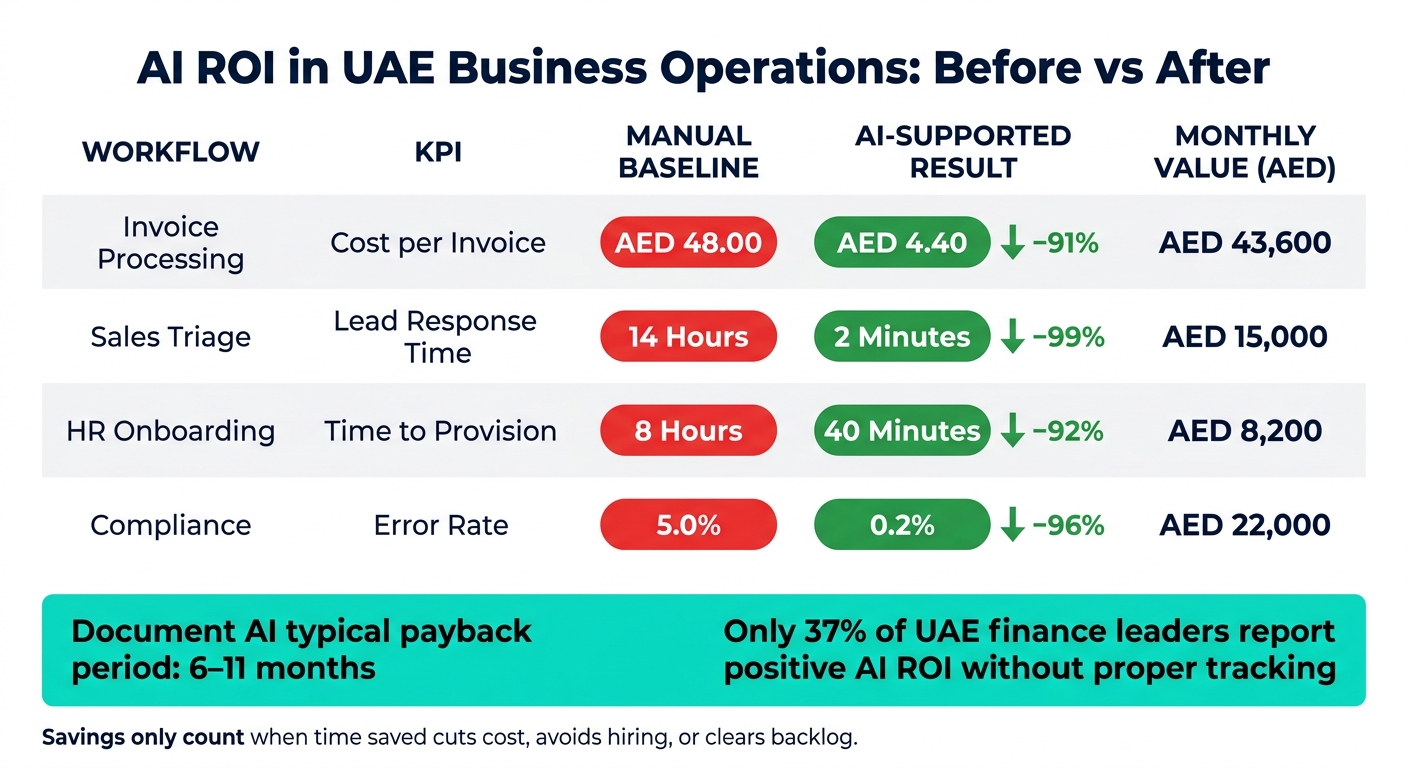
This table is the quick read. It shows manual performance next to AI-supported performance in the same baseline-versus-AI format.
| Workflow | KPI | Manual Baseline | AI-Supported Result | Change (%) | Monthly Value (AED) | Review Date |
|---|---|---|---|---|---|---|
| Invoice Processing | Cost per Invoice | AED 48 | AED 4.40 | −91% | AED 43,600 | 03-08-2026 |
| Sales Triage | Lead Response Time | 14 Hours | 2 Minutes | −99% | AED 15,000 | 03-08-2026 |
| HR Onboarding | Time to Provision | 8 Hours | 40 Minutes | −92% | AED 8,200 | 03-08-2026 |
| Compliance | Error Rate | 5.0% | 0.2% | −96% | AED 22,000 | 03-08-2026 |
Monthly Value (AED) is the decision column. Speed, error rate, and cycle time explain _why_ the AED number moved.
Or put another way: if the AED column is blank, the workflow is not ready for ROI reporting.
Step 4: Review ROI over time, avoid attribution errors and scale what works
A dashboard can show movement. That does not mean AI caused it, or that the gain will last.
Step 3 tells you something changed. Step 4 checks if the result is real, if it sticks, and if AI actually drove it.
Use a 90-day and 12-month review cadence
Run the first formal review 90 days after go-live. If the KPIs have not moved by day 90, don’t jump to retraining the model. Fix adoption and workflow fit first.
The 12-month review checks whether savings and cycle-time gains held up, and whether the payback period from Step 2 still stands. This is the checkpoint for the AED payback case built in Step 2. Keep in mind that 22% of AI agents turn negative by month 12, even after early gains [6].
Use the review table to separate adoption problems from financial ROI.
| Review Horizon | Focus Area | What to Confirm |
|---|---|---|
| 90 Days | Adoption & workflow adoption | User engagement; manual hours still in the workflow falling |
| 12 Months | Financial ROI | Sustained P&L impact; payback period alignment |
| Ongoing | Governance | Full audit-trail coverage; compliance with local data laws |
In other words:
- 90 days tells you if people are using the system as planned.
- 12 months tells you if the money story is still true.
- Ongoing governance tells you if the setup can stand up to audit, risk, and local data rules.
Apply conservative attribution and separate non-financial benefits from financial ROI
This is where teams often fool themselves. If pricing changes, staffing changes, or process redesign happened alongside the AI rollout, you can’t give AI credit for all the improvement.
Discount gains linked to those other changes. That is how you isolate AI’s share across sales, recruiting, operations, and internal support workflows.
Also, keep non-financial benefits separate from financial ROI. If a team reports better staff experience, faster replies, or fewer handoff issues, log that. Just don’t blend it into the main AED ROI figure.
Or put another way: your headline number should stay clean. The AED case needs to stand on its own, while non-financial outcomes sit beside it, not inside it.
Conclusion: A repeatable method to confirm whether AI is delivering business value
The four steps in this guide create a repeatable measurement loop. Define one use case and one outcome. Record a detailed baseline before deployment. Quantify benefits and total cost in AED, then calculate ROI and payback. Track results in KPI dashboards. Review outcomes at 90 days and 12 months on a fixed cadence.
That is the simplest way to confirm whether AI is delivering measurable business value across cost savings, time saved, error reduction, cycle-time gains, and revenue lift: compare the workflow before deployment, compare it again after rollout, and keep only the gains that remain after conservative attribution.
FAQs
Which workflow should we automate first?
Start with a workflow that gets used a lot, follows clear rules, and happens again and again, ideally 50+ times a week. Good early candidates include invoice and document processing, inbound enquiry triage, finance and compliance tasks, and employee onboarding.
Go after processes that cut across multiple tools, need manual handoffs, or force people to enter the same data more than once. That’s usually where the drag sits.
Before you automate anything, check that integration access is in place. Then set a baseline metric, such as the current processing time, so you can show ROI before you scale.
How do we prove AI savings are real in AED?
Start with a baseline before launch. If you skip that step, you’re guessing after go-live.
Then measure the post-go-live change against finance metrics. For each use case, track one main outcome so the result stays clear. That could be:
- processing hours
- error or exception count
- approval-cycle time
Turn time saved and error costs avoided into AED using your loaded labour cost. Keep the maths simple with one ROI check: ROI (%) = (Net Benefit / Total Investment) × 100.
In your dashboards, compare worst-case, base-case, and best-case scenarios side by side. That gives finance and ops a clean view of what changed, what it’s worth, and where the range sits.
What costs are usually missed in AI ROI?
Commonly missed costs don’t stop at the first build. The bigger problem is what shows up after launch: ongoing API usage, hosting, maintenance, integration work, data clean-up, and the 18% buffer that’s often needed when implementation gets messier than planned.
A lot of teams also underestimate how subscription fees climb as user numbers or message volume grow. On top of that, they may spend too little on measurement, like setting pre-deployment baselines, which makes ROI much harder to prove later.