7 Ways AI Agents Fit Into Real Business Workflows
AI agents fit best where your team repeats the same handoffs every day. In this article, I’d sum it up like this: if work keeps moving between WhatsApp Business, CRM, ERP, email, and shared docs, an agent can often take the next step instead of waiting for a person.
In plain terms, these seven workflow types stand out:
- Lead capture and qualification
- Meeting follow-up and CRM updates
- Document handling and finance checks
- WhatsApp customer support
- HR onboarding and employee self-service
- Internal service desk triage
- ERP and CRM coordination
What makes these workflows a good fit? Usually the same pattern:
- The task happens many times each month
- The rules are mostly clear
- Staff keep copying data between systems
- Delays cost money, time, or missed follow-up
- A person still steps in for approvals, edge cases, or risk checks
The article also points to clear numbers. For example, invoice processing can drop from AED 30–50 per invoice to AED 3–8. In support, reply times can fall from 47 minutes to under 90 seconds. In order handling, cycle time can move from 2–4 hours to 5–15 minutes.
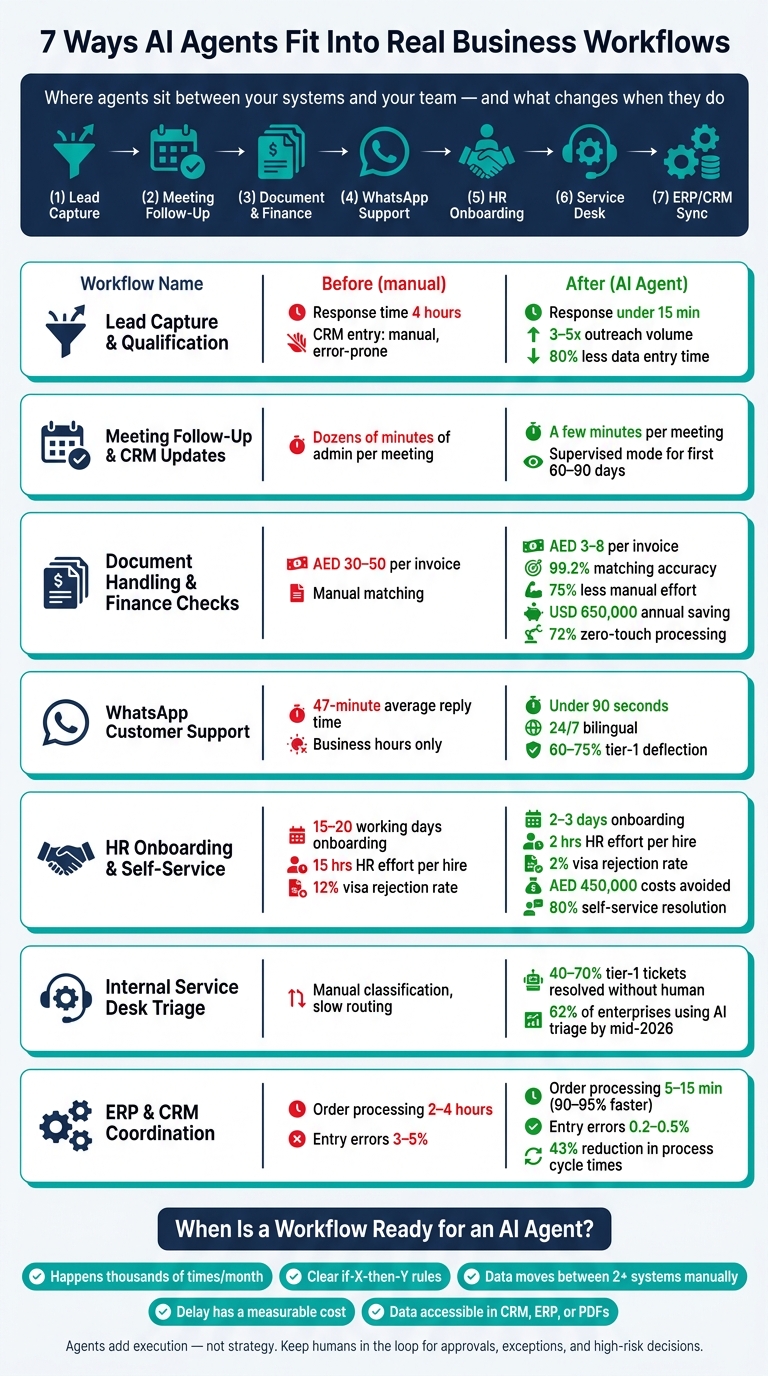
Quick comparison
| Workflow | Main trigger | Systems touched | What the agent does | Human handoff |
|---|---|---|---|---|
| Lead capture | New enquiry | WhatsApp, email, CRM | Sorts, scores, logs, replies | Sales takes over on buying intent |
| Meeting follow-up | Meeting ends | Notes, CRM, email, calendar | Pulls actions, updates CRM, drafts follow-up | Rep approves in early rollout |
| Finance checks | Invoice received | Inbox, PDF, ERP | Extracts fields, checks PO/GRN/VAT, flags gaps | Finance reviews mismatches |
| WhatsApp support | Customer message | WhatsApp, CRM, ERP | Replies, checks status, routes cases | Person steps in for complaints or low confidence |
| HR onboarding | New hire starts | WhatsApp, HRIS, gov portals, IT tools | Collects docs, checks records, triggers setup | HR approves legal and pay-related steps |
| Service desk triage | Ticket submitted | Email, Slack, forms, ticketing tools | Classifies, routes, drafts reply | Staff confirm risk-heavy requests |
| ERP/CRM coordination | Deal close or overdue invoice | CRM, ERP, email, WhatsApp | Syncs records, creates tasks, starts next action | Team approves credit, payment, final posting |
My takeaway: this is not about replacing core systems. It is about adding an execution layer on top of them, with clear rules, audit logs, and human approval where risk is high.
If you’re choosing where to start, I’d look first at the workflow with the highest volume, lowest judgement load, and clearest cost of delay.
sbb-itb-c83bf24
Where AI Agents Fit in the Workflow Stack
Most businesses already run on core systems: Odoo or SAP for operations, Zoho for sales, Microsoft 365 or Google Workspace for day-to-day work, and WhatsApp Business for customer conversations.
The weak spot usually isn't the systems themselves. It's the handoff between them: the manual steps, copy-paste work, and small judgement calls people deal with every day.
AI agents sit above CRM, ERP, email, and messaging tools. They take input from one system, apply a rule, and pass the result to another.
Put simply, agents add execution, not strategy. They move routine work across systems faster and with more consistency.
That matters in the UAE, where workflows often include Arabic-English inputs, VAT and TRN checks, and customer communication through WhatsApp Business. A well-set agent layer can handle these handoffs without changing the systems underneath. That includes:
- CRM to follow-up
- Inbox to task
- Invoice to ERP
- WhatsApp to support
- Records to approvals
| System | Agent Action |
|---|---|
| WhatsApp Business | Receives messages, qualifies leads, routes support |
| CRM (Zoho) | Logs notes, updates records, triggers follow-ups |
| ERP (Odoo / SAP) | Matches invoices to POs, flags VAT mismatches |
| Microsoft 365 / Google Workspace | Triages inboxes, drafts replies, schedules meetings |
These are the workflows most ready for AI agents.
For UAE deployments, the agent layer should support audit trails, role-based access, and local data residency under PDPL [3][2].
With that stack in place, the seven examples below show where agents create immediate value.
1. Uklad AI for Lead Capture and Qualification
The first high-value handoff happens at lead intake: from enquiry to CRM.
When a new enquiry comes in through a web form, email, WhatsApp Business, or Telegram, the agent reads the message and sorts it into the right bucket: sales lead, support request, partnership proposal, or spam. It then pulls out the key details - company name, budget, timeline, and requirements - and sends that data into the CRM or ERP without any manual re-entry.
It works with both Arabic and English, scores lead quality, and replies within seconds before a salesperson gets involved. On top of that, it applies business rules and scoring logic to add context to the record. So instead of handing sales a raw message, it gives them a qualified, structured entry that’s ready to use.
The value is straightforward: faster intake, cleaner CRM data, and round-the-clock cover outside working hours.
Once the lead is logged and scored, sales can move straight to follow-up.
2. AI Agents for Meeting Follow-Up and CRM Updates
After lead capture, the next handoff usually happens right after a meeting. The transcript, notes, or recording is ready, and someone needs to turn that conversation into clear CRM action.
This is where an agent does more than simple automation. It reads messy notes, figures out which CRM fields matter, creates the next tasks, and drafts the follow-up email. Then it pushes those structured updates into tools like Zoho, Odoo, Microsoft 365, or Google Workspace. In plain terms, the agent sits between the meeting and the CRM and turns conversation into action without manual re-entry.
For the first 60 to 90 days of deployment, most teams that get good results run this in "Supervised Executor" mode. The agent prepares everything, but a human still clicks confirm before anything is sent or saved.
That shift can cut admin time from dozens of minutes to just a few minutes per meeting. The payoff is simple: sales teams spend more time talking to customers and less time stuck in admin.
The same pattern shows up again when agents move from conversations into records, invoices, and other documents.
3. AI Agents for Document Handling and Finance Checks
After follow-up tasks, the next workflow that often eats up time is invoice intake and finance validation.
An AI agent can watch finance inboxes and shared folders, then pull in invoices as PDFs or scanned files. It reads both layout and context, which means it can deal with new supplier formats and English-Arabic documents without needing template updates. From there, it pulls the fields finance teams need before the invoice reaches the ERP: totals, VAT amounts, payment terms, and bank details.
Then the checks begin. The agent compares the invoice against the PO and GRN, verifies VAT details, flags duplicate invoices, and checks the right exchange rate for cross-border invoices.
One Dubai trading and distribution company used an AI agent connected to SAP to process more than 8,000 supplier invoices a month. The results were hard to ignore: 99.2% matching accuracy, 75% less manual effort, 78% early-payment discount capture, and an estimated annual saving of USD 650,000. On top of that, 72% of invoices were processed with no human touch.[11]
When something doesn't line up, the agent sends it to a reviewer with the failed field, the extracted value, the expected value, and the source link.[12][10] Small variances below AED 500 can be auto-cleared. Bigger gaps go forward for approval.
That same exception-and-approval flow also fits customer support and internal operations.
4. AI Agents for Customer Support on WhatsApp Business
WhatsApp support moves fast. Messages often come in after office hours, and people still expect a quick reply. That makes the job pretty clear: triage, look up the right info, reply, or hand the case to a human.
The agent reads the message, checks live records, and handles routine requests without leaving the chat. When connected to Zoho or Salesforce, it can review customer history. When linked to SAP or Odoo, it can confirm stock, shipment status, or returns. It can also book appointments inside the chat and send reminders 24 hours and 2 hours before the slot. In one implementation, response times dropped from 47 minutes to under 90 seconds [15].
The gap between an AI agent and a scripted bot becomes obvious when the chat goes off-script. WhatsApp support often includes voice notes, photos, and mixed-language messages. Fixed scripts usually struggle there. An AI agent can transcribe a voice note, use image analysis to inspect a photo of a damaged product, and reply in the same chat [13][14]. It keeps track of context across turns, asks a clarifying question when needed, and moves the conversation forward without looping or breaking.
Well-run agents handle most routine WhatsApp queries on their own and pass the rest to a human with context intact. Human agents should step in when confidence is low, sentiment turns negative, or the customer clearly asks for a person. The handoff should include the full conversation, extracted details, and the next step, so the human agent doesn’t have to start from scratch. The same setup works in any support flow where routine requests need fast answers and clean escalation.
5. AI Agents for HR Onboarding and Employee Self-Service
HR onboarding is heavy on paperwork and packed with handoffs. That’s exactly why AI agents fit so well here. They can collect, check, and route documents without the usual back-and-forth between HR, new hires, and other teams.
An AI agent can run the workflow from start to finish. It gathers passports, IDs, and certificates through WhatsApp Business, then checks them before submission to MOHRE and GDRFA. That screening step can cut visa rejection rates from 12% to 2% [16]. Once approval comes through, the same agent can trigger IT setup and HRIS setup automatically.
In March 2026, aTeam Soft Solutions deployed an AI HR agent for a 500-person engineering and facility management firm in Dubai. The agent collected documents from new hires across 30+ nationalities through WhatsApp Business, processed visas through the MOHRE and GDRFA portals, and coordinated IT setup. The results were hard to ignore: onboarding time dropped from 15–20 working days to just 2–3 days for in-country hires. HR effort per hire fell from 15 hours to 2 hours. The company also avoided an estimated AED 450,000 in annual costs linked to idle time and compliance fines [16].
After day one, the same agent moves from onboarding into employee self-service. Instead of relying on static FAQs, it answers questions about leave balances, parental leave policies, and benefits eligibility by pulling live data from the HRIS. Organisations using this model report an 80% self-service resolution rate for employee queries and 60% faster onboarding cycles overall [17].
The system also syncs both ways with tools like SAP SuccessFactors, BambooHR, and ERP platforms such as Odoo. That means updates move across systems without manual re-entry. In practice, the split is simple: agents draft and verify, while humans approve legal and financial steps. The same handoff pattern shows up in internal operations and service desk triage.
6. AI Agents for Internal Operations and Service Desk Triage
Inside a business, the same handoff pattern shows up in service desks and internal request queues. AI agents sit between the request inbox and the system of record, turning tickets into routed actions.
They pull in requests from email, Slack, or web forms written in plain language, then work out the intent, urgency, and best destination. From there, they send each ticket to IT, finance, or procurement with a short summary attached. That matters because internal requests are often messy. People leave out details, mix topics together, or phrase the same issue in ten different ways. Older rule-based automation tends to struggle with that. AI agents can handle those messy inputs and follow branching rules based on what the request actually says.
By mid-2026, 62% of enterprises use AI agents for ticket triage and drafting replies [7]. Organisations also report that 40% to 70% of tier-1 tickets are resolved without human involvement [8].
A couple of examples make this easier to picture:
- Uber's Finch lets employees query financial data in Slack. A routing agent sends each request to a database agent, which runs the lookup and returns the result [4].
- Tejas Networks' procurement agent classifies requests, identifies approval chains, and routes pre-filled forms to managers. That cut paper use by 90% and reduced compliance review time from two weeks to two days [18].
A sensible way to roll this out is to start in supervised mode. The agent classifies the ticket and drafts a response, while a human confirms the routing and priority. Once the team sees that the output is accurate, low-risk cases like routine access requests can move end-to-end without manual handling.
High-stakes changes, such as security permissions or payroll updates, should stay behind an approval gate. And when one request needs updates across more than one system, the same agent layer can coordinate both ERP and CRM.
7. AI Agents for Cross-System ERP and CRM Coordination
This is where agents earn their keep: moving finished work from one system to the next without anyone re-entering the same data by hand.
When a deal closes in CRM, the agent can check ERP inventory, pricing, and credit rules, then create the sales order. It can also work the other way around. If an invoice is overdue in ERP, the agent can flag it, update the account status in CRM, and create a follow-up task for the account manager.
The time savings can be huge. Order processing drops from two to four hours to 5 to 15 minutes - a 90–95% improvement [19]. Order-entry errors also fall, from 3–5% in manual workflows to 0.2–0.5% when agents handle the entry [19]. Companies that let agents write into transactional systems such as ERP and CRM report a 43% reduction in process cycle times [9].
The highest-value lanes are usually the plain, repetitive handoffs that teams deal with every day:
| Workflow Lane | Trigger System | Action System | What the Agent Does |
|---|---|---|---|
| Lead-to-Cash | CRM (Zoho / Salesforce) | ERP (Odoo / SAP) | Creates sales order and customer record on deal close |
| Credit Sync | ERP (SAP / Odoo) | CRM (Zoho / HubSpot) | Updates account risk status and creates task for account executive |
| Order Visibility | ERP (Odoo / SAP) | WhatsApp Business / Email | Drafts and sends status updates based on warehouse data |
A sensible rollout starts small. Give the agent read and draft access first, then add write access after a supervised period. Keep credit status, bank details, and final postings behind approval.
How to Write Up Each Workflow Example
Use four fields for every workflow example: entry point, systems it touches, daily actions, and outcome. Keep that structure the same across all seven workflows so readers can scan them fast and compare them side by side. The goal is to show the handoff, not just the task itself.
Start with a specific trigger. A concrete trigger makes the workflow feel real, not abstract.
Then name the systems involved. When you spell out each system, the handoff becomes easy to see, and it’s much clearer where data moves from one place to another.
Next, describe what the agent decides, not just what it outputs. That decision layer is the difference between an agent and a basic autoresponder. It’s the part that shows judgment: what gets routed, what gets flagged, what needs follow-up, and what can move ahead on its own.
Finally, tie each example to one measurable result, such as response time, hours saved, error rate, or cost per transaction. Use these same four fields in the comparison tables below.
Comparison Tables to Include in the Article
The workflows above are much easier to understand when each one includes a simple before-and-after table. Use tables only when they show a clear change in cost, time, or accuracy.
For UAE businesses, the most useful columns are usually the ones tied to execution: systems used, human handoff point, and measurable impact. That keeps the table grounded in how the work gets done, not just broad commentary.
Use these four table types across the seven workflows:
Table 1 - Manual vs. AI-Agent Lead Qualification goes in Section 1. It compares response time, outreach volume, CRM accuracy, and where a human still steps in during manual and agent-supported sales.
| Metric | Manual Process | AI Agent Supported | Human Handoff Point |
|---|---|---|---|
| Response time per lead | 4 hours | Under 15 minutes [5] | Sales rep takes over once the lead shows buying intent |
| Outreach volume per salesperson | Baseline | 3–5x increase [1] | Human joins for deal discussion or custom follow-up |
| CRM data entry time | High | Reduced by 80% [1] | Rep reviews records for high-value opportunities |
| Lead conversion probability after a 60-hour gap | Drops by nearly 75% [6] | Under 15-minute response [5] | Human takes over before pricing or final negotiation |
Table 2 - Document Handling Stages goes in Section 3. It should map receipt, extraction, validation, and approval to agent or human ownership, while also showing the time effect.
| Stage | Manual Handling | Agent Handling | Human Handoff Point | Time Impact |
|---|---|---|---|---|
| Invoice receipt and logging | Manual inbox sorting and logging | Automatically captures and logs incoming documents | Staff reviews unusual document formats or missing fields | Same-day processing [1] |
| Data extraction (TRN, VAT, amounts) | Manual keying, error-prone | Automated parsing | Finance team checks flagged exceptions | 70% faster cycle time [1] |
| Processing cost | AED 30–50 | AED 3–8 [1] | Human review stays in place for disputed or complex invoices | 80–90% cost reduction [1] |
| Exception flagging | Missed or delayed | Immediate, rule-based | Staff handles flagged mismatches | Improved accuracy [5] |
| Human approval (high-value) | Standard step | Preserved as handoff | Final approval remains with finance or management | Approval gate retained |
Table 3 - WhatsApp Support Models goes in Section 4. It compares three common support setups: fully manual, basic chatbot, and AI agent. Include handoff so it’s clear where people step in for sensitive or unclear cases.
| Support Model | Tier-1 Deflection | Avg. Handle Time | Availability | Human Handoff Point |
|---|---|---|---|---|
| Fully manual team | Low | 8–12 minutes [1] | Business hours only | Every case starts and ends with a human agent |
| Basic chatbot (FAQ only) | Moderate | 4–6 minutes | 24/7 for FAQs | Human takes over when the query falls outside preset answers |
| AI agent (WhatsApp Business) | 60–75% [1] | ~90 seconds [1] | 24/7, bilingual | Human takes over for complaints, edge cases, or sales-ready leads |
Table 4 - Cross-System Workflow Map is the summary table. Place Table 4 in Section 7.
| System | Agent Role | Human Handoff Point | Time / Cost Impact |
|---|---|---|---|
| WhatsApp Business | Lead triage, support replies | Ambiguous queries, complaints | Response time under 10 seconds [1] |
| CRM (Zoho, Odoo) | Lead scoring, profile updates | High-value deal review | 80% less manual data entry [1] |
| ERP (SAP, Odoo) | Invoice matching, PO processing | Payment approval | Cost drops from AED 30–50 to AED 3–8 per invoice [1] |
| Microsoft 365 / Google Workspace | Inbox triage, auto-drafting | Contract sign-off | 5–15 hours saved per month [2] |
| Cross-system coordination | Procurement, vendor onboarding | Exception handling | 60–70% shorter procurement cycle [1] |
Include the human handoff point in every table. That makes it clear where oversight stays in place for high-stakes decisions.
How to Spot Workflows That Are Ready for AI Agents
After the seven workflows above, use these checks to pick the first one to automate.
Start with tasks that happen thousands of times each month and follow steady rules. If something only comes up ten times a month, it’s often cheaper to keep it manual [1].
Another strong sign is repeat checking across documents or systems. Think of jobs with clear _if-X-then-Y_ logic, where the inputs are a bit messy and need some judgment before the next step. That’s where AI agents tend to fit well [1][7].
A good example is a workflow where staff manually move data between WhatsApp, CRM, ERP, and email. That kind of handoff work eats time and invites mistakes.
You should also look for a workflow with a clear cost of delay. If a slow reply loses a lead, a missed invoice follow-up stretches Days Sales Outstanding, or a late document creates a compliance problem, you can put a number on the damage. And once you can measure the cost, it becomes much easier to work out if the agent will pay for itself [2].
One more check is data accessibility. The agent should be able to pull what it needs from structured systems like a CRM or ERP, or from accessible unstructured files such as emails and PDFs [1]. If the data is buried, patchy, or stuck inside unclear processes, sort that out first.
In UAE operations, the fastest pilot wins usually come from a small set of workflow types:
| Pilot Workflow | Setup Cost (AED) | Monthly Time Saved | Payback Window |
|---|---|---|---|
| Invoice chasing | AED 2,500 – AED 4,000 | 6 – 12 hours | 30 – 60 days [2] |
| Lead routing / qualification | AED 3,000 – AED 5,500 | 4 – 10 hours | 45 – 75 days [2] |
| Document parsing (PDFs, IDs) | AED 4,000 – AED 8,000 | 8 – 20 hours | 60 – 90 days [2] |
| Multi-step operations agents | AED 8,000 – AED 38,000 | 12 – 40 hours | 90 – 180 days [2] |
Start with one workflow. Keep human approval in place for 60 to 90 days, then expand.
Conclusion
Across the seven workflows above, the same pattern shows up again and again: AI agents sit between people and systems and keep routine work moving. They don’t replace the tools you already use. They take care of the repetitive, rules-based steps that eat up time and lead to mistakes.
The best rollouts stay tight in scope. One workflow. One owner. Clear escalation rules. Measurable output.
The upside is practical and easy to track: lower processing cost, faster responses, and less manual re-entry.
Speed matters, but control matters just as much. Keep people involved when exceptions appear, log every action, and store sensitive data in UAE-based infrastructure when policy or regulation requires it.
FAQs
How do I choose the first workflow to automate?
Start with a workflow that repeats often, has several steps, and moves across more than one system. Pick something with clear success measures, like cost per transaction or resolution time. A common first pick is invoice chasing. It’s usually easier to integrate, easier to track, and easier to handle if something goes wrong.
Look for work with:
- High volume
- Clear if-X-then-Y rules
- Clean CRM or ERP data
- Low-risk errors, or human-in-the-loop checks
Stay away from work that needs deep judgement or relies on messy, inconsistent data.
What tasks should stay with people?
AI agents work best on repetitive, high-volume tasks that follow clear rules.
Some work should stay with people. That includes high-stakes financial approvals, legal recommendations, medical advice, and critical hiring or disciplinary decisions. The same goes for situations where facts can’t be checked through digital systems.
Human oversight should also stay in place for edge-case decisions that could lead to major liability or loss, and for any action that calls for accountability or judgement beyond a fixed rule.
How hard is integration with CRM, ERP and WhatsApp Business?
It’s usually fairly simple now, mainly because of modern APIs. Most major platforms come with APIs or ready-made connectors, which means AI agents can securely read and write data without much custom code.
A lot of businesses also lean on low-code orchestration platforms to get things live faster. The main job is making sure security, role-based permissions, and data mapping line up with your business logic.