Manual Processes Are Slowing Growth: How AI Fixes That
If work still moves through inboxes, spreadsheets, and manual follow-ups, growth slows down. I’d put it simply: AI helps by cutting delay in lead response, approvals, reporting, and admin work without forcing you to replace your current tools.
Here’s the short version:
- Slow replies lose sales when leads sit in WhatsApp, email, or web form queues.
- Approval hold-ups slow teams down when invoices and POs wait in inboxes.
- Late reports hurt decisions when data takes hours to pull together.
- Manual data entry costs more and adds error risk.
- AI sits on top of your current systems and moves work from one step to the next.
A few numbers make the case:
- Manual invoice processing averages US$11.01 per invoice, versus US$2.25 for top automated teams.
- In the UAE, talent costs are up 8%–12% year on year.
- One freight forwarder in Jebel Ali Free Zone cut PO approval time from 4.5 days to 3.8 hours and monthly admin cost from AED 22,000 to AED 4,500.
- IBM and Bouygues Telecom saw a 30% drop in call handling time after adding AI to call summaries and CRM updates.
I’d focus on one workflow first, not the whole business. Start with the job that repeats every day, touches more than one system, and wastes the most time.
The article boils down to this:
- Where manual work breaks first: handoffs between teams, channels, and systems
- What AI fixes first: triage, routing, matching, summaries, and record updates
- Where to start: sales, HR, finance, and team coordination
- How to roll it out: pilot one workflow, run in draft mode, measure time saved, error drop, and AED impact
Or put another way: don’t add headcount to a slow process if software can move the work first.
7 Steps to Automate Any Business With AI
Where Manual Processes Break Down
Manual workflows don’t fail all at once. They fail at the handoff - between channels, teams, and systems. That’s where delays creep in, mistakes pile up, and revenue starts to leak.
As volume grows, those delays stop being a small annoyance and start acting like a cap on growth. The weak spots tend to show up in the same places: lead handling, approvals, reporting, and document-heavy admin.
Slow Lead Response and Lost Revenue
In the UAE, slow triage of inbound enquiries across WhatsApp Business, email, and web forms leads to missed opportunities in real estate and B2B services [3]. When those channels sit in separate queues, leads wait. And once the first follow-up takes more than five minutes, qualification rates drop fast [2].
In other words: sales results end up depending on how fast one person replies, not on whether the process itself works well.
Approval Delays, Reporting Lag and Internal Friction
Manual approvals create bottlenecks when invoices or purchase orders bounce between inboxes. That leads to lag, off-process purchasing, and more internal friction [7]. If staff can’t get approval on time, some will work around the process and use personal cards for software or services. That creates compliance and audit risk.
Reporting has the same problem. If pulling data from several tools takes two to four hours, the report is already old when it lands with the decision-maker [8]. The business keeps moving, but leadership is looking at yesterday’s picture.
Repeated Admin Work Raises Cost and Error Risk
The cost of manual work shows up most clearly in data re-entry and document processing. Ninety-two percent of organisations identify document processing as a major operational bottleneck [6]. Manual invoice processing costs an average of US$11.01 per invoice, compared with US$2.25 for best-in-class automated teams [6].
Manual-entry mistakes also tend to surface late - during reconciliation or audit - when they cost more to fix. And if you automate a broken process, you don’t remove the problem. You just move the same errors through the workflow faster.
These are the points where AI can step in for triage, routing, and data handling.
How AI Removes the Constraint
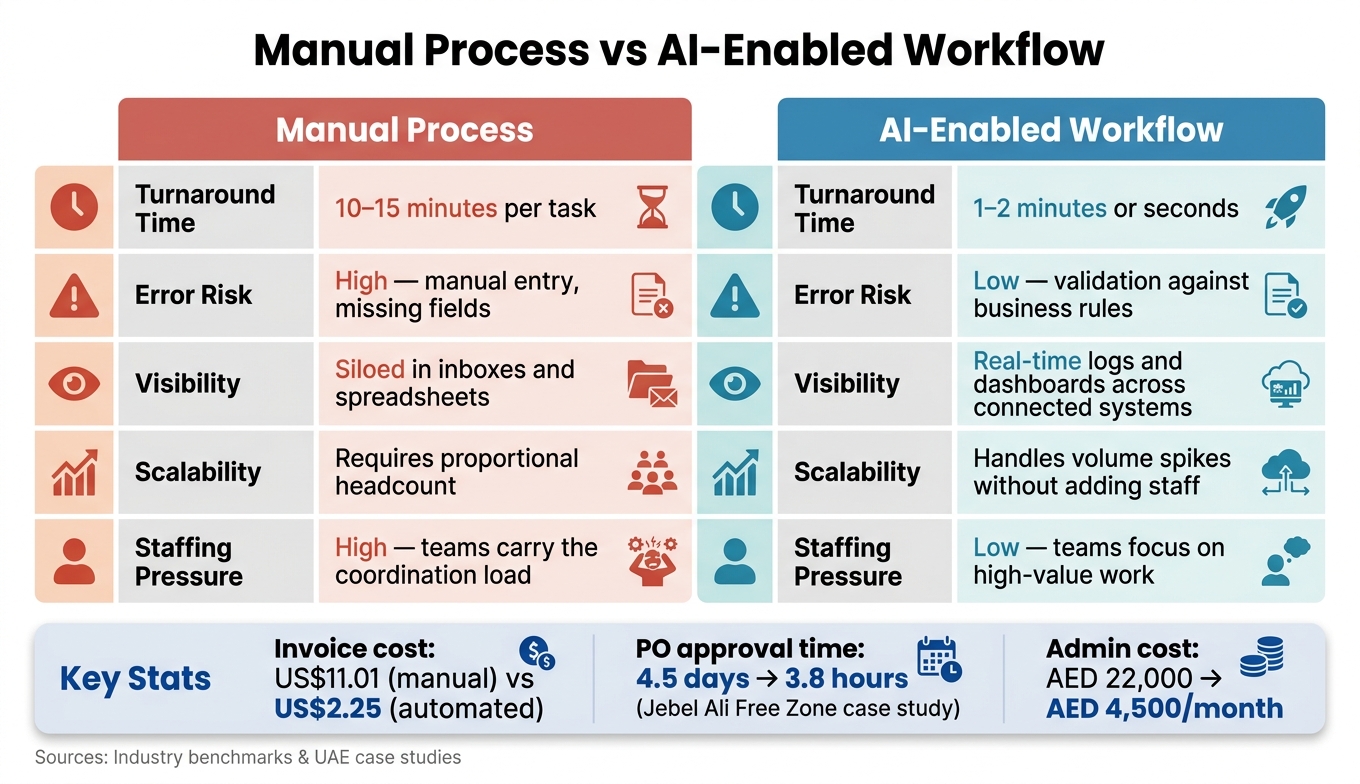
The problem is simple: work gets stuck when people have to move information by hand.
Slow lead response, stalled approvals, and manual data entry all come from the same issue. A person has to read something, decide what it means, then push it into the next system. Until that happens, nothing moves.
AI changes that by sitting on top of your current tools as an AI layer. It makes rules-based decisions, updates records, and triggers the next step across your existing systems. In other words: it cuts the wait between request, decision, and action.
What Improves When AI Handles Repetitive Work
When AI takes care of repetitive business workflows, four things get better: speed, accuracy, scalability, and team productivity.
Manual Process vs AI-Enabled Workflow: A Direct Comparison
| Dimension | Manual Process | AI-Enabled Workflow |
|---|---|---|
| Turnaround Time | 10–15 minutes per task [5] | 1–2 minutes or seconds [5] |
| Error Risk | High - manual entry, missing fields [5] | Low - validation against business rules [5] |
| Visibility | Siloed in inboxes and spreadsheets [1] | Real-time logs and dashboards across connected systems [1] |
| Scalability | Requires proportional headcount [5] | Handles volume spikes without adding staff [5] |
| Staffing Pressure | High - teams carry the coordination load [1] | Low - teams focus on high-value work [1] |
This is why lead handling, approvals, and document-heavy tasks tend to improve first. AI removes the lag between inbound work and action, so the first wins usually show up in sales, finance, HR, and operations.
Business Functions Where AI Delivers Quick Wins
Start where the business feels pain first: the bottleneck that slows revenue or limits team capacity.
Sales and Customer Response
Begin with revenue-facing work. If replies are slow, conversions slip. It’s that simple.
An AI agent tied to WhatsApp Business and your CRM can read an incoming message, pull out intent, score the lead, and create a record before a sales rep even opens it. It can draft follow-ups, and if a call takes place, it summarises the conversation and logs next steps back into the CRM. It can also handle basic questions and route tickets with the customer’s history attached.
In June 2026, Sandvik Coromant piloted Microsoft's Dynamics 365 Sales Qualification Agent and recovered over 120 hours of team time and US$19,000 in costs within three weeks, with the company forecasting a 5% revenue increase at scale as the agent autonomously researched leads and handled multi-turn conversations before transferring them to human sellers [10].
The same pattern shows up in approvals and document workflows.
HR, Finance and Document-Heavy Workflows
Once lead response is under control, move to the work that gets buried in files, forms, and inboxes.
Document-heavy tasks often pay back fast. CV screening, invoice matching, and document checks are usually the first places to look.
An AI agent connected to Google Workspace or Microsoft 365 can screen CVs against role criteria, prepare a shortlist, and send first-response messages without a recruiter touching the file. On the finance side, AI can extract line items from invoices, match them against purchase orders in SAP or Odoo, and flag anomalies for human review. In other words: less time spent keying in data, and fewer mistakes slipping through.
Operations Coordination Across Teams
After documents, clean up the handoffs between teams.
Operations teams lose a lot of time chasing updates, pulling reports from different systems, and routing tasks by hand across departments. AI helps by sitting on top of the tools you already use and moving work along. It reads activity across Odoo, SAP, or Microsoft 365, works out the next step, and either triggers the action or drafts the update for a person to approve.
In 2026, IBM and Bouygues Telecom deployed generative AI that summarised every support call and updated CRM records in real time, resulting in a 30% reduction in call handling time and millions of dollars in operational savings [9]. Meeting summaries, shift handover notes, and cross-team status reports can also be generated and routed automatically, which lets operations staff spend more time on decisions and less on moving information around.
What Implementation Looks Like in Practice
The hard part isn't the tech. It's knowing where to start without messing up the systems your team relies on every day.
The safest move is simple: pick one bottleneck, show the gain, then expand.
Start with One Bottleneck and Measure the Impact
Start with one high-volume workflow that slows people down every single time it runs. A good first target is a process that jumps between systems, like a lead coming in through WhatsApp and then getting logged by hand into a CRM, or an invoice arriving by email and then being entered manually into SAP or Odoo.
Before you build anything, define success in plain terms:
- Minutes saved
- Error reduction
- AED impact
In February 2026, a Jebel Ali Free Zone freight forwarder cut purchase-order approval time from 4.5 days to 3.8 hours and reduced monthly admin costs from AED 22,000 to AED 4,500. [4]
Once you've picked the first workflow, run it in draft-only mode. Let the agent do the work up to the last step, then have people review replies, matches, or shortlists before anything goes out or gets finalised.
That gives the team room to build trust. It also makes it easier to spot edge cases early, before they turn into expensive mistakes.
Connect AI to Current Systems and Controls
When the pilot shows results, connect the agent to the tools your team already uses. In practice, AI agents act as a coordination layer across current systems through APIs, including Microsoft 365, Google Workspace, ERP, CRM, and WhatsApp Business. They read inputs, trigger actions, and pass structured data from one system to another without replacing any of them.
For UAE deployments, governance needs to be built in from day one. Use role-based access so each agent can touch only what it needs. Log every action with timestamps, confidence levels, and decision records to stay aligned with PDPL, DIFC, and ADGM requirements. [3][6]
For sensitive data, regional data residency helps keep information inside the local perimeter. [4] And if customer-facing Arabic content is moving through WhatsApp Business, have a native speaker review it during the first month. That matters even more when messages switch between Arabic and English, where dialect and tone can slip fast. [3]
Conclusion: Cut Bottlenecks Without Adding Headcount
Manual work puts a hard limit on how fast a business can move. AI helps remove that limit by taking on repetitive tasks across lead response, approvals, reporting, and admin work inside the workflows you already run and the systems you already use.
Start small. Measure in AED. Scale only what proves useful.
FAQs
Which process should we automate first?
Start with a high-volume workflow that happens at least 50 times a week and eats up staff time. The best first target is routine work that still matters to the business, with clear rules and a set structure, like inbound lead triage via WhatsApp, invoice processing, or standard approval requests.
Stay away from messy processes. If you can’t describe the steps, name the owner, or confirm system access, it’s not ready yet. Map the current workflow, keep a human in the loop, and track time saved before you expand.
How does AI work with our current tools?
AI doesn’t replace tools like Odoo, SAP, Zoho or Microsoft 365. It sits on top of them as an intelligent layer, connecting the systems your team already uses and cutting down manual data entry and repetitive work.
Through API integrations, AI can read data from WhatsApp, email and PDFs, apply your business rules, and then update your current systems. In plain terms, it moves information from one place to another without someone having to copy and paste it all day.
For example, it can log lead details into your CRM or post invoice data to your ERP without manual re-keying.
How do we measure AI ROI in AED?
Measure AI ROI in AED with a simple comparison: total value created versus total project cost.
Use this formula:
(hours saved × fully loaded hourly cost + cost of avoided errors) − (setup + monthly operations)
That gives you a practical view of whether the project is cutting cost or just adding another tool to manage.
Track the before-and-after change in a small set of workflow metrics:
- Autonomous handling rate
- Cycle time
- Error rate
- Residual human hours
Keep the focus on where the money shows up first. In most teams, that means administrative savings, avoided headcount growth, and faster lead-response gains. Those are the areas where AI usually earns its keep inside day-to-day operations, not in slide-deck promises.
On the cost side, include both the upfront build and the monthly run rate. A typical setup can range from AED 30,000 to AED 165,000, with monthly costs between AED 1,000 and AED 10,000.
In other words: if the workflow saves staff time, cuts mistakes, and helps the team respond to leads faster, you can map that value back to AED and judge the project on what matters - output, cost, and time.