Automate Supplier Follow-Ups on WhatsApp with AI
I’d automate supplier reminders, not purchase decisions. Start with one AI agent workflow for PO confirmation over 2–4 weeks, keeping price, quantity and delivery-date changes subject to buyer approval.
My setup would cover:
- WhatsApp Business Platform: supplier opt-in, approved templates and clear human handover.
- ERP or CRM controls: match replies to the right PO, check proposed changes and retain message and approval logs.
- Reminders and escalation: stop messages after a relevant reply or opt-out, and give unresolved issues a named owner.
- UAE and KSA data checks: review access, storage and cross-border transfers before launch.
I’d test duplicate replies, failed writes and the stop control before using live records. Then I’d measure response times, buyer effort and incorrect updates against the baseline. Faster replies are not enough: _buyers must stay in control of every commitment_.
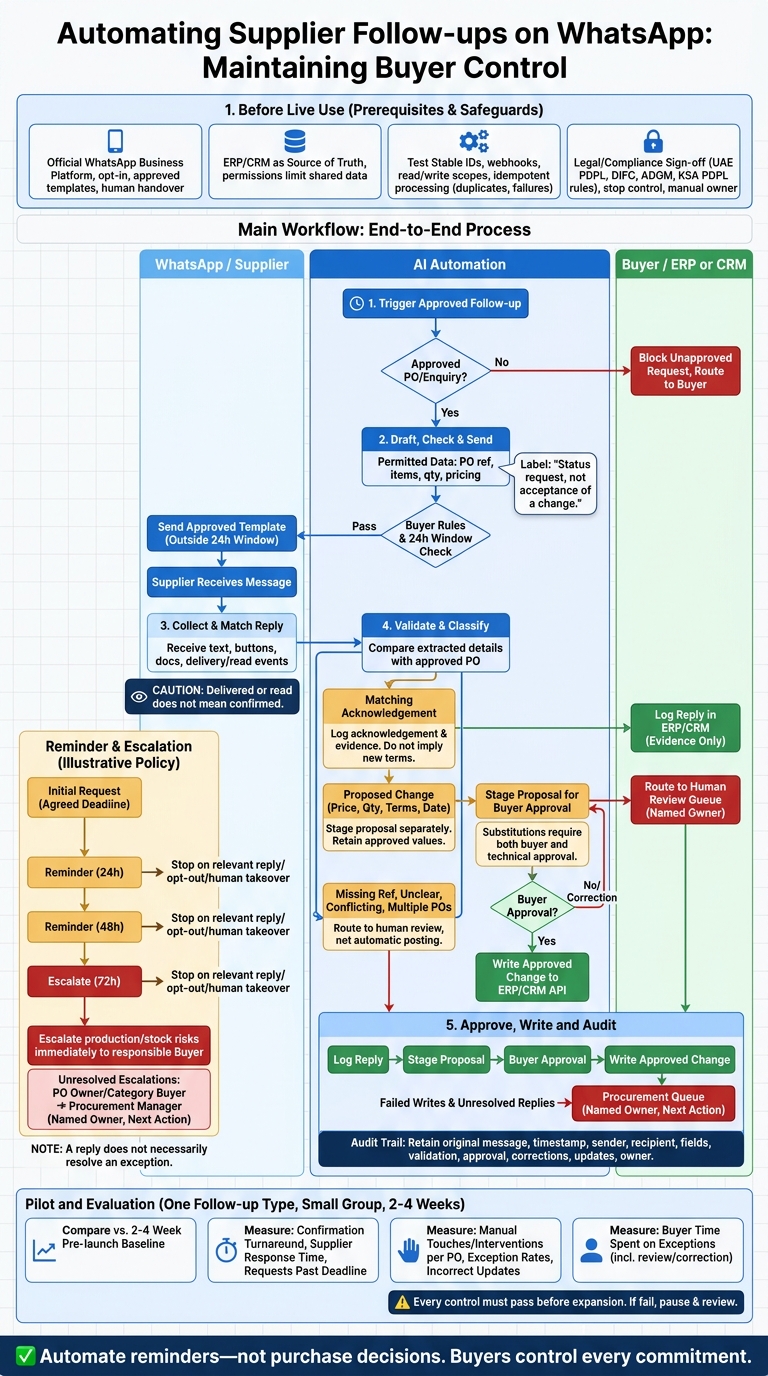
Build the WhatsApp follow-up workflow
Start with an approved enquiry or PO, with permissions already set. Block any message that could create a commitment before buyer approval. After sending, classify the reply and route any exception.
Trigger, approve and send messages
Trigger follow-ups when an approved enquiry or PO needs acknowledgement, confirmation is overdue, or delivery is approaching. Draft messages using only permitted data from the system of record, such as PO numbers, item descriptions, quantities and agreed pricing.
Include the reference and requested action. Label the message as a status request, not acceptance of a change. Apply buyer approval rules before sending, and use the approved outbound template outside the 24-hour window. [1]
Collect replies and check updates
Collect text, button replies, documents and delivery/read events through webhooks. Delivered or read does not mean confirmed. Match each reply to the supplier and PO line item, then extract quantities, proposed prices and promised dates.
Compare those details with the PO record. Route missing references, unclear dates and mismatches for review rather than guessing.
Log acknowledgements and delivery/read events automatically, but keep proposed commercial or delivery-date changes pending buyer approval. Retain the source message, timestamp and attachment as evidence for each update. Send unclear or conflicting replies to exception handling, not automatic posting.
Link messages to system actions
Keep logging a reply, staging a change and approving it as separate actions. In Odoo, SAP or Zoho, an incoming WhatsApp message must not bypass the buyer’s approval controls.
| Trigger | AI action | Supplier response | System update | Decision point |
|---|---|---|---|---|
| Approved PO issued | Send reference and confirmation request | Acknowledgement matching PO terms | Log acknowledgement and evidence | Review any mismatch |
| Confirmation overdue | Send reference and reminder | Confirmation or no reply | Log response or outstanding status | Escalate under buyer rules |
| Proposed commercial change | Extract changed price, quantity or terms | Revised commercial details | Stage proposal; retain approved values | Buyer approval before acceptance |
| Delivery approaching | Request dispatch status and promised date | Delay or revised date | Log risk and proposed date | Verify before updating delivery date |
| Unapproved purchase request | Block supplier commitment | Not applicable | No order or commitment created | Route to buyer for approval |
Route unresolved replies and overdue confirmations to exception handling.
Handle replies and stalled requests
Route confirmations and exceptions
Classify each reply before changing any record. Treat it as provisional until it matches the PO, supplier and line item. Keep approved values unchanged and store proposed changes separately.
Send partial availability, unclear replies and messages referencing multiple POs to human review. Use these checks to decide whether to send a reminder, escalate or freeze the line item. Escalate any delay that threatens production or stock levels immediately to the responsible buyer.
Set reminders and escalation rules
Time the initial request around the agreed confirmation deadline. A policy can set reminders at 24 and 48 hours, then escalate at 72 hours, with adjustments for supplier agreements, business hours and material risk [6][7].
Stop reminders after a relevant reply, opt-out or human takeover. A reply does not necessarily resolve an exception.
Use one rule set for each reply type. Buyer approval is mandatory for commercial and delivery-date changes. Substitutions also require a technical approver.
| Response type | Automated handling | Review focus | Mandatory escalation |
|---|---|---|---|
| Confirmation | Match to PO; log acknowledgement | Discrepancies | Mismatches to PO owner |
| Price change | Store proposed price separately | Price variance | Every change to buyer |
| Quantity change | Flag shortfall and inventory impact | Quantity amendment | Planning if minimum stock is at risk |
| Date change | Extract proposed date; flag ambiguity | Revised date | Buyer if production deadlines are at risk |
| Substitution | Flag proposed item | Technical suitability | Every substitution to buyer and technical approver |
| No reply | Send reminders within agreed cadence | None for routine reminders | PO owner after escalation deadline |
Every escalation needs a named owner and next action. If unresolved, escalate from the PO owner or category buyer to the procurement manager. Include the conversation, affected lines, stock impact and required decision [6][7].
Log decisions and measure results
After each reminder or escalation, retain the decision record in the ERP or CRM. Record the original message, timestamp, message or template ID, sender, recipient, extracted fields, validation result, approval outcome, buyer corrections, system updates and owner. This keeps buyers in control and informs further escalation [2][6].
Compare pilot results against the baseline: confirmation turnaround, requests past their response deadline, manual touches per PO, incorrect updates and buyer time spent on exceptions. Include review and correction time when calculating time saved.
Faster replies alone do not count as success: exceptions must close safely and be logged. Use the audit trail to reconcile WhatsApp replies with ERP or CRM records.
Connect WhatsApp to ERP or CRM
Keep ERP or CRM as the source of truth
A supplier’s WhatsApp reply should not change a purchase record without approval. Keep supplier contacts and purchase records in the ERP or CRM, the only place where approved changes are written. Connect through the official WhatsApp Business Platform, with permissions that limit shared data to the supplier contact, PO reference, item quantities and delivery dates needed for follow-up. [1][2][6]
Use AI to structure each reply, compare it with the source record and route it for approval. Then write only the approved change and audit log back through the API. Send unclear replies and failed writes to a procurement queue with an assigned owner. [2][6]
Test connections and security controls
Before connecting live records, test four integration controls:
- Stable IDs: Check that replies match the correct supplier, PO and line item.
- Authenticated webhooks: Reject unauthenticated events. Treat supplier messages and attachments as untrusted data.
- Separate read/write scopes: Test each scope independently.
- Idempotent processing: Test duplicate confirmations, out-of-order replies, delivery failures and ERP write failures. Retries must not apply a change twice, bypass approval or overwrite a newer buyer decision. [1][2][6]
Use a dedicated test WhatsApp number and non-production purchase data for these checks. Resolve failures, then map UAE and KSA data-location and access rules before the live pilot. [1][2]
Check UAE and KSA data controls
Passing webhook and ERP tests does not make a workflow ready for production. Require legal, compliance and security sign-off on the live workflow before launch. Check the UAE PDPL, DIFC or ADGM rules where relevant, and the KSA PDPL. Regional hosting alone does not establish compliance or mean every messaging, AI and integration component processes data locally [2][5].
Map data locations and access
For each system, map where data moves and who can access it. Cover storage, processing and access for messages, contacts, attachments, prompts, ERP or CRM updates, logs and backups.
Record every provider, subprocessor, support access location and cross-border transfer, including Meta’s WhatsApp Business Platform or any business solution provider. If you use external AI models, send only de-identified or tokenised data outside the perimeter. Verify data-residency claims in the contract rather than assuming they cover WhatsApp or every external service [8].
Minimise shared data and set role-based access so supplier replies, AI prompts and ERP writes stay within approved boundaries. Mirror message history in the ERP or CRM for audit access; provider-side storage alone is not enough.
Review transfer safeguards, de-identification controls, supplier privacy notices, WhatsApp opt-in records and opt-out handling [2]. Document these controls alongside the approval rules.
Localise messages and purchase details
Use explicit dates and local time zones. Format amounts from the approved ERP record, using AED for UAE transactions and SAR for Saudi records [3][6].
Date and time-zone examples: 29 October 2026; UAE GST (UTC+4); KSA AST (UTC+3).
Include only the purchase fields needed for the reply. Schedule follow-ups around each supplier’s working hours, local holidays and Ramadan working hours. When timing is vague, ask for a specific date rather than letting the agent turn it into a commitment [6].
“after Eid”
Check readiness and launch a pilot
Start with one follow-up type, such as PO confirmation, for a small supplier group over 2–4 weeks [2][6]. Keep proposed ERP or CRM updates in draft mode until a buyer approves them [6][9].
Use only the approval and exception rules already defined in the workflow. Test supplier follow-up, reply classification, approval gating and ERP/CRM write-back, including exception handling.
Complete the launch checklist
Confirm the official WhatsApp Business Platform sender, approved templates, supplier opt-in records and correct contact-to-PO mapping [1][2]. Test reply classification with missing PO references, ambiguous dates and price changes. Send unverified replies for human review [1][6].
Lock buyer thresholds, code limits and escalation ownership [1][10]. Require UAE and KSA data-control sign-off [2][8]. Display the original reply, extracted values and audit trail in the ERP/CRM record [9]. Every control must pass before you expand the pilot.
Before launch, test alerts for failed deliveries, unanswered requests and incorrect updates. Test that the stop control works, rather than just checking it exists. Confirm who takes over manual follow-ups when automation stops [2][4][6].
If any control fails, pause the pilot before adding suppliers or write permissions.
Review results before expanding
Compare the pilot against a two-to-four-week pre-launch baseline for supplier response time, manual interventions, exception rates and incorrect updates [10].
Review access permissions and audit logs. Resolve failures before adding suppliers or granting further write permissions [2][10]. Keep the pilot limited to routine follow-ups, with commitments handled manually.
FAQs
How should AI handle Arabic and English supplier replies?
AI agents should use multilingual models to interpret conversation context, mixed-language shorthand and approximate dates. Store each original message with its language metadata and a translation for internal review.
When wording is unclear or informal, use context, regional holidays and business patterns to resolve dates. Before saving updates to the ERP or CRM, coordinators should use a review dashboard to check AI-extracted data against the original messages.
What happens if a supplier confirms by phone instead?
A procurement team member or coordinator must manually log the phone confirmation in the ERP or CRM, updating details such as the estimated arrival date or PO status. This keeps the system as the single source of truth.
With two-way synchronisation, changes in the ERP also flow to the agent database, keeping the AI’s data aligned with the latest updates.
Can one workflow meet both UAE and KSA data requirements?
Yes. A shared integration architecture can support each country’s data residency requirements. A centralised AI layer connects to your existing ERP or CRM, while infrastructure and data processing are configured to meet local rules.
Keep the ERP as the single source of truth. Configure the WhatsApp Business API so message history and logs are stored in each country’s local environment.