AI Interview Scheduling with Odoo, SAP, Zoho
Interview scheduling is not a hiring problem. It is a workflow problem.
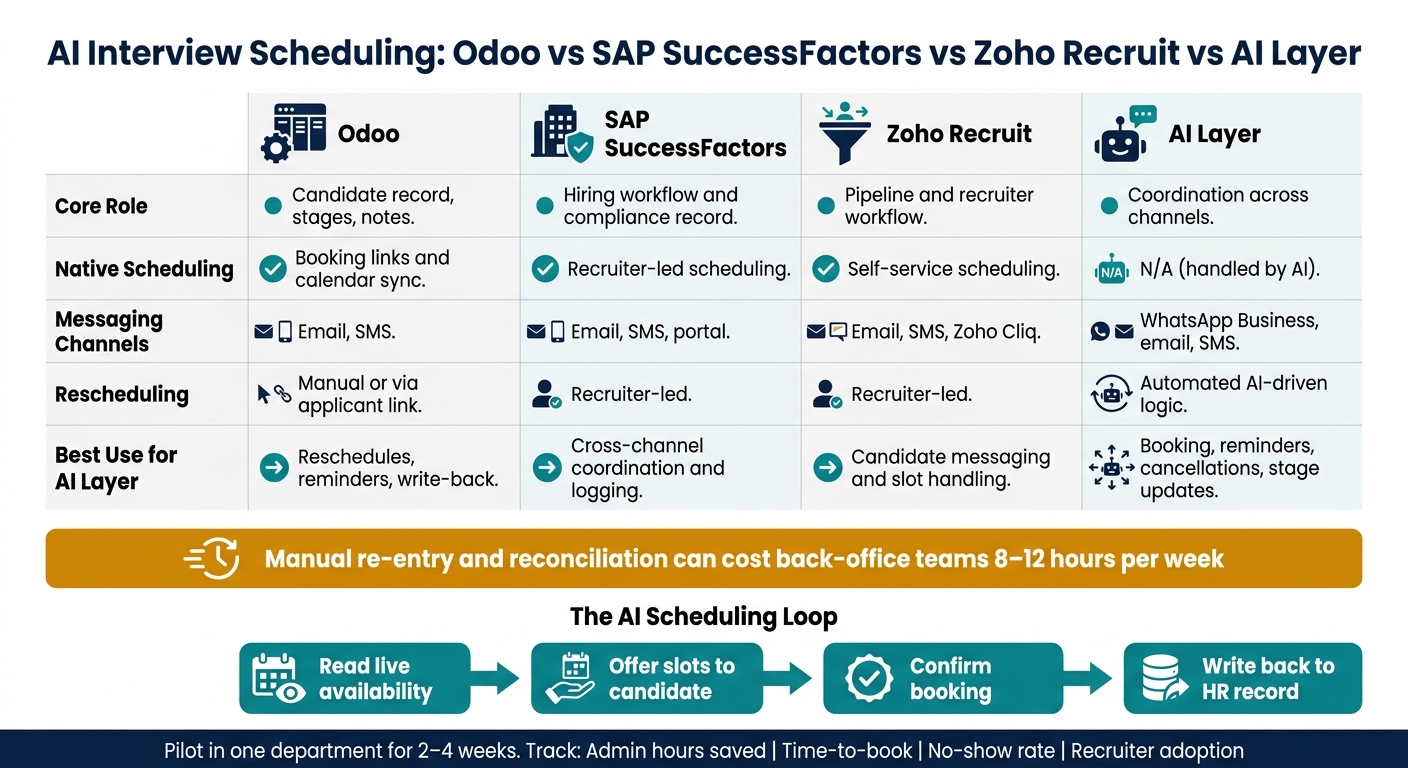
If you use Odoo, SAP SuccessFactors Recruiting, or Zoho Recruit, the clean setup is simple: keep the HR system as the record, and let the AI layer handle slot offers, reminders, reschedules, cancellations, and write-back through WhatsApp Business or email.
I’d boil the article down to this:
- Odoo, SAP, and Zoho stay in charge of candidate records, stages, notes, and compliance data.
- The AI layer handles the back-and-forth with candidates, in plain language, across channels.
- Calendars must be synced first or the workflow breaks fast.
- Stages, templates, permissions, and field rules must match across systems.
- Every booking, cancellation, and stage update should write back to the same candidate record.
- Start with one department for 2 to 4 weeks and track:
- Admin hours saved
- Time-to-book
- No-show rate
- Recruiter adoption
The article also makes one point that matters: manual re-entry and reconciliation can cost back-office teams 8 to 12 hours per week. Or put another way: if your recruiters still chase interview times by hand, the delay is usually in the process, not in the ATS.
What each system already does:
- Odoo: booking links, stage-triggered emails, calendar sync
- SAP SuccessFactors Recruiting: recruiter-led workflow with compliance controls
- Zoho Recruit: pipeline automation and self-service scheduling
- AI layer: WhatsApp Business, natural-language rescheduling, 24/7 replies, and record updates
I Built This Interview Scheduler AI Agent That Books Candidate Interviews Automatically
Quick Comparison
| Tool | Core role | Native scheduling | Best use for AI layer |
|---|---|---|---|
| Odoo | Candidate record, stages, notes | Booking links and calendar sync | Reschedules, reminders, write-back |
| SAP SuccessFactors | Hiring workflow and compliance record | Recruiter-led scheduling | Cross-channel coordination and logging |
| Zoho Recruit | Pipeline and recruiter workflow | Self-service scheduling | Candidate messaging and slot handling |
| AI layer | Coordination across channels | N/A | Booking, reminders, cancellations, stage updates |
For UAE teams, the setup should use DD/MM/YYYY, 24-hour time, Asia/Dubai, AED, and a Sunday–Thursday workweek. I’d also keep bilingual replies in mind, because many candidates switch between English and Arabic in the same thread.
_That is the whole playbook in one view: fix the workflow, sync calendars, control write-back, and test it in one team before rolling it out further._
2. Prepare Odoo, SAP, and Zoho for AI scheduling
AI scheduling breaks fast when the HR system under it is messy. Get the workflow right first in Odoo, then copy the same setup into SAP SuccessFactors Recruiting and Zoho Recruit.
Set stages, templates, permissions, and booking links
In Odoo, install the hr_recruitment, hr, and calendar modules [4]. Then set clear hiring stages in the Kanban pipeline: New, Initial Qualification, First Interview, Second Interview, Contract Proposal, Contract Signed [5].
Attach the Recruitment: Schedule Interview template to interview stages such as First Interview and Second Interview [1][2]. When a candidate moves into one of those stages, the system sends a booking link automatically [1][2].
Use the same stage, template, permission, and booking-link setup in SAP and Zoho. That gives the AI one workflow to follow instead of three slightly different ones.
Connect calendars and define data rules
Start by syncing recruiter and interviewer calendars. Connect Microsoft 365 or Google Workspace to the HR tool so availability stays current and double-bookings are less likely [6][8].
In Odoo, set the user time zone correctly in Preferences. For UAE teams, use Asia/Dubai. If that field is blank, Odoo may fall back to UTC and show the wrong times [9]. Use ISO 8601 for all date-time values so the agent reads time slots the same way every time [9].
After calendar sync is done, define the exact fields the AI can read and write. At minimum, include candidate name, email, phone, job position, responsible recruiter, stage, interview type, date and time, time zone, status, and video call URL [9][2][4]. Set the meeting title to the candidate's name by default, and link the event to the right job position and recruiter for auditability [2][4].
| Field | Purpose |
|---|---|
| Candidate Name | Sets the event title [2][4] |
| Matches the candidate record [9] | |
| Phone | Supports candidate contact details [9] |
| Job Position | Links to the requisition [4] |
| Responsible Recruiter | Keeps ownership and audit trail clear [2][4] |
| Stage | Shows candidate position in the hiring flow [9] |
| Interview Type | Shows interview format [9] |
| Date and Time | Stores the booked slot [9] |
| Time zone | Prevents slot mismatches across regions [1][2][9] |
| Status | Keeps the interview state current [9] |
| Video Call URL | Stores the meeting link [2][4] |
Then set availability rules so confirmed interview slots mark interviewers as Busy by default [1][6]. Also configure the AI to check for an existing email address before it creates a new record. That helps avoid duplicate candidate entries [9].
With stages, permissions, calendars, and field rules in place, the next move is syncing candidate records, recruiter tasks, and booking updates.
3. Sync candidate data, recruiter tasks, and calendars
Once stages and calendars are set, the next problem is simple: too many handoffs. Candidate data sits in one place, recruiter follow-ups in another, and the booked slot somewhere else. The fix is to keep all three moving inside one workflow.
That gives the AI one job loop: read live availability, offer slots, and write the confirmed booking back to the source record.
Keep candidate records and recruiter actions in sync
The AI reads the existing candidate record - for example, Odoo's hr.applicant - by record ID. That stops duplicate profiles when the same candidate applies more than once [4][3].
When a candidate reaches the First Interview stage, the AI can do two things in the same step:
- send the scheduling link
- create the next recruiter task, such as CV review or panel confirmation, with a deadline [1][2][4]
Use server actions to update the existing record, not create a new one [3]. In other words: keep the work tied to the same applicant file.
That keeps the hiring stage correct and lets the recruiter see the right status in the same system. Automated rules can also flag applicants stuck in one stage for more than 14 days [4].
Once record updates and recruiter actions are tied together, scheduling stops depending on manual follow-up.
Coordinate interview slots across calendars and channels
When a candidate replies, the AI checks live calendar availability before offering slots. After confirmation, it writes the booking back to all calendars and the candidate record automatically [1][2][6].
Set the system to block local public holidays so it doesn't offer slots on unavailable days.
WhatsApp Business sends the candidate's reply straight into the HR system instead of leaving it on a recruiter's personal device [10].
Native scheduling vs AI-coordinated workflow: comparison by platform
Each platform handles scheduling in its own way out of the box. The table below shows where native tools stop and where an AI layer takes over.
| Feature | Odoo 19 | SAP SuccessFactors | Zoho Recruit | AI layer |
|---|---|---|---|---|
| Native scheduling | Kanban-triggered scheduling link [1] | Compliance-led recruiter workflow [7] | Automated pipeline with self-service link [7] | Unified cross-platform logic |
| Calendar inputs | Google, Outlook, Odoo internal [6] | Enterprise-grade integrations [7] | Zoho Calendar, Google, Outlook | Aggregated multi-tool availability |
| Status fields | Colour-coded (green, red, grey) [5] | Complex compliance fields [7] | Standard pipeline stages | Automated "stale" and "urgent" flags [4] |
| Messaging channels | Email, SMS [1] | Email, SMS, portal | Email, SMS, Zoho Cliq | WhatsApp Business, email, SMS |
| Rescheduling | Manual or via applicant link [2] | Recruiter-led | Recruiter-led | Automated AI-driven logic |
This split keeps scheduling, reminders, and status changes in one flow.
4. Update Interview Status, Notes, and Follow-Ups Automatically
The booking is only half the job. If status, notes, and next steps live in different places, the pipeline drifts fast.
After booking, keep everything synced in the same flow across Odoo, SAP SuccessFactors Recruiting, and Zoho Recruit.
Write Back Bookings, Cancellations, and Stage Changes
In Odoo, calendar events link to the hr.applicant record through a read-only "Linked to" field. When a candidate reschedules or cancels, both the recruiter’s calendar and the applicant record update automatically [1][2].
Use that same write-back pattern in SAP SuccessFactors Recruiting and Zoho Recruit. From the same candidate record, you should:
- update the stage
- log the note
- create the next task
That keeps the workflow tight. A stage change should update the applicant record, trigger the next task, and keep the pipeline current.
AI server actions can update records through approved tools, which helps keep status changes aligned with the database structure [3].
Create a dedicated Hired stage to mark the final outcome and hire date [5].
Once the booking is written back, record the interview outcome in that same record.
Capture Notes and Trigger the Next Action
Store interview notes on the candidate record, not in side chats or private docs. In Odoo, the Chatter thread keeps all communication - emails, call notes, and meeting descriptions - in one threaded view tied to the applicant [3].
The Survey module adds a clean way for panellists to complete evaluation forms. Their scores are then aggregated directly on the applicant card, which makes comparison faster [4][5].
After the interview is complete, the AI layer can suggest the next stage, with recruiter approval before anything is changed [3]. If the follow-up includes pay or timing, use AED and DD/MM/YYYY.
Start with a small pilot and test the full write-back flow before rolling it out across teams.
5. Run a Small Pilot and Measure Results Before Scaling
Don’t roll this out across the whole company on day one. Start with one department where scheduling pain is worst, then prove the flow works before you push it further.
A good place to start is Engineering or Operations. Pick the team where recruiters spend the most time chasing calendars, updating records, and handling manual booking steps. After write-back and follow-up automation are in place, test the full flow there first and validate that department’s workflow before enabling AI.
Set your benchmarks before go-live, not after. From day one, track:
- Admin hours saved
- Time-to-book
- No-show rate
- Recruiter adoption
Research on fragmented recruitment systems estimates that manual re-entry and reconciliation can cost back-office administrators 8 to 12 hours per week [7].
Run the pilot for two to four weeks, then review the results. Look at stage ageing and booking speed in the pipeline board. If booking speed moves in the right direction and recruiter adoption stays steady, extend the setup to the next department or location. If not, fix the data or adjust the stage logic before scaling any further.
Using Uklad AI as a Layer Over Odoo, SAP, and Zoho
Uklad AI can sit above Odoo, SAP, Zoho, Microsoft 365, Google Workspace, email, calls, Telegram, and WhatsApp Business. In other words: the pilot stays focused on one workflow in one department, with results measured before any broader rollout.
Conclusion: Add AI Scheduling Without Replacing Core Systems
Keep the HR system as the source of truth. Let AI handle coordination, updates, and follow-up.
FAQs
Do I need to replace Odoo, SAP, or Zoho?
No. Odoo, SAP, or Zoho can stay at the centre of your hiring process, including candidate data, application stages, and employee records.
You don’t need to rip out the system your team already uses. A lighter move is to add an AI layer on top to handle interview coordination and data synchronisation. That means smoother day-to-day workflows without the disruption, downtime, or cost of a full platform migration.
What must be synced before AI scheduling goes live?
Before AI interview scheduling goes live, make sure each applicant’s candidate data is in place: full name, email, and phone number.
You’ll also need your recruitment stages set up to send the “Recruitment: Schedule Interview” email template. On top of that, calendar integration must be turned on so the selected slot is logged for the recruiter, interviewer, and candidate in the correct time zone.
How does the AI avoid duplicate candidate records?
It cuts duplicate records by tying applicant data, message history, and interview scheduling to one persistent candidate profile in a centralised database.
When someone books an interview through a self-service link, the system maps that appointment to the existing record instead of creating a new one. For new applications, OCR-based CV digitisation pulls out contact details and fills records in a consistent way across connected modules.