AI Escalation Matrix for SMB and Enterprise
I would not let an AI agent act until its limits and human owner are clear. My starting rule: define what it can do, when it must pause and who takes over. For critical security incidents, set an immediate pause and a 15-minute acknowledgement target; silence is not approval.
I use an escalation matrix to put those rules into each workflow:
- Set authority: separate drafting from sending, and recommending from spending.
- Set limits: assess risk before amount. Refund limits such as AED 500 for SMBs or AED 5,000 for enterprises are _illustrative policy settings_, not legal limits.
- Assign people: name an owner and backup, with response deadlines and a hold rule.
- Apply controls: cover procurement, HR, customer service and internal controls through system permissions and approval gates.
- Test before scaling: register the agent, keep audit records and run a two-week pilot. Check response times, missed triggers, review costs and net value.
For an SMB, I would start with workflow owners and backups. For an enterprise, I would add domain approval tiers and formal incident routes. In both, I would approve one workflow before expanding.
How Much Authority Should You Give an AI Agent? | ZaranTech
AI Escalation Matrix Template
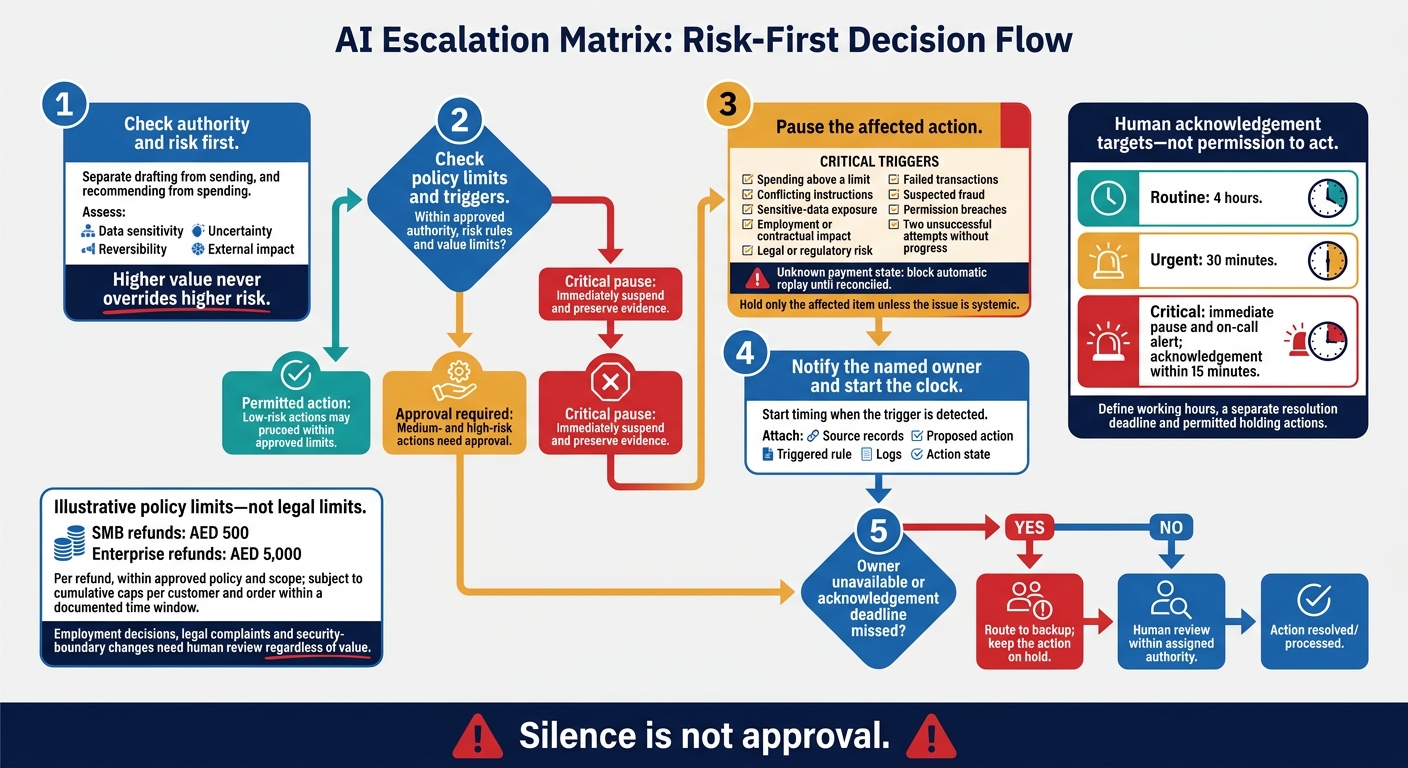
Treat these settings as policy limits, not legal limits. Copy the matrix and replace role titles with named owners and backups. Response times refer to human acknowledgement after a trigger, not permission to act.
Use this baseline, then apply it to the business functions below.
| Task type | Risk level | Agent authority | AED value threshold | Required human response time | Primary owner | Fallback path | Audit record | Automatic pause trigger |
|---|---|---|---|---|---|---|---|---|
| Procurement - SMB | Medium | Draft quote only | AED 500 | 4 hours | Office Manager | Business Owner | Quote ID, vendor, price | Price above threshold; conflicting instructions |
| Procurement - enterprise | High | Draft quote and route for approval | AED 5,000 | 4 hours | Procurement Lead | Finance Director | ERP reference, vendor risk score | New supplier detected; budget exceeded; contractual change |
| HR - SMB | Critical | Gather data; prepare draft for review | No monetary threshold | 30 minutes for sensitive cases | HR Manager | Legal Counsel | Employee ID, access log, decision log | Employment decision; PII exposure; conflicting instructions |
| HR - enterprise | Critical | Gather data; no employment decisions | No monetary threshold | 30 minutes for sensitive cases | HR Manager | Legal Counsel | Employee ID, access log, decision log | Employment decision; PII exposure; conflicting instructions |
| Customer service - SMB | Low | Issue refunds within approved policy and scope | AED 500 per refund, subject to cumulative cap | 4 hours | Support Lead | Senior Agent | Ticket ID, payment reference, amount, policy check | Limit exceeded; legal complaint; suspected fraud |
| Customer service - enterprise | Low | Issue refunds within approved policy and scope | AED 5,000 per refund, subject to cumulative cap | 4 hours | Support Lead | Senior Agent | Ticket ID, payment reference, cumulative total, outcome | Limit exceeded; duplicate request; unknown payment state |
| Internal controls - SMB | Critical | Monitor and flag; no access changes | N/A | Immediate alert; 15-minute acknowledgement | Security Lead | CTO | Action ID, system path, rule triggered, state | Permission breach; self-approval attempt |
| Internal controls - enterprise | Critical | Monitor and flag; no access changes | N/A | Immediate alert; 15-minute acknowledgement | Security Lead | CTO | Action ID, system path, evidence bundle, action state | Access breach; sensitive-data exposure; repeated errors |
Checklist: Set Risk and Value Limits
Assess risk before amount. Check data sensitivity, uncertainty, reversibility and external impact. Link Risk level to AED value threshold: low-risk actions may proceed within approved limits; medium- and high-risk actions need approval; critical triggers require immediate suspension and preservation of evidence. Higher value never overrides higher risk.[4][5][7]
For refunds, AED 500 for an SMB and AED 5,000 for an enterprise are illustrative limits that require policy approval. Set cumulative caps per customer and order, within a documented time window, so split transactions cannot bypass approval. Employment decisions, legal complaints and security-boundary changes need human review regardless of value.[3]
Checklist: Define Triggers, Deadlines and Fallbacks
Make every Automatic pause trigger observable. Triggers include spending above a limit, conflicting instructions, sensitive-data exposure, employment or contractual impact, legal or regulatory risk, failed transactions, suspected fraud, permission breaches, or two unsuccessful attempts without progress. If the payment state is unknown, block automatic replay until it has been reconciled.[1][2][5][7]
Start the Required human response time clock when the trigger is detected. Allow 4 hours for routine acknowledgement and 30 minutes for urgent cases. Critical incidents require an immediate pause and on-call alert, with acknowledgement within 15 minutes.[1][2][3][7][8]
Define working hours, a separate resolution deadline and permitted holding actions. Under Fallback path, route to the backup if the owner is unavailable or misses the deadline; do not release the action. Hold only the affected item unless the issue is systemic, and attach source records, the proposed action, the triggered rule, logs and action state.[1][2][3][7][8]
The next section applies these columns to procurement, HR, customer service and internal controls.
Escalation Checklists for 4 Business Functions
For each function, define the task type, risk level, value threshold, response time, owner, fallback path and audit record. Apply these fields to the workflows below, starting with procurement.
Procurement: Separate Quotes from Commitments
Allow preparation; block commitment. Quotation collection, stock checks and order tracking can proceed within approved supplier and data-access rules. Purchase orders above the approved limit and any supplier bank-detail change need human approval.
Pause cases involving new suppliers, conflicts of interest, unusual pricing, restricted goods or commitments above the limit. Route them to the finance approver or budget owner. In enterprise workflows, send exception packets to the Procurement Lead.[1]
Keep quotations, risk labels, approval timestamps and order change history.
HR: Keep Employment Decisions Under Human Review
Limit automation to administrative guidance and draft documents, within approved access rights. Recruitment, pay, promotion, discipline, termination and leave disputes need human review. Block decisions based on sensitive data or incomplete records.
Route cases to the HR Lead or specialist, and send unattended cases to the HR backup.[3] Sensitive concerns need a confidential reporting route that bypasses anyone implicated.
Keep the policy sources used, recommendations and decision rationale under restricted access.
Customer Service: Set Refund and Complaint Rules
Automate only policy-approved, reversible resolutions. FAQs, order status updates, password resets and booking changes can proceed within policy. Refunds above the approved limit must go to a human lead.[1]
Escalate safety risks, discrimination complaints, legal threats, cases involving vulnerable customers, repeated failures and requests for a human agent. The Support Lead owns decisions; the Duty Manager handles urgent cases.[1][3]
Keep full conversation logs, policy versions, tone and escalation history.
Internal Controls: Block Self-Approval and Access Breaches
Enforce least privilege across ERP, CRM, email and messaging. Block self-approval, permission escalation and bypass attempts.
Route access and permission changes, budget adjustments and record modifications to the Security Lead or Finance-Control Owner. Use a restricted incident channel for critical issues, and provide an emergency stop.[1][2][7]
Keep tamper-evident records of the original input, proposed or blocked action, rule triggered, data access, tool calls, approval trail and remediation steps. Never record credentials or unnecessary sensitive data.
Deployment Checklists for SMBs and Enterprises
Apply the matrix to your organisation’s size and system maturity. Scale approval tiers, not accountability. SMBs need clear owners and backups. Enterprises need domain owners, central governance and formal incident routes.
Comparison Table: SMB and Enterprise Controls
The same control fields need different settings for SMBs and enterprises. Treat these as policy settings, not legal thresholds.
| Matrix field | SMB | Enterprise |
|---|---|---|
| Task type | Workflow-level permissions | Domain-level permissions; separate request, approval and execution[2][4] |
| Risk level | Owner review; weekly exception checks | Specialist review; Compliance and Security routes[3][9] |
| Value threshold | Owner review above AED 1,000 | Domain approval; business-unit review above AED 10,000[9] |
| Response time | Working-hours duty cover | Risk-based deadlines; on-call cover[5][6] |
| Owner | Workflow owner; executive backup | Domain owners; central AI governance[3][9] |
| Fallback path | Duty lead and backup | Formal incident response and on-call cover[5][6] |
| Audit record | Weekly exception review; monthly matrix review | Quarterly matrix review; periodic control testing[3][6][9] |
Specify working hours, elapsed-time deadlines and out-of-hours cover in the matrix.[5][6]
Launch Checklist: Register, Test and Review Agents
Once the matrix is set, register each agent before production use.
- \ ] Approve the agent’s purpose, systems, data access, permissions, risk, owner, backup and matrix version.[[2][4]
- \ ] Test normal cases, limit breaches, unavailable approvers, failed notifications, suspension and recovery.[[2][6]
- \ ] Verify that live-system records are timestamped, attributable and tamper-evident.[[2][5]
- \ ] Schedule risk-based exercises, including annual tabletop exercises for enterprise-critical workflows.[[6]
Implementation Checklist: Enforce Controls in Existing Systems
After registration and testing, enforce the rules in connected systems.
- \ ] Use system permissions and deterministic approval gates, not prompts alone.[[4]
- [ ] Verify that the same owner, backup and audit rules apply throughout the live workflow across connected ERP, CRM, email and messaging systems.
- [ ] Check the agent’s purpose, owner, backup and routing in the deployed workflow.
- \ ] Check deployment-specific storage, processing, transfers and access against applicable requirements.[[2]
Conclusion: Approve 1 Workflow Before Scaling
Once the matrix is built and tested, approve one workflow before rolling it out more broadly. Sign off on its task type, authority, risk level, AED value threshold, response time, owner and backup, fallback path, pause rules and audit record.[1][2][3][8]
Run a two-week pilot on that workflow. Each week, review missed triggers, false escalations and repeated overrides. Fix unclear rules and check that the matrix works under live conditions.[3]
To test the matrix in production, measure trigger-to-acknowledgement time and require a human decision or action. Track reviewer edits, rejected outputs, near misses and blocked actions. Compare time-to-decision and decision quality with the manual baseline.[1][2][4][5][7]
Calculate net value after software, implementation labour and human-review costs. Move the same rules to the next workflow only if the pilot shows both control and value: SLAs are met, false escalations are low, pauses and backups work, audit records are complete, net value is positive and escalation rules held.[1][3]
FAQs
How do I choose AED limits for my business?
Set AED limits based on consequences, risk and internal authority, not arbitrary numbers. Review your last 50 to 100 transactions for financial impact, whether actions can be reversed and whether the supporting evidence is sufficient for an audit.
Record thresholds as versioned policy rules. Permit routine, low-value transactions within those limits. Route amounts above the defined authority boundary to a finance lead for human approval.
Who can authorise an AI agent to resume after a pause?
Only the designated escalation owner can authorise resumption. Name this owner by role in your escalation matrix, such as support lead, finance approver or workflow owner, so the process doesn’t depend on one person.
The reviewer must confirm that the exit condition is met, whether that means missing information has been supplied or a policy exception has been resolved. Resume only after explicit human approval or case closure, and keep a clear audit trail.
How do I handle escalations involving multiple departments?
Start with the relevant managers working together directly to resolve the issue. If they cannot agree, escalate to functional directors. If the conflict persists, seek executive arbitration.
Set objective escalation triggers, such as budget variances or timeline delays, and build the rules into workflows. Keep an audit trail of the issue, the reason for escalation and the decision.
Assign a primary and backup owner to each urgent escalation path so accountability stays clear and absences are covered.