AI Change Management: Champion Network Guide
Most AI rollouts fail because support inside the team is weak, not because the tool is bad.
If I had to cut this guide down to the part that matters, it would be this: put named champions inside the first teams using AI, give them clear rules, train them on live workflows, and track use, risk, and business output every week.
That is the whole model in plain terms.
If you are setting this up, I would focus on five things first:
- Clear role split between sponsor, change lead, and champions
- Simple communications for leaders, managers, champions, and users
- Training tied to work, not theory
- Low-risk first workflows with human review
- One feedback loop for issues, policy questions, and data concerns
_Or put another way:_ if people do not know who owns what, what they can share, and where to ask for help, adoption slows down fast.
A few points stand out:
- Champions are not launch cheerleaders; they are the first support layer
- Policy has to be short enough to use during work
- Data handling rules must appear in every message, not just one policy page
- Early workflows should be repeatable, low risk, and easy to review
- Weekly checks should cover 3 metrics: active use, risk incidents, and business results
There is no magic ratio in the article, but the structure is clear: if you have more than one site, team, or shift in the UAE, support needs to sit where the work happens.
For me, the main takeaway is simple: AI sticks when people support, control, and measure it inside the workflow. If you want results, build the network before you push the tool.
How OpenAI Built a Champion Network to Drive AI Adoption ft. Christina Meng (OpenAI)
Set up the network: sponsor, change lead and champion roles
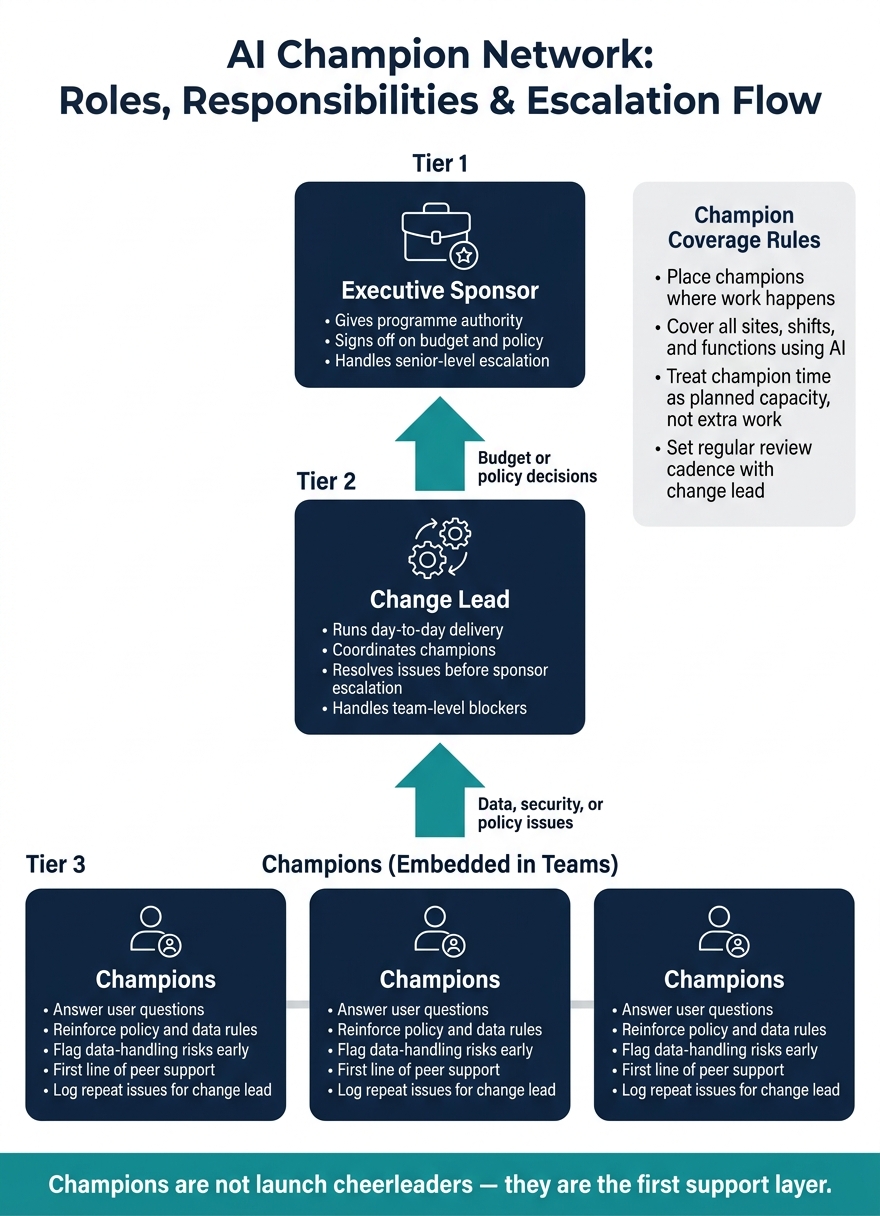
Before launch, define three roles. If this part is vague, the rollout usually slows down fast.
The executive sponsor and change lead: what each role does
The executive sponsor gives the programme authority, signs off on budget and policy, and handles senior-level escalation.
The change lead runs day-to-day delivery, coordinates champions, and sorts out issues before they need sponsor attention.
Once ownership is clear, put champions where adoption will start first.
How to select, size and place champions across the business
Pick trusted peers who know the workflow and can answer questions in plain language. Start with the teams and workflows that will use AI first.
Place champions in the functions, sites, and shifts using AI first. You need enough coverage to avoid role confusion or workload strain. In UAE businesses with more than one site or shift, support should sit where the work is happening.
Champion duties, time commitment and review cadence
Set the champion role as ongoing peer support, not a one-off launch task. Champions support users, surface issues, and help keep the rollout moving. They answer questions, reinforce policy, and flag data-handling risks early.
Set a regular review cadence with the change lead so issues, feedback, and prioritisation can be handled fast. Treat champion time as planned capacity, not extra work handed out on top of the day job.
Once roles and cadence are fixed, use them to shape communication and training.
Prepare the network: communication plan and training path
Roles on paper don’t change behaviour. A clear message and a simple training path do.
Communication plan by audience, channel and frequency
The order matters. Start with the executive sponsor announcement so the rollout has authority from day one. Then brief managers, equip champions, and roll out to teams. Each group needs a different message.
Leadership needs the big picture: why this matters, where the risks sit, and what controls are in place. Managers need to know how AI will affect day-to-day work, how AI agents fit into business workflows, and what they own. Champions need the practical detail. End users need plain rules: what is changing, why it matters, and what data they can and cannot share.
Put simply:
- The sponsor sets authority
- Managers translate impact into team work
- Champions reinforce the right habits
- Users need clear guardrails
| Audience | Core message | Channel | Timing |
|---|---|---|---|
| Leadership | Strategic rationale and risk controls | Executive briefing, email | Pre-launch, launch week, first-month check-in |
| Managers | Team impact, workflow changes and escalation path | Team meeting, manager briefing | Pre-launch, launch week, first-month check-in |
| Champions | Enablement updates, issue triage and policy changes | Champion call, shared workspace | Pre-launch, launch week, first-month check-in |
| End users | What changes, why it matters, and what data is allowed | Team meeting, intranet, WhatsApp Business | Pre-launch, launch week, first-month check-in |
Data privacy needs to show up in every communication. Not just the launch note. Not just the policy page.
Be explicit about data-sharing limits in every channel. Users need to know exactly what information is safe to enter into AI tools, because once personal or company data is entered, it may move across systems inside the model flow.
Once the message is locked, train champions for the questions that will follow.
Champion onboarding and skills path
Champions need a structured path tied to real work. Skip abstract AI theory. Focus on the tasks people will do.
Train champions across four areas:
- AI basics and policy
- Prompt practice
- Workflow handling
- Escalation
That gives them enough ground to guide teams with confidence and route the harder issues to the right place.
After that, shift champions into the live support setup.
Peer support model after launch
When rollout starts, champions become the first line of support. They’re the people a hesitant user asks before logging an IT ticket or going to the change lead.
Keep the structure light. That usually means regular office hours, internal discussion groups or forums, and a clear escalation route for issues that need extra help. The tone matters just as much as the format. Champions should make it plain that no question is too basic. People need room to ask in good faith without feeling judged.
Fast peer support stops small usage problems from turning into policy, security, or adoption issues. If something can’t be resolved at that level, move data, security, or policy issues to the change lead, and then to IT or the sponsor.
Control the rollout: workflow choice, usage policy and risk controls
Once champions can back users, the rollout needs tight control over which workflows AI takes on first. Early errors can dent trust, and that’s hard to win back.
Choose the first workflows for fast, measurable results
Start with workflows that are frequent, repeatable and low risk. Pick use cases where a person can review the output before it’s shared or used.
Do not let AI make autonomous decisions that affect people, such as account blocking or automated approvals. Champions help teams spot which workflows fit these rules and flag any that carry more risk.
The next move is simple: set the rules around those workflows.
Write an AI usage policy people can actually follow
The policy should spell out approved tools, allowed tasks, off-limits data, required human review and the escalation contact. It should also include a clear rule that staff must not enter personal data unless the policy explicitly allows it.
Keep it short enough to use in the moment. If people need to read a long document every time, they won’t.
Champions turn the policy into day-to-day behaviour. They answer questions, correct bad habits and reinforce the rules before issues escalate.
Risk controls and escalation rules
Match controls to the risk level of the workflow. For low-risk work, human review may be enough. For higher-risk workflows, add:
- role-based access
- review checkpoints
- an audit trail
Escalate unsafe, inaccurate or non-compliant output to the change lead immediately [1].
That makes champions the daily control point, not just launch support. They enforce controls in the flow of work: spotting bad habits early, reinforcing the policy and keeping governance lined up with adoption.
Run and scale the programme: feedback, metrics and next steps
Gather team feedback and clear blockers
Once controls are live, you need a short feedback loop. If blockers sit around for weeks, adoption slows down and people quietly stop using the system.
Champions should log repeat issues and send them to the change lead on a fixed cadence. The change lead handles team-level blockers, then passes budget or policy decisions to the sponsor.
Use one shared channel for questions, fixes and policy updates. Keep it simple. People need space to ask basic questions without blame, because early problems are far easier to fix than hidden ones.
One risk inside this loop needs close attention: data handling. Track the data types users enter and where that data flows [1]. Tight oversight helps stop sensitive information from leaking between systems or being exposed to external models.
Track adoption, risk and business results
Use the same review cycle to check two things at once: is adoption going up, and is risk going down.
Track three metrics:
- active use
- risk incidents
- business results
Keep these useful for weekly decisions, not just monthly reporting. Review the feedback stream, adoption signals and risk issues together so the sponsor, change lead and champions can spot patterns fast.
Use that data to clear blockers and update the policy. The goal is simple: keep the programme moving with confidence, not create reporting for the sake of reporting.
Conclusion: the operating model that makes AI stick
AI adoption usually fails on the people side, not the tool side. Sponsor, champions, communication, training, workflow choice, policy and controls all shape the operating model.
The core message is simple: adoption, governance and workflow value must be managed together. Measure all three. When adoption, governance and value move in step, AI sticks.
FAQs
How many AI champions do we need?
Aim for one AI champion for every 20 to 30 employees in each department. That gives local teams enough hands-on support across your organisation.
Pick champions from different functions, like sales and operations. They can help drive AI use inside the workflows your teams already rely on, including Odoo, SAP, and Microsoft 365.
Which teams should start first?
The source material does not state which teams should go first in an AI change management champion network.
If that choice matters for your plan, you’ll need to make it outside the provided material, because this point is not covered.
What should we track each week?
Track weekly metrics that show use and business impact.
Focus on a small set of signals that tell you what’s happening inside the workflow:
- Active users by department
- Successful AI-agent tasks in tools such as Microsoft 365, Odoo, SAP, or Zoho
- Champion feedback on workflow friction or new use cases
- Policy-compliant versus flagged interactions
This gives you a clear read on where teams are moving, where they’re getting stuck, and where sponsor support needs to step in.
Use that data to adjust training and sponsor engagement in real time.