How to Use AI for Meeting Notes and Action Items
Most meeting problems do not start in the meeting. They start after it.
If I want AI meeting notes to help my team, I need more than a transcript. I need three outputs right away: a short summary, a record of decisions, and action items with an owner, due date, and follow-up channel. That matters because teams spend 7.8 hours a week on post-meeting admin, and some AI meeting assistants can cut note cleanup from 45 minutes to 3 minutes per meeting.
In plain terms, this is what I would do:
- Pick the setup by meeting type: internal syncs, sales calls, interviews, and client check-ins need different note formats and system links.
- Set rules before rollout: templates, AED formatting, dd/mm/yyyy, 24-hour time, access controls, and consent for external calls.
- Run meetings in a clear way: one person at a time, direct wording for decisions, and task statements like _“Khalid will send the revised proposal by 17:00 on 16/07/2026.”_
- Review the draft fast: check names, figures, terms, and sensitive content within a few minutes.
- Push approved tasks into daily tools: Microsoft 365, Google Workspace, Zoho, Odoo, SAP, Teams, email, Jira, Asana, or WhatsApp Business.
- Keep a human check for high-risk actions: payments, contracts, HR, legal, and board matters should not auto-sync without approval.
- Start with a small pilot: one team, one repeatable meeting type, four weeks, then measure time saved, note accuracy, and on-time task completion.
A transcript tells me what was said. A workflow turns it into work. Or put another way: the gain is not the bot writing notes. The gain is getting spoken commitments into the systems my team already uses.
If I were rolling this out in a UAE business, I would also check Arabic-English transcription quality, local date and time formats, data residency, and audit logs before scaling it across teams.
5 Best AI Note Taker Apps for Meetings in 2026
2. Choose the right AI setup for each meeting type
One setup for every meeting sounds neat. In practice, it creates messy notes and more cleanup.
A weekly team sync, a sales call, and a hiring interview each need different outputs. Get the fit right early, and the meeting can end with a usable summary, clear decisions, and assigned tasks instead of a pile of edits.
Match the tool to the meeting
Pick the tool that catches the right details and sends them to the system where the work already lives.
For internal team meetings, use what your team already works in: Microsoft Copilot for Microsoft 365, Google Meet Gemini for Google Workspace, or Zoom AI Companion for Zoom. That keeps outputs close to tasks and shared workspaces. If your team moves between Arabic and English, Otter.ai is worth testing for its handling of that [1].
Sales calls need more than a transcript. You need objections, commitments, and next steps pushed into your CRM. Fireflies.ai can sync with Zoho and other CRM platforms, so call notes sit next to deal context [6].
Hiring interviews need tighter control. Use role-based access control, and make human approval mandatory before any summary is shared. Let AI draft the notes, then have a person review them before they go anywhere [5][1].
Client check-ins work best when each meeting connects to the last one. A corporate AI layer can tie meeting outputs to project records, CRM entries, and follow-up workflows. That helps if your team runs client work across Odoo, SAP, Zoho, Microsoft 365, or Google Workspace.
| Meeting Type | Recommended Approach | Key Integration |
|---|---|---|
| Internal sync | Microsoft Copilot, Google Meet Gemini, or Zoom AI Companion | Microsoft 365 / Google Workspace / Zoom |
| Sales call | Fireflies.ai | Zoho / CRM platforms |
| Hiring interview | Controlled setup with role-based access control and human review | Internal HR systems / ATS |
| Client check-in | Corporate AI layer | ERP / CRM / WhatsApp Business |
Once the tool fits the meeting, control the setup. That’s what keeps notes accurate.
Set up templates, permissions, and local formats
Don’t wait until after the first meeting to configure the tool. If there’s no template, notes drift. If there is one, people know what they’re looking at and what to do next.
Give each meeting type its own template. For example:
- A sales call template can track budget, pain points, and next steps.
- A project sync template can track blockers, decisions made, and owners.
- An interview template can track candidate strengths and weaknesses.
Build them once, then reuse them. Use AED, dd/mm/yyyy, and 24-hour time in templates.
Add disclosure to invites and an automatic recording notice at the start of external calls. Lock access down with SSO/SAML and role-based permissions. For sensitive meetings such as HR, Legal, or M&A, it may be better to disable AI recording fully [5][1].
If your team switches between Arabic and English in the same meeting, check transcription quality before rolling out at scale. Also set currency fields to display AED in local format [1].
Start with a small pilot
Start small. A four-week pilot in one team is enough to show whether this will work in your workflow.
Choose one repeatable meeting type. Sales or engineering usually works well. Then measure:
- hours saved on post-meeting admin
- the share of action items finished on time
- note accuracy as rated by participants
AI meeting assistants can cut cleanup from about 45 minutes to 3 minutes per meeting [1]. Your own numbers will matter more inside the business.
Use weeks one to four to audit the current process, configure security and permissions, set up integrations, and run live sessions with training. After that, bring the results back to the team before scaling [1].
Once the pilot works, the next step is the meeting itself - how it’s run so the AI can record notes people can trust.
3. How to run meetings with AI and get reliable notes
Once the pilot is done, lock down one clear way of running meetings. That’s what makes AI notes dependable from one call to the next.
Before the meeting: set the agenda and tell participants
A structured agenda gives the AI context. If it knows the purpose of the meeting, it can tag key discussions with better accuracy.
Connect your AI assistant to your Google or Outlook calendar so it joins scheduled meetings automatically [8]. Use the approved meeting template so it captures the right fields.
At the start of external calls, state that AI is recording notes and ask for verbal consent before recording [8][3]. That protects the business and helps build trust with everyone in the room.
For Arabic-English meetings, enable mixed-language transcription and preload company terms and people names [8][1].
During the meeting: improve transcription and task capture
The AI can only record what it hears. So if the conversation is messy, the transcript will be too.
Speak clearly and don’t talk over each other. That cuts transcription mistakes. When a decision is made, say it plainly: _We've agreed to move the launch to 15/09/2026._ When a task is assigned, put the owner and deadline in the same sentence: _Khalid will send the revised proposal by Thursday at 17:00._ Vague ownership leads to vague action items [1][2].
For hybrid meetings where some participants are remote, check microphone quality before going live. A quick test call can catch audio issues that would otherwise damage the transcript [8].
Clear owners and deadlines here make the handoff into workflow tools much easier later.
After the meeting: review and correct the draft
Review the draft within 3 minutes while the discussion is still fresh [1]. This is the best time to catch small errors: a misspelt name, a misheard figure, or an AED amount that disappeared from the notes.
Check for a few things in particular:
- names spelled correctly
- currency values accurate
- technical terms transcribed properly
- any sensitive content - HR, legal, or financial - that should not be shared beyond the immediate team
For board or legal meetings, require a human reviewer to sign off before anything is distributed or synced into workflow tools [1][2].
Once the draft is clean, the action items are ready to move into daily workflows.
4. Turn AI notes into action items and connect them to daily workflows
Once the draft is approved, the job changes. You’re no longer just recording what was said. You’re deciding what happens next and making sure it lands in the tools your team already works in.
After the draft is clean, turn each decision into a task and send it into the right system.
Use a standard action-item format
Each action item from a meeting should answer five questions:
- What is the task?
- Who owns it?
- When is it due?
- What is the priority?
- What is the next step?
Without that structure, accountability gets fuzzy fast.
This applies whether it’s a sales follow-up, a hiring interview, or a client delivery task. The format stays the same: owner, due date, priority, and next step.
_Rania to send revised pricing proposal - due 16/07/2026, 17:00 - high priority - follow up by email._
AI tools pull these items from transcripts by spotting commitments like _I'll send it by Monday_, decisions like _We're going with option B_, and open questions like _We need to verify this_. If people use clear ownership language during the meeting, AI has a much better shot at pulling the right owner, date, and context.
Once every item follows the same pattern, routing into daily workflows becomes automatic.
Connect notes to email, CRM, ERP, and chat
Once action items are structured, move them into the tools where work already happens.
For teams on Microsoft 365, Copilot can send tasks into Planner and keep follow-up inside Teams. For Google Workspace users, summaries can flow into shared documents and task lists. If your team runs sales on Zoho CRM or operations on Odoo or SAP, AI-generated action items can update records, create follow-up activities, or trigger workflows.
For client-facing teams in the UAE, WhatsApp Business is often a practical follow-up channel, especially when an urgent action needs a quick acknowledgement.
No-code tools such as n8n, Make.com, or Zapier can route tasks into Jira, Asana, or other project boards your team already uses. If you need something more embedded, a purpose-built AI agent layer can sit over existing systems and route notes, tasks, and reminders into the right workflow.
One rule matters here: keep a human approval step before AI pushes payment approvals, contract sign-offs, or HR decisions into live systems. A quick approval in Slack or Teams takes seconds and can stop costly mistakes.
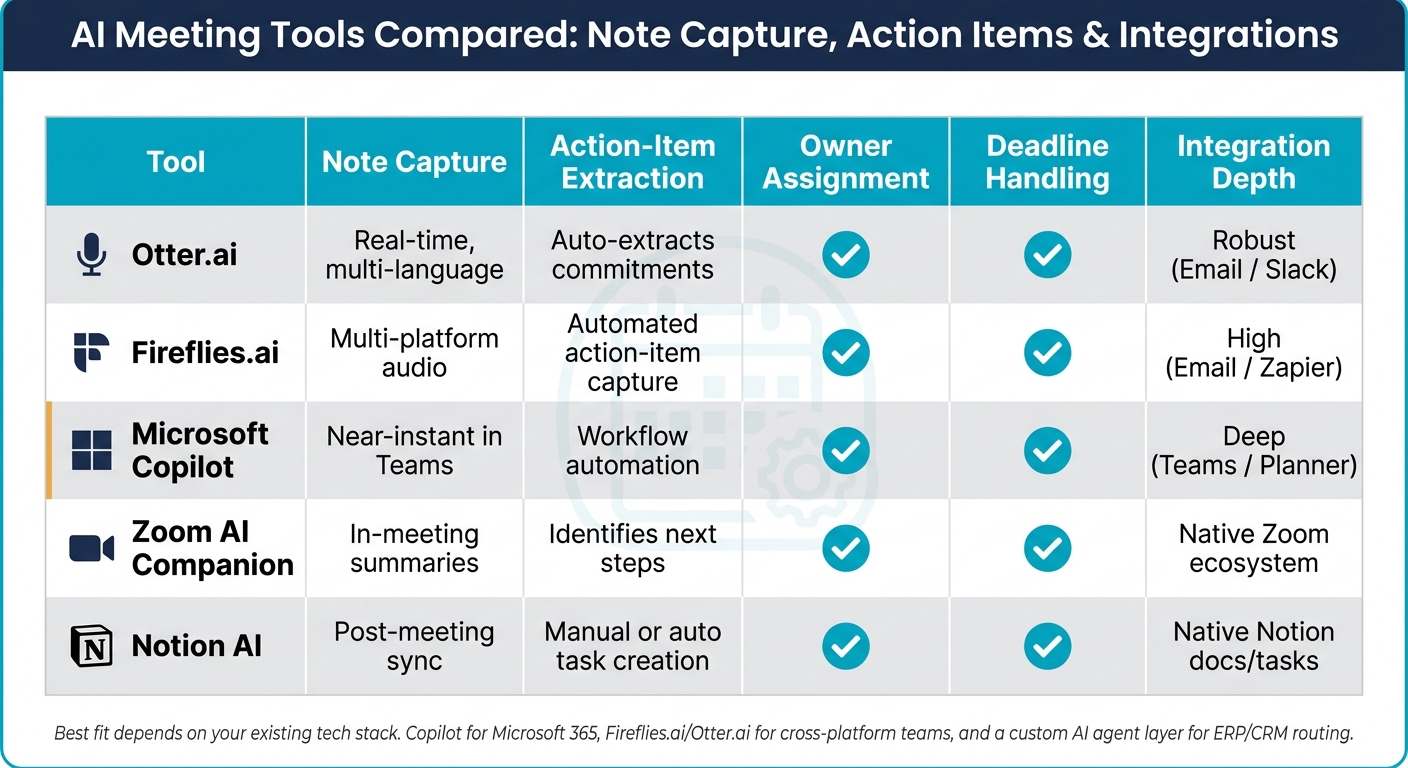
Tool comparison: how each option handles action items
Use the table below to match the tool to how your team handles follow-up.
| Tool | Note Capture | Action-Item Extraction | Owner Assignment | Deadline Handling | Reminder Options | Integration Depth |
|---|---|---|---|---|---|---|
| Otter.ai | Real-time, multi-language | Auto-extracts commitments | Yes | Yes | Email / Slack | Robust |
| Fireflies.ai | Multi-platform audio | Automated action-item capture | Yes | Yes | Email / Zapier | High |
| Microsoft Copilot | Near-instant in Teams | Workflow automation | Yes | Yes | Teams / Planner | Deep |
| Zoom AI Companion | In-meeting summaries | Identifies next steps | Yes | Yes | Zoom / email | Native Zoom ecosystem |
| Notion AI | Post-meeting sync | Manual or auto task creation | Yes | Yes | Notion tasks | Native Notion docs/tasks |
Pick the tool that fits your stack. Microsoft Copilot makes sense for Microsoft 365. Fireflies.ai and Otter.ai fit teams working across platforms. A purpose-built agent layer makes more sense when you need routing into ERP or CRM systems.
5. Measure results, manage risk, and scale what works
Putting AI into meetings is the easy part. The hard part is proving it helps, keeping sensitive data protected, and expanding without creating a mess somewhere else.
Track time saved and task follow-through
After the pilot, use a small set of metrics to decide if you should expand. Compare post-meeting time, action-item completion, and on-time follow-through against your pilot baseline.
Track four things:
- How long does documentation take now?
- What percentage of meetings produce a complete set of action items - summaries, decisions, owners, and deadlines?
- How many of those tasks are finished on time?
- How fast do action items move from the meeting into workflow tools?
If those numbers improve after the pilot, you have a clear case to expand. If they don’t, fix the template or the workflow before going further.
Apply privacy and security controls
Once the gains are clear, put the rules in place that keep them safe. Apply RBAC, exclude HR, legal, M&A, and trade-secret meetings, and require disclosure and consent for external calls.
For organisations in the UAE and Gulf region, data residency matters. Pick vendors that offer local deployment or regional data centres to reduce cross-border jurisdiction risk [1][7]. Keep audit logs for at least 90 days [2][4].
Key steps for a successful rollout
With measurement and controls in place, move in phases. Start small, check the outputs, connect approved notes to systems, then expand.
Begin with one low-stakes meeting type. Internal status syncs or routine operational calls are a good place to start. In the first 30 days, use AI for transcription and summaries only, with a human reviewing every output before it is shared or acted on [3][1].
In the next phase, send approved summaries into your CRM, ERP, or task management tools [2][1][7]. In days 61–90, add more meeting types and teams once the pilot has stabilised [3].
Keep a human approval step before any external share, payment step, or contract action.
FAQs
How accurate are AI meeting notes in Arabic-English meetings?
Accuracy in Arabic-English meetings comes down to three things: code-switching, cross-lingual processing, and speaker diarisation. Most modern tools do well with clear audio when everyone sticks to one language. The trouble starts when people switch between Arabic and English mid-sentence, use local terms, or talk over each other.
That’s why the better benchmark isn’t raw transcript accuracy alone. Summary quality matters more. A transcript can look clean and still miss the point of the meeting. It might gloss over a soft commitment, an implied approval, or who actually owns the next step.
Human review still matters, especially for nuanced calls. It helps catch implicit agreements, tone, and assigned responsibilities that software may not label well on its own.
What should never be auto-synced from meeting notes?
Avoid auto-syncing notes from sensitive HR, legal, or regulated conversations. That’s where privacy and compliance tend to matter most, and a bad default can create problems fast.
In one-to-one performance reviews, AI summaries can miss nuance that changes the meaning of what was said. In those cases, manual notes - or no recording at all - may be the safer call.
Also, check with legal counsel before turning on AI transcription by default. Regional or industry rules may limit when you can use it, how consent works, or where the data can sit.
How do I choose the right AI setup for each meeting type?
Start with the workflow, not the tool.
Group meetings by objective first: sales calls, 1:1s, board meetings, or project syncs. That makes it much easier to pick the right summary format for each one.
Then look for tools with bi-directional integration into systems such as Odoo, SAP, Microsoft 365, Google Workspace, or your CRM. The point is simple: meeting outcomes should flow straight into tasks, records, and follow-ups without extra manual work.
For sensitive discussions, put local deployment or UAE data residency near the top of your checklist. That matters when meeting notes include client, financial, or internal company details.
Keep the rollout tight at the start. Test one high-value use case first, prove it works inside a real workflow, and then expand.