5 Signs Your Team Is Ready for AI Workflow Tools
Most teams do not have a tool problem. They have a workflow problem.
If I had to sum this up in one line: _your team is ready for AI workflow tools when the work is repeatable, the admin cost is clear, the data is already in your main systems, one person owns the process, and the team will test one pilot._
Before anyone spends AED 8,000 to AED 35,000 on a pilot, I’d check five things:
- The steps are the same each time
If the work changes by person or by mood, fix that first.
- The manual cost can be counted
Track hours, task volume, and error rates. A workflow that eats 10+ hours a week is already worth a close look.
- The data is already digital and centralised
AI workflow tools work best when records already sit in systems like Odoo, SAP, Zoho, Microsoft 365, Google Workspace, or WhatsApp Business.
- One person owns the workflow
That person reviews edge cases, sets approval points, and checks what the agent did.
- The team will run a small pilot
Start with one workflow, two users, and clear before-and-after numbers.
A few numbers matter here:
- Manual processes often carry 1% to 5% error rates
- A good data base usually means 6 to 12 months of digital records
- A strong first pilot can often go live within 90 days
- UAE teams should also check data residency, cloud region, and sector rules in places like DIFC and ADGM
Or put another way: do not buy AI because the market is noisy. Buy it when one workflow is stable enough to test and measure.
If these five signs are in place, you are not looking for hype. You are looking at a pilot with a clear business case.
How to Check For AI Readiness in Your Company
1. Your workflows follow the same steps every time
Automation works when the process is the same each time. Same trigger. Same inputs. Same decisions. Same output. No side routes, no personal workarounds.
Think about lead qualification on WhatsApp, HR screening for inbound CVs, or purchase-order routing through approvals in Odoo or SAP. These can usually be mapped as a clear decision tree: one trigger, one set of rules, one outcome, no matter who handles the task.
If the honest answer is “it depends”, the workflow isn’t ready yet. Fix the process first. Then automate it.
"Automation amplifies what's already there. Standardize a workflow first, and automation makes it dramatically faster. Leave it inconsistent, and automation just reproduces the mess at scale - faster." [3]
The test here is simple: is this work driven by rules or by judgement? If rules drive it, it’s a strong fit for automation. If it still leans on individual judgement, standardisation comes before software.
Once the steps are repeatable, the next thing to check is how much manual effort the workflow is eating up.
2. You can measure how much manual work is slowing you down
Manual work feels annoying. That alone won't get a project approved. A number will.
Put a cost on the work: hours per week, tasks per day, errors per month. If you can measure it, you have a business case. If you can't, you're still guessing.
Ask the team to track recurring tasks for one week. Mark anything done more than 10 times a week or taking more than 10 hours a week [7][2]. At UAE labour rates of AED 150 to AED 300 per hour for fully loaded manual work [7], those hours stack up fast.
Use a simple formula to turn that into money:
_annual transactions × minutes saved per transaction ÷ 60 × labour cost = estimated annual savings_ [3]
That moves the discussion from opinion to maths.
Errors matter too. Manual processes tend to carry error rates of 1–5% [2]. If fixing those errors eats up more than 5% of your team's total working hours, the case for automation is already positive [2]. So this audit isn't busywork. It's proof that the workflow is worth automating.
A different warning sign shows up when demand is there, but output stalls. If leads are coming in, orders are coming in, and the team still can't keep up because it can't process the volume fast enough, you've hit a throughput limit [2][4]. In other words: the market isn't the issue. Process capacity is.
You see the same thing when staff are copying data between CRM and ERP by hand. Your people have become the integration layer between systems that don't talk to each other [2]. That's expensive, slow, and hard to scale. Growth gets held back by the workflow, not by demand.
Use a number, not a complaint. Saying there's "too much admin" is too vague to back an investment or shape the rollout. Saying the team spends 15 hours a week manually moving data between your CRM and ERP gives you something far more useful:
- a clear target
- a baseline for comparison after automation goes live
If the bottleneck is clear, the next step is to check whether your core data already lives inside the systems your team uses.
3. Your data lives in CRM, ERP, or workspace tools your team already uses
First, check where the data sits. If it already lives in the systems your team uses every day, you're in a good spot.
AI workflow tools work best when records are already stored in CRM, ERP, or workspace systems - not in paper files, random inboxes, or personal chats [1][5]. If your team already works inside Zoho CRM, Odoo, SAP, Microsoft 365, or Google Workspace, then the data is there to work with.
A common sign that a workflow is ready: staff still move data by hand between systems. That might mean copying WhatsApp Business enquiries into CRM records, or matching CRM and accounting data line by line. In that case, an AI layer can sit across those tools and handle the movement. But it only works when both systems hold structured data.
You also need enough history to make the setup useful. A practical mark is 6–12 months of relevant digital records - enough past data for the workflow to do more than just connect apps [1].
Here’s a quick way to judge it:
| Signal | Ready | Not Ready |
|---|---|---|
| Where it sits | Centralised CRM, ERP, or cloud workspace | Scattered inboxes, paper files, personal chat |
| Can systems read it | Exportable via API or structured report | Trapped in proprietary or analogue formats |
| Is it shared | One shared record across tools | Humans manually copy-paste between apps |
| How much history it has | 6–12 months of digital logs or records | Less than 6 months of digital data |
For UAE-based teams, there’s another practical point. If your work already runs through Microsoft 365 or Google Workspace, keeping AI agents inside those environments can help you keep your current security, identity access, and data residency controls in place [8].
If the data is already there, the next thing to check is simple: who owns the process, and who handles exceptions.
4. Someone owns the process and there are clear review controls
Once the data is in place, the next test is simple: who owns the workflow? One person should be able to own it, approve exceptions, and review what the agent does.
Set that owner before automation starts. They need to know the steps, the awkward edge cases, and the points where a human should step in. Without clear ownership, automation just scales a messy process. It moves faster, but it does not get cleaner.
The role shifts after launch. Before deployment, the owner maps the workflow and sets the standard for what “done correctly” means. During a pilot, they review AI suggestions. Once the workflow is live, they deal with exceptions and edge cases.
Some steps should stay behind clear human-review triggers. That includes financial approvals, legal sign-offs, and other sensitive actions. In practice, that might mean invoice limits or senior review for high-value leads.
Controls matter just as much. Before any AI agent goes live on top of tools like Odoo, SAP, or Microsoft 365, role-based access controls and an audit trail should already be in place. That way, there’s a clear record of what the agent did, when it did it, and which data it used [10].
If you can name the owner, define human-review triggers, and log exceptions, the workflow has enough control to automate with care.
If that part is sorted, the next step is not technical. It’s whether the team is ready to test the workflow in a pilot.
5. Your team is willing to try a pilot
Controls on paper don’t mean much if nobody wants to use the workflow. Adoption is the last test. Ownership and controls make it safe. Team buy-in is what makes it last.
One of the clearest signs you’re ready is visible demand. People are already trying tools like ChatGPT to draft emails or summarise meeting notes [4]. And if the same bottleneck keeps coming up in the weekly meeting, that’s usually a plain signal: the team wants a fix, not one more internal project [1][9].
When that demand is already there, don’t overthink it. Run a small pilot. Pick two users who already want the fix, and let them test one workflow in a tight, focused way [4].
Watch for simple outcomes:
- faster turnaround
- fewer manual steps
- fewer errors
Once people can see the result in their own workflow, the sceptics often ease up without much pushing. That’s how trust in AI starts to grow inside a business [6]. Prove one workflow first, measure what changed, and only then expand if it’s working.
Use the next check to decide where to start.
A quick readiness check for UAE teams
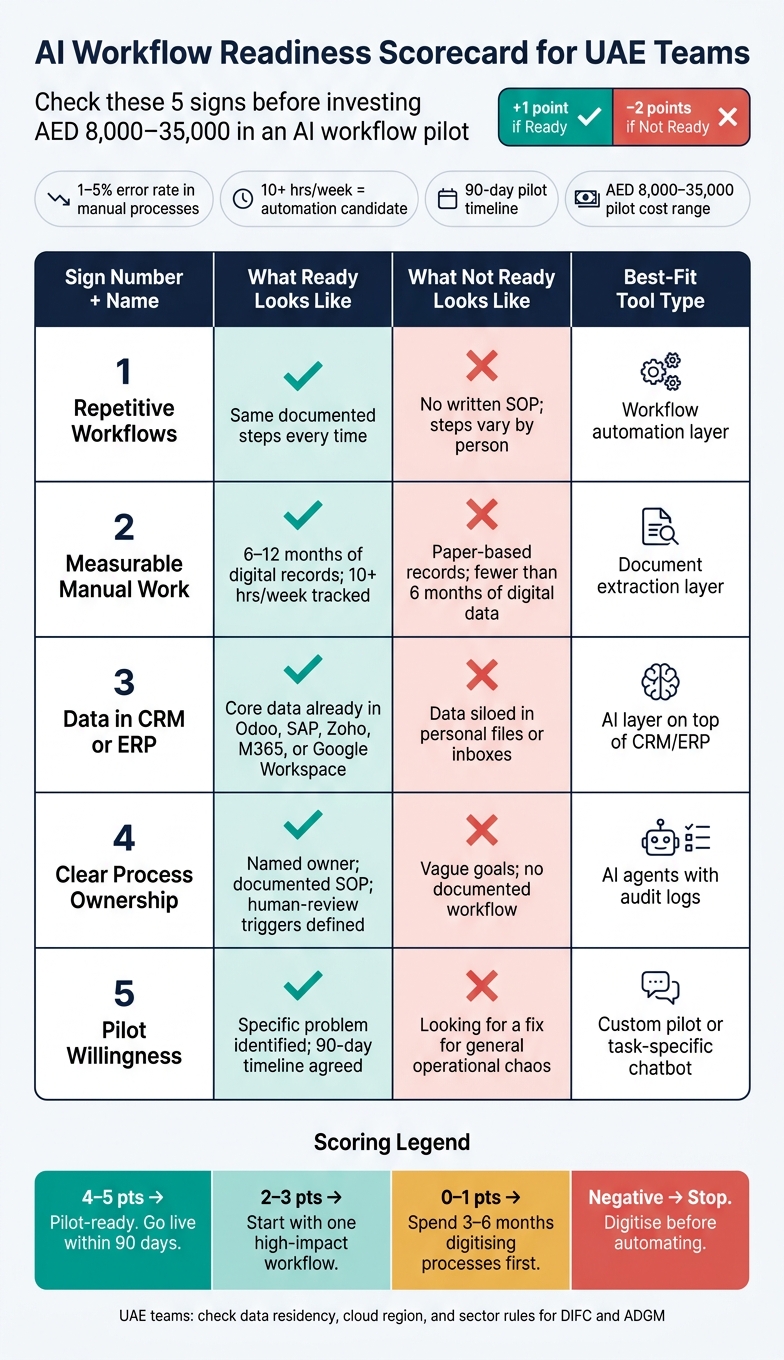
Don’t spend budget on AI just because the pressure is there. First, check whether the workflow is ready.
This scorecard is a simple filter. Count the signs that are ready, subtract the ones that are clearly not, and you’ll get a rough read on whether you’re close to a pilot.
Give yourself +1 point for each sign where your team is clearly ready. Subtract 2 points for each sign that is clearly not ready.
| Ready sign | What ready looks like | What not ready looks like | Example workflow | Best-fit tool type |
|---|---|---|---|---|
| 1. Repetitive workflows | Same documented steps every time [1][2] | No written SOP; steps vary by person [1] | Lead qualification | Workflow automation layer |
| 2. Measurable manual work | 6–12 months of digital records [1][2] | Paper-based records; fewer than 6 months of digital data [1] | Invoice extraction | Document extraction layer |
| 3. Data in CRM or ERP | Core data already moves between CRM, ERP, and workspace tools [2][7] | Data siloed in personal files or inboxes [1] | CRM-ERP sync | AI layer on top of CRM/ERP |
| 4. Clear process ownership | Named owner; documented SOP [1][8] | Vague goals; no documented workflow [1] | Procurement approvals | AI agents with audit logs |
| 5. Pilot willingness | Specific problem identified; 90-day timeline agreed [1][7] | Looking for a fix for general operational chaos [1] | Pilot workflow | Custom pilot or task-specific chatbot |
What your score means in practice:
- 4–5 points: You’re in good shape. A focused pilot can go live within 90 days [1].
- 2–3 points: You’ve got a base to work from. Start with one high-impact, low-complexity problem and prove it there before expanding [1].
- 0–1 points: You’re close, but not ready yet. Spend the next 3–6 months documenting your top processes and tracking metrics in digital systems [1].
- Negative score: Stop before you buy tools. Digitise core processes and build a reliable data history before adding any automation layer [1].
A high score usually means one thing: the workflow is stable enough to test. That’s where quick wins tend to show up first.
Pilot-style implementations usually sit in the AED 8,000 to AED 35,000 range for one focused workflow [1][7].
If you operate in DIFC or ADGM, or you handle sensitive finance or healthcare data, apply local data protection, consent, and residency rules [7][8].
Where AI workflow tools will have the fastest impact
When the readiness check looks good, don’t start with the flashiest use case. Start where repetition meets delay. That’s usually where the first gains show up.
Pick the workflow that is repetitive, measurable, and already lives inside your core systems. The fastest wins tend to come from work with clear steps, visible handoffs, and enough volume to track properly.
Sales follow-up and lead capture are a strong first move because they tie straight to repeat work and measurable manual effort. If leads come in through WhatsApp Business, an AI layer can log each message as a CRM entry in Odoo or Zoho, route high-intent prospects to sales, and trigger follow-up sequences without someone manually sorting the queue. Teams using AI for customer triage have seen first reply times drop by 73% [6].
Meeting notes and document drafting go after manual workload head-on. AI can turn a short brief into a structured first draft, then a person cleans it up. That works for proposals and reports alike, and it can shrink a multi-hour compilation task down to a first draft in minutes [2].
Approval routing and HR screening fit well when ownership and review controls are already clear. Purchase requests and procurement sign-offs usually follow fixed logic and structured inputs. In HR, AI can screen large CV batches in minutes and send candidate updates via WhatsApp, while final hiring decisions stay with a person [5].
Match each readiness sign to the quickest first pilot below.
| Readiness sign | Fastest-impact use case |
|---|---|
| Repetitive workflows | Sales follow-up, document drafting |
| Measurable manual work | AI meeting notes, CRM data entry |
| Data in CRM or ERP | CRM-to-ERP sync, invoice reconciliation |
| Clear process ownership | Approval routing, procurement sign-offs |
| Pilot willingness | Governed AI layer across one department |
A governed AI layer sits on top of existing systems. It adds audit logs and permissions, and it lets you test one workflow before rolling it out more broadly.
Conclusion
Teams usually get this wrong. They spend too much time picking tools and not enough time fixing the workflow underneath.
If your team can point to repeatable work, visible bottlenecks, central data, clear ownership, and pilot readiness, it’s likely ready. Readiness comes from workflow discipline, not software choice. You don’t need perfection. You need enough evidence to justify a pilot.
Once those signals are in place, move to one pilot. Start with a single workflow. Measure hours saved, errors, and response times against the baseline you already have. Structured pilots can reduce administrative task time within 90 days [2].
Scale only after the pilot proves value. Prove one workflow first, then expand. A controlled pilot turns readiness into proof.
FAQs
What if our workflow is partly standardised but still has exceptions?
It comes down to how often exceptions show up and what kind of exceptions they are.
If people need to step in for more than 30% of cases, the workflow is likely too variable for plain automation.
When exceptions happen only now and then, start by setting clear business rules for them. If they happen often, rigid scripts usually won’t hold up. In that case, intelligent process automation is a better fit.
The practical move is simple: standardise the core process, then document how exceptions should be handled. Work that needs subjective judgement, or has no clear pattern, is usually better left manual.
How do we choose the best first AI pilot?
Choose a high-impact, low-complexity process your team already handles at least weekly.
Start with a workflow you already know well, not the messiest one in the business. The best first pick is usually repetitive, rule-based, and quietly eating time every week. Map the steps, then run a time audit to spot work that’s taking at least 10 hours per week.
Prioritise one high-friction process with clear success metrics and at least 6 months of digital data. Good examples include lead qualification, document routing, or email nurture sequences.
The goal is simple: prove ROI and build confidence within 90 days.
What should UAE teams check before sharing data with AI tools?
Before sharing any data with AI tools, UAE teams need to get data governance right first. That matters even more when regional compliance is in play. If your organisation operates in DIFC or ADGM, check data residency rules early. In some cases, local storage may be required instead of a public cloud provider.
Data quality matters just as much. If the source data is messy, the AI output will be messy too. Or put another way: bad input travels fast.
Keep the basics tight:
- Classify data by sensitivity so teams know what can and cannot be shared.
- Set strict access controls and audit trails to track who used what, and when.
- Audit data for completeness and accuracy before it enters any AI workflow.
- Aim for less than 10% missing values so you don’t scale poor-quality information.
This is where many teams slip. They rush into the tool and ignore the workflow around it. The safer move is simple: sort the data rules first, then put AI into the process.