Performance Alignment for AI Agents: Guide
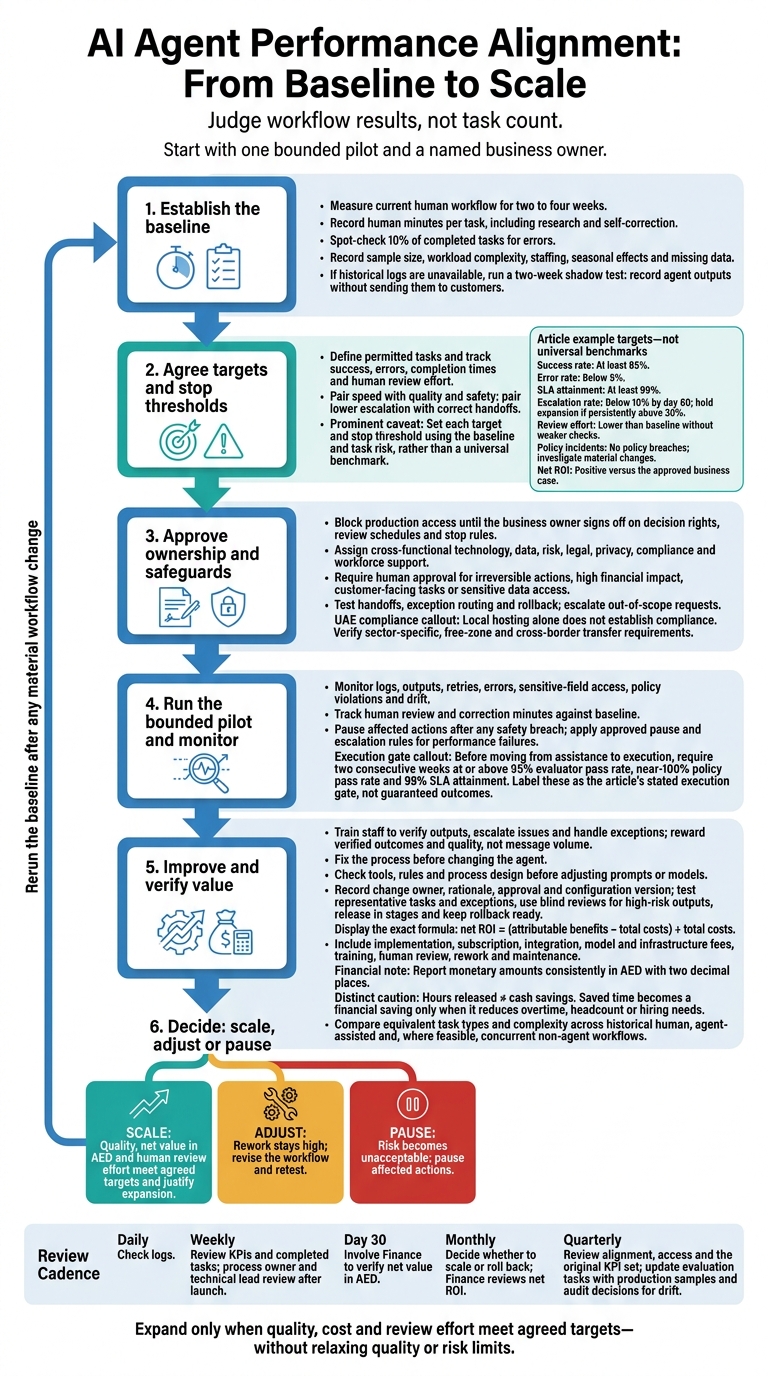
I judge an AI agent by workflow results, not task count. Before launch, I measure two to four weeks of current performance, name a business owner and agree when people must approve, intervene or stop work.
My checks cover the whole workflow:
- Scope and targets: define permitted tasks, then track success, errors, completion times and human review effort.
- Accountability and safety: assign review duties, test handoffs and rollback, and check UAE data rules. Local hosting alone is not proof of compliance.
- Cost and team effort: calculate net value in AED, include review and rework costs, and keep _hours released_ separate from cash savings.
- Improvement and scale: train staff, monitor drift, test changes and expand only when quality, cost and review effort meet agreed targets.
<u>My starting point is one bounded pilot</u>, with clear evidence for deciding whether to scale, adjust or pause.
AI Agent Evaluation: 6 Metrics Every Business Needs
Set Baselines and Performance Targets
Measure the current workflow before the agent starts work. With its role and limits defined, build a short metric set before launch that tracks business outcomes, not task volume, across operations, quality, efficiency and business results [1]. Pair speed with quality and safety: faster processing does not help if correction time increases [3][6][4].
Measure Workflow Performance Before Launch
Observe the existing workflow for two to four weeks to establish a baseline [1][9]. Record human minutes per task, including research and self-correction, and spot-check 10% of completed tasks for errors [9].
Record sample size, workload complexity, staffing, seasonal effects and missing data [9]. If historical logs are unavailable, run a two-week shadow test, recording agent outputs without sending them to customers [9].
Enter the baselines in the worksheet and check outputs against domain-approved reference answers [6].
| Metric | Definition or formula | Baseline source | Target | Owner / review | Stop threshold |
|---|---|---|---|---|---|
| Success rate | Successful outcomes ÷ total tasks | Workflow logs | At least 85% [9] | Operations manager / weekly | Investigate immediately if it drops below target. |
| Quality: error rate | Tasks with factual or policy errors ÷ audited tasks | Human spot checks | Below 5% [9] | Quality lead / weekly | Hold expansion until the error rate returns below target. |
| SLA attainment | Tasks completed within SLA ÷ tasks due | Workflow timestamps | At least 99% [5] | Operations manager / weekly | Hold expansion if below target. |
| Escalation rate | Tasks passed to a human ÷ total tasks; also count per 1,000 tasks | Handoff logs | Below 10% by day 60 [9] | Team manager / weekly | Hold expansion if persistently above 30% [9]. |
| Review effort | Review and correction minutes ÷ completed tasks | Staff time records | Lower than baseline without weaker checks | Team manager / weekly | Investigate any increase above baseline. |
| Policy incidents and drift | Incident count; behavioural drift | Audit and decision logs | No policy breaches; investigate material changes | Risk owner / continuous review | Pause the affected actions after any safety breach [3][5]. |
| Net ROI | (Attributable benefits − total costs) ÷ total costs; final proof of financial alignment | Finance records | Positive versus the approved business case | Finance owner / monthly | Hold expansion if net value turns negative versus the approved business case. |
Set Targets and Stop Thresholds
Set each target and stop threshold using the baseline and task risk, rather than a universal benchmark. Pair throughput with accuracy, and lower escalation rates with correct handoffs.
Treat review effort, errors and behavioural drift as early warning signs; financial returns arrive later. Before moving from assistance to execution, require two consecutive weeks at or above 95% evaluator pass rate, near-100% policy pass rate and 99% SLA attainment [5].
Calculate Net Value in AED
Calculate net ROI = (attributable benefits − total costs) ÷ total costs. Include implementation, subscription, integration, model and infrastructure fees, training, human review, rework and maintenance [2][5]. Report monetary amounts consistently in AED with two decimal places.
Keep hours released separate from cash savings. Saved time becomes a financial saving only when it reduces overtime, headcount or hiring needs [2][7]. Compare equivalent task types and complexity before attributing gains to the agent.
| Comparison group | What to measure | How to keep it comparable |
|---|---|---|
| Historical human workflow | Successful outcomes, quality, staff hours and total cost | Record staffing, seasonality and workload mix |
| Agent-assisted workflow | The same measures, including review, rework and agent costs | Use the same completion and quality definitions |
| Concurrent non-agent workflow, where feasible | The same measures during the pilot | Match task complexity and workload; check for unrelated changes |
Record owners, review frequency and escalation rules alongside these baselines.
Assign Owners and Set Review and Exception Rules
Block production access until the business owner signs off on decision rights, review schedules and stop rules. The named business owner remains accountable for agreed performance targets, even when IT runs the system [2]. Use the baseline metrics from the previous section to trigger reviews, pauses and escalations.
Assign Decision Rights and Review Schedules
Set up a cross-functional approval group with the business owner and representatives from technology, data, risk, legal, privacy, compliance and workforce teams [2].
Keep reviews tied to the same KPI set used in the baseline worksheet: check logs daily, review KPIs and completed tasks weekly, decide whether to scale or roll back monthly, and review alignment and access quarterly [1][5][9].
Set Escalation and Human Approval Rules
Define who approves, escalates and pauses affected actions when performance drops below approved thresholds, risk exceeds agreed limits or compliance fails. Require human approval for irreversible actions, high financial impact, customer-facing tasks or sensitive data access [3].
| Exception category | Action required | Trigger |
|---|---|---|
| High risk | Human approval | High financial impact, irreversible actions or sensitive data access [3][8] |
| Performance failure | Immediate pause | Performance below the approved threshold, policy violations or critical SLA dips [9][5] |
| Out-of-scope | Escalation | Requests outside the agent’s approved scope [9] |
| Drift | Review or intervention | Metrics remain within target, but outputs become unintended or data distributions shift [3][6] |
Use these rules to turn baseline targets into live operating controls.
Monitor Drift and Check UAE Data Compliance
Check that the agent stays within its approved task scope and target range. Review logs, outputs, retries, errors and sensitive-field access for signs of changes in data distributions or organisational priorities. Track policy-violation rates and near-miss events; pause affected actions after policy failures or major regressions [8][5].
For UAE deployments, legal, privacy and compliance teams must verify sector-specific, free-zone and cross-border transfer requirements. Local hosting alone does not establish compliance [2]. Use the findings to adjust workflows, retrain staff and revise targets after launch.
Improve Workflows and Team Performance After Launch
After live monitoring and compliance checks, use review findings and employee feedback on errors, rework, exceptions and human effort to fix weak handoffs, clarify rules and reduce repeat work. Track human minutes per task against the baseline, including time spent checking, editing and handling exceptions [8].
Train Staff and Align Manager Objectives
Train staff to verify outputs, escalate issues and handle exceptions. Use experienced staff’s judgement to update agent rules and training materials [3]. Reward managers for verified outcomes and quality, not message volume [8].
Plan training and reviews around local working hours and Ramadan. Carry these changes into the next review cycle.
Test Changes and Measure Results Again
When a review flags problems, fix the process before changing the agent. Check whether failures come from tools, rules or process design before adjusting prompts or models [8].
For each fix, record the owner, rationale, approval and configuration version. Keep approval records for material changes to instructions, permissions or integrations [2]. Test representative tasks and exceptions against the baseline, with blind reviews for high-risk outputs [6]. Release changes in stages and keep rollback ready [5].
Use Pilot Results to Decide Whether to Scale
After testing changes, assess whether the revised workflow is ready to expand. Run one bounded workflow with pre-set success criteria and an observation period. Use the agreed scale-up gate to approve expansion [5].
Expand only when results against the baseline and targets show that quality, net value in AED and human review effort justify scaling [8][10]. Revise the workflow if rework stays high, and pause affected actions if risk becomes unacceptable. Rerun the baseline after any material workflow change [9].
Conclusion: Launch and Review Checklist
Launch only with a named business owner and approved baselines, targets, dashboards and exception rules. [1][2][5]
Before launch: approve the two- to four-week human baseline [1][9] and targets for reliability, quality, efficiency and business outcomes [1][5]. Confirm dashboards flag deviations and provide alerts and weekly reports [1][4]. Approve permitted systems, data and actions [2], then test exception routing, human approvals, stop thresholds and rollback triggers [2][5][8].
Prepare managers: confirm their training covers handoffs and escalation. [2][3]
After launch: assign weekly reviews to the process owner and technical lead [9][5]. On day 30, involve Finance to verify net value in AED [9]. Record the decision to scale, adjust or pause, and assign follow-up actions [2][3][5].
Review quarterly against the original KPI set. Check targets against business priorities, update evaluation tasks with production samples and audit decisions for drift [1][3][6]. Use the findings to update rules and decision rights without relaxing quality or risk limits [2][3].
FAQs
How do I set targets for low-volume workflows?
With low-volume workflows, manual review matters more than automated dashboards. Limited data makes trends less statistically meaningful, so prioritise qualitative outcomes. Set clear success criteria for each task, including checks that confirm the intended business outcome.
Have a human review 100% of the agent’s outputs against your quality rubric. Track human minutes per task to see whether the agent reduces effort. Use review logs to pinpoint changes needed in instructions or tool integrations before scaling.
What if my agent meets targets but staff distrust it?
Build transparency and staff input into the agent’s design. Document what it can and cannot do, along with when and how it should escalate to a person. Involve staff so the design reflects their practical knowledge, and let employees review or approve high-stakes outputs.
Share task success rates and quality metrics regularly to show how reliably the agent performs. Be clear about its role: supporting staff expertise, not replacing it.
How do I separate agent gains from other improvements?
Set a human baseline before the agent goes live. Record two to four weeks of performance in a shared sheet: average task time, error rate based on a 10% spot check, and how often tasks need a human handoff. After launch, compare those same measures for the same tasks.
Break down KPIs by task type, channel and region. Use controlled comparisons, such as A/B testing or holdout groups, to separate the agent’s contribution from other improvements.