Offer Approval Delays: Causes and Fixes
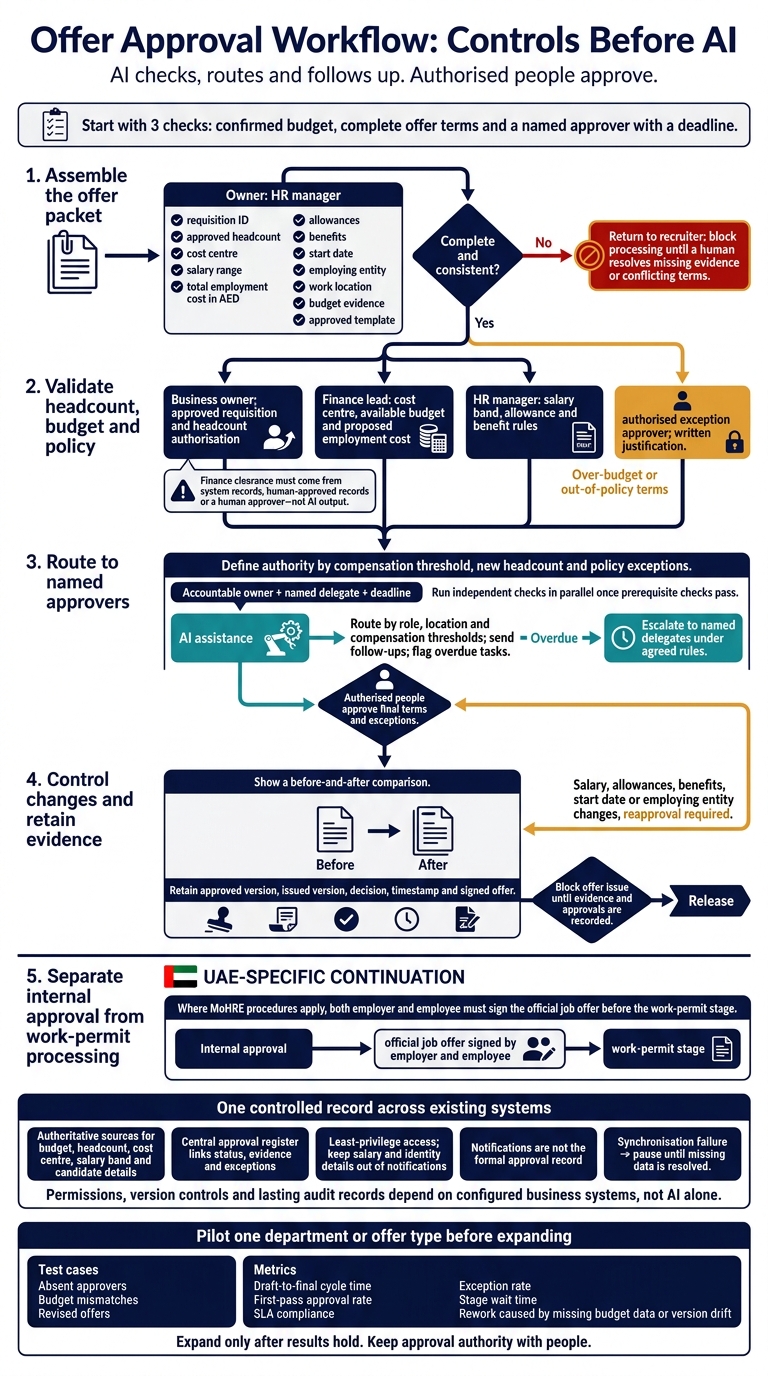
I would fix the approval controls before adding AI. Start with 3 checks: confirmed budget, complete offer terms and a named approver with a deadline.
My approach is to keep people, records and AI in one workflow:
- Check the packet: confirm headcount, total employment cost in AED and policy approval before routing.
- Control the handoffs: assign delegates, track overdue requests and require reapproval when terms change.
- Connect existing systems: keep one approved record, limit access and use AI to check, route and follow up. _People retain approval authority._
- Test before expanding: pilot one department and measure approval time, rework and gaps in the audit trail.
For UAE hiring, I would also track internal approval separately from work-permit processing. Where MoHRE procedures apply, both employer and employee must sign the official job offer before the work-permit stage.
Automate Approvals in Zoho Recruit
Set Approval Controls Before Adding AI
Delays usually come from missing controls, not missing effort. Before adding AI, HR, Finance and business leaders should define the checks, approvers and escalation rules.
AI applies the rules; authorised people approve exceptions and final terms. These controls help reduce rework, unclear ownership and approval drift.
| Control | Owner | Required evidence | Escalation trigger |
|---|---|---|---|
| Packet completeness | HR manager | Complete offer record; approved template | Missing mandatory information |
| Headcount validation | Business owner | Approved requisition; headcount authorisation | Unplanned or unverified headcount |
| Budget verification | Finance lead | Cost centre; available budget; proposed employment cost | Cost exceeds available budget |
| Compensation and exceptions | HR manager; designated exception approver | Approved salary band; allowance and benefit rules; written justification | Terms fall outside policy |
| Response deadline | Workflow system | Assigned approver and delegate; timestamped audit log | No response by the agreed deadline |
Require a Complete Offer Packet
Make the checklist mandatory: requisition ID, approved headcount, cost centre, salary range, total employment cost in AED, allowances, benefits, start date, employing entity, work location, budget evidence and the approved template.
HR checks completeness and policy fit. Finance checks total cost against budget. Do not route an incomplete packet. Send over-budget requests to the authorised exception approver.
Once the packet is complete, route it to the named approvers without manual chasing.
Name Approvers, Delegates and Deadlines
Define approval authority by compensation threshold, new headcount and policy exceptions. Assign one accountable owner and a named delegate at each stage.
Set due dates in local format: 5 November 2026, 14:00 GST (UTC+4). State who receives overdue requests and when the delegate takes over. Run independent checks in parallel once prerequisite checks pass.
Control Changes and Keep Approval Evidence
Restrict edits to approved fields. Show a before-and-after comparison and require reapproval whenever salary, allowances, benefits, start date or employing entity changes.
Retain the approved version, issued version, decision, timestamp and signed offer. AI uses this audit trail for follow-up and escalation.
Use AI to Check, Route and Follow Up
AI can apply defined approval rules across requests and keep work moving. Final hiring decisions, offer terms and policy exceptions stay with authorised people.
Check Records and Route Requests
After drafting, the agent checks the packet against budget, compensation bands and required documents, using system records or human-approved records. Finance clearance must come from those records or a human approver, not AI output.
The agent routes complete requests by role, location and compensation thresholds, with parallel reviews where needed. This keeps missing budget checks, unclear ownership and scattered files from holding up the process.
Return Incomplete Packets and Escalate Delays
Return incomplete or conflicting packets to the recruiter. Flag missing evidence or unclear policy, and block processing until a human resolves the issue.
Draft follow-ups using agreed response windows and delegate cover. Escalate overdue tasks to named delegates.
Keep decisions, edits, timestamps and reasons in the system of record. Give approvers a change summary showing revised terms and unresolved exceptions, so they assess the changes rather than simply click approve.
Compare Manual, Rule-Based and AI-Assisted Workflows
Use fixed rules for mandatory fields and known approval thresholds. AI helps when evidence sits across documents or needs interpretation, but its findings still need verification. The difference is not speed alone: it is how people, rules and agents share the work.
| Task | Manual process | Rule-based workflow | AI-assisted workflow | Human control retained |
|---|---|---|---|---|
| Completeness checks | Check files | Block empty fields | Flags missing evidence and inconsistent terms | Verify evidence |
| Routing | Forward emails | Apply fixed conditions | Routes by role, location and thresholds | Confirm authority |
| Reminders | Chase replies | Send scheduled alerts | Sends follow-ups; flags overdue tasks | Set deadlines |
| Exception handling | Identify and escalate | Block out-of-policy terms | Summarises the policy gap | Approve exceptions |
| Version control | Compare files | Store controlled versions | Flags changes from the approved version | Review changes |
| Audit trail | Collect emails and notes | Log workflow events | Logs findings, messages and decisions | Own the record |
Permissions, version controls and lasting audit records depend on configured business systems, not AI alone. Block offer issue until evidence and approvals are recorded.
These checks and routes need to sit within connected document, notification and access controls.
Connect Approvals to Existing Systems
Approval rules need to connect to the systems holding the source data. Add an approval layer over existing tools to close manual gaps, rather than creating another place to maintain records.
Assign an authoritative source for each field: budget, headcount, cost centre, salary band and candidate details. Keep a central approval register that links each request to its status, evidence and exceptions. This helps reduce rekeying, version drift and manual chasing.
Link Records, Documents and Notifications
Use Odoo or SAP as the system of record for budget, headcount and cost-centre data, and Zoho for HR and business records. Microsoft 365 or Google Workspace can store documents and send email. Confirm integration access and data ownership before connecting these systems.
Use WhatsApp Business or approved internal channels for notifications, not as the formal approval record. If synchronisation fails, flag the request and pause its progress until the missing data is resolved.
Limit Access and Protect Offer Data
Give agents and approvers access only to the records their tasks require. Keep salary and identity details out of notifications, set retention periods and define access-review rules. Do not copy sensitive offer details into message logs.
Before choosing storage, assess UAE data-protection rules, cross-border transfer limits, data-residency commitments and hosting terms.
Assess Uklad AI for Offer Approval Workflows
Scope Uklad AI around offer-packet checks, routing, follow-ups and audit-record capture. Do not assume it is a preconfigured offer-approval product. Use it as the control layer over existing records, not as a separate approval path.
Validate supported integrations, field-level permissions, human approval controls, audit coverage and failure handling when synchronisation breaks. Require a demo showing that the agent cannot approve its own request without recorded human authorisation.
Uklad describes data residency for the UAE and KSA. Before sharing candidate data, confirm the agreed deployment, storage, backup and support-access arrangements.
Conclusion: Test Controls Before Scaling
Put controls first: complete offer packets, named approvers, version control and clear escalation deadlines. These address missing evidence, unclear ownership, manual handoffs and weak escalation. Then measure whether they reduce delays.
Use AI to flag gaps, route work, send follow-ups and log actions. Keep approval authority with people.
Measure Approval Time, Rework and Record Gaps
Track draft-to-final cycle time, first-pass approval rate, SLA compliance, exception rate, stage wait time and rework caused by missing budget data or version drift. Use consistent start and end events so comparisons hold.
Reject approvals without a complete audit trail. Speed is no substitute for evidence and human approval.
If the metrics improve, test the workflow in one team before extending it to others.
Pilot One Department Before Expanding
Pilot one department or offer type. Test absent approvers, budget mismatches and revised offers. Verify that changes are flagged against the last approved version before re-review.[1]
Include HR and Finance when testing incorrect flags and reviewing exceptions. Expand only after the results hold.
FAQs
How do we set realistic offer approval deadlines?
Map the critical path before setting deadlines: identify what needs approval, who owns each decision, what evidence is required and which tasks must happen first.
Allow 4 hours for routine acknowledgements and 30 minutes for urgent ones. Critical incidents need immediate action, within 15 minutes.
Automate reminders and escalations. Set timeouts to block unapproved actions, not release them, and name a fallback owner if the primary approver is unavailable.
When is AI worth adding to our approval workflow?
AI is worth adding when high-volume, repetitive approvals follow clear rules, but manual data entry, system-to-system transfers or routing delays cost time or money.
It can prepare decision briefs, check policy compliance and handle routine approvals within pre-set limits. The aim is less coordination work, not less human judgement. Keep people in control of sensitive actions, financial decisions and actions with legal effects.
How should we handle urgent offers without bypassing controls?
Use an escalation matrix with named human owners and fallbacks. Aim to acknowledge urgent issues within 30 minutes. For critical incidents, pause immediately and alert on-call staff within 15 minutes.
Silence is never approval. AI agents should pause and alert when spending exceeds limits, records are missing or details have changed. Give approvers the evidence and source records. Execute only approved actions, and log decisions and timestamps in existing systems.