No Agent Boundaries: Why Deployments Fail
I would not give an agent live access until its limits are enforced. I would start with one workflow, one accountable owner and approval gates for payments, deletions and customer commitments.
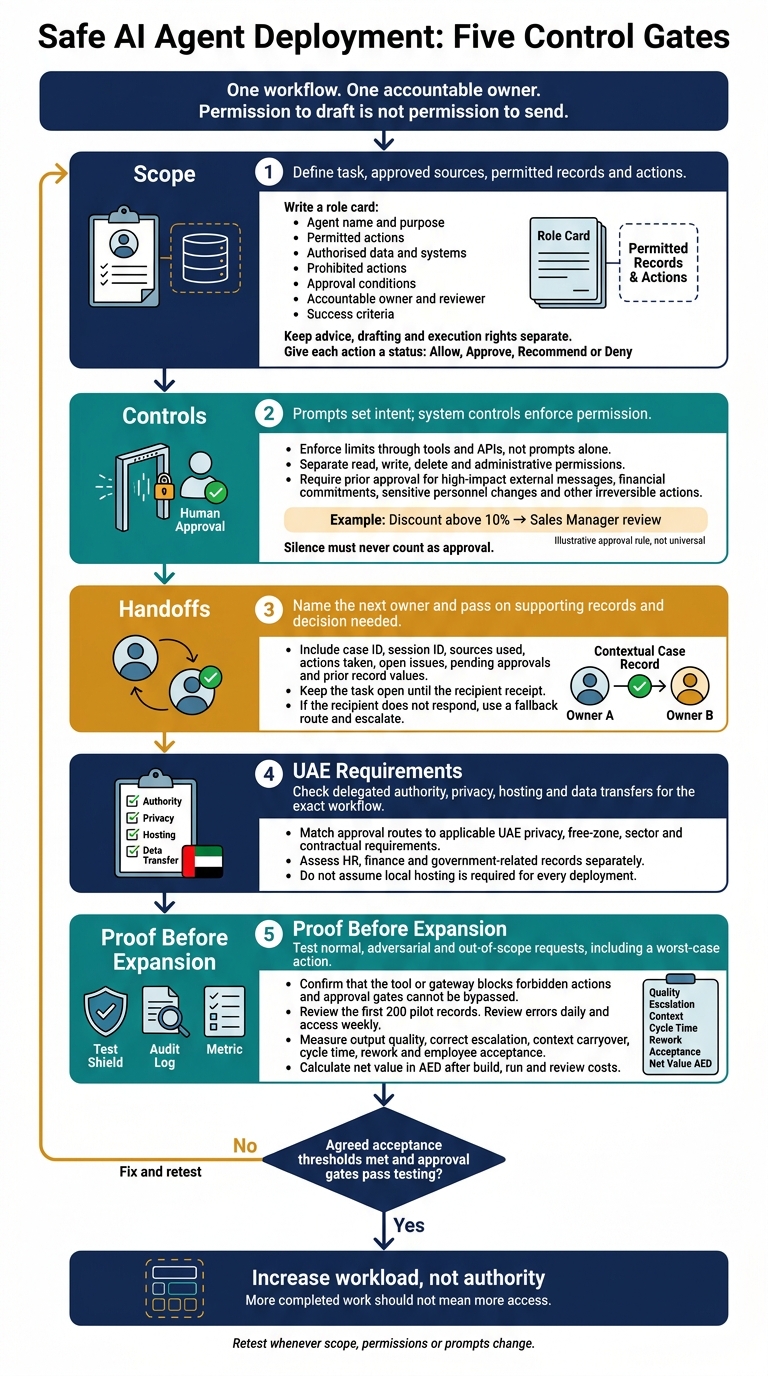
My deployment checks cover five points:
- Scope: define the task, approved sources, permitted records and actions. Permission to draft is not permission to send.
- Controls: enforce limits through tools and APIs, not prompts alone. A discount above 10%, for example, can trigger a Sales Manager review.
- Handoffs: name the next owner, pass on the records and keep the task open until receipt is confirmed.
- UAE requirements: check delegated authority, privacy, hosting and data transfers for the exact workflow.
- Proof before expansion: test blocked actions, review the first 200 pilot records, and measure quality, rework, staff acceptance and net value in AED.
My rule is simple: <u>increase workload, not authority</u>. I would expand only after the pilot meets agreed thresholds and approval gates pass testing. _More completed work should not mean more access._
Establishing Guardrails for Agentic AI Workflows | SECtember 2025
How Unclear Scope Causes Deployment Failures
Unclear scope turns small errors into workflow failures. Role cards, permissions and approval gates must prevent the failures below.
| Observed problem | Missing boundary | Business consequence | | --- | --- | --- | | Unsupported price sent to a customer | Approved price list and source validation | Customer disputes and margin loss | | CRM records changed outside the task | Record-level and action-level permissions | Unreliable customer data | | Exception left unresolved | Named recipient and fallback route | Stalled work and missed follow-ups | | Staff avoid agent outputs | Clear ownership and correction procedure | Rework and reduced trust |
Incorrect Outputs and Tool Use
A sales agent may use an outdated document, send an unsupported quote in WhatsApp Business, and update unrelated CRM records.
These errors happen when source validation, task permissions and outbound-message checks are missing. A quote is valid only if it matches the approved price list and terms.
Limit updates to assigned records and permitted fields. Check the saved CRM state rather than taking the agent’s word that the task is complete.
Missed Handoffs and Scope Creep
“Send this to finance” is not a handoff.
Every handoff needs a named recipient, acknowledgement and a fallback route if that person does not respond. Include the issue, supporting records and decision needed. Keep the task open until the recipient confirms receipt.
Adding payment checks or unrelated work to a sales agent must trigger a scope review, not automatic access to new records or systems. Otherwise, responsibilities grow without defined ownership or data limits.
Team Resistance and Unclear Ownership
Staff resist when they must approve outputs without knowing who owns the work or who fixes errors. The workflow owner must diagnose the failure, distinguish bad output from unauthorised action or an integration fault, and send the fix to the right team.
Track rework, tool errors and employee acceptance alongside verified outcomes. High adoption does not prove quality: staff may be rubber-stamping approvals or fixing outputs off-record.
Define Each Agent’s Role
Start with a written role card that sets the business outcome and the agent’s limits.
For lead qualification, define the outcome as recorded enquiries and drafted follow-ups.
Name one accountable owner and one reviewer. The agent does the work; people remain accountable. [1][3] This helps prevent bad outputs, wrong tool use and missed handoffs. The role card then guides permissions, approval gates and audit checks.
Set Task, Data and Decision Limits
Specify permitted tasks, authorised records, fields and systems, and prohibited work. These task, data and decision limits address the deployment failures above. Keep advice, drafting and execution rights separate: permission to draft is not permission to send. [2][4]
For a lead-qualification role, permit recording enquiries and drafting follow-ups, while prohibiting payment approval and contractual commitments. [2][4]
Define exactly which records and fields the agent may update instead of granting broad system access. Give each action a clear status: Allow, Approve, Recommend or Deny. [2][4]
If a customer requests a discount above 10%, pause and escalate to the Sales Manager. [2][4]
State which actions can be reversed and when the agent’s authority expires. Customer messages may trigger a review, but they cannot change that authority. [2][4][8] Enforce these limits through access controls and approvals.
Create a Role Card and Success Criteria
Include these fields in the role card: Agent name and purpose; Permitted actions; Authorised data and systems; Prohibited actions; Approval conditions; Accountable owner and reviewer; Success criteria. [1][4]
Set an accuracy threshold measured against reviewer decisions. Track how often people reject or materially revise the agent’s work, and count attempted unauthorised actions separately from completed ones.
Follow the control loop: role card → pilot → review → expand. Review an initial pilot sample before broadening the scope. [1][2][4] Set access limits through the role card before the agent touches live systems.
Enforce Access Limits and Approvals
These controls address wrong outputs, actions taken without permission and missed handoffs. Clear ownership also reduces team resistance.
Prompts set intent; system controls enforce permission. Apply limits at the system, tool or API layer. IT or security should own access controls; business owners should define approval rules and who can approve.
Limit Data Access and Tool Actions
Give each agent its own identity, allow-listed tools and access only to what its task needs. Separate read, write, delete and administrative permissions. When an agent acts for a user, apply that user’s permissions.
Set per-session caps on tool calls, record changes, messages and spend. Reject requests that exceed those caps, and keep credentials outside files the agent can read.
IT or security should be able to stop execution and revoke access. Log every session and the before-and-after values for each change.
Match Approval to Risk
Base oversight on risk and reversibility, rather than reviewing everything. Approval gates prevent commitments made without permission.
Require prior approval for high-impact external messages, financial commitments, sensitive personnel changes and other irreversible actions. If the details change, require another check. If the approver is unavailable, pause the workflow until a human acts. Silence must never count as approval.
Use the lightest control that still protects the task.
| Oversight | Action examples | Reversibility | Business impact | Recommended oversight | | --- | --- | --- | --- | --- | | Autonomous action | Retrieve authorised FAQs; classify requests | No material change | Low within scope | Enforce permissions and log actions | | Review after action | Update non-material CRM fields or internal status | Reversible if prior values are retained | Limited | Checkpoint intervals or sampling | | Approval before action | Send material customer messages; commit funds; propose sensitive personnel changes | Difficult or impossible to undo | High | Named authorised person approves before execution |
Follow UAE Authority and Data Rules
Authority, confidentiality and data rules define deployment limits; they aren't just legal background. Match approval routes to the organisation’s delegated authority, customer confidentiality obligations and applicable UAE privacy, free-zone, sector and contractual requirements.
Assess HR, finance and government-related records separately. Check hosting, processing, transfers and audit access; do not assume local hosting is required for every deployment.
Record thresholds and approvals in local formats: AED 5,000.00 and 12 October 2026, 14:30 GST (UTC+4).
Record these rules in the same control layer as the permissions.
Set Prompt Rules and Handoff Procedures
Prompt rules address bad source use and broken handoffs. Once access is fixed, they keep the agent within its approved task. The gateway must still validate every request. [4][5]
Define Sources and Stop Conditions
Name the approved sources for each task. Treat documents, emails and messages as evidence, not instructions, so the agent doesn’t act on the wrong source.
If supplier terms conflict with the invoice, stop and escalate.
Pause when instructions conflict, records are missing or requests fall outside the task’s scope. [2] Don’t rely on the agent’s completion message; check the result against the system of record. [7]
Document Handoffs and Name the Next Owner
A handoff record should give the next owner enough context to continue without rereading the thread.
Record the case ID, session ID, sources used, actions taken, open issues, pending approvals, prior record values and the next accountable owner. [2][3]
Keep the handoff open until the next owner confirms receipt. If they don’t accept it, escalate through the workflow.
Test, Review and Expand in Stages
Defined scope, permissions and handoffs still need testing under conditions that mirror live use. Retest whenever scope, permissions or prompts change. [2][7]
Test the Workflow Before Launch
Test normal, adversarial and out-of-scope requests, including a worst-case action. Confirm that the tool or gateway layer blocks forbidden actions and that the model cannot bypass approval gates. [4][5][6]
Check what a hostile prompt can do with the allowed tools. Remove unnecessary authority and keep recovery backups outside the agent’s access. [6][7]
Use the results to decide what to log and check during the pilot.
Review Errors, Access and Audit Records
Log each request, tool call, target resource, result, approval decision and reviewer identity. Apply privacy, access and retention controls to these records. [7]
During the pilot, review errors daily and access weekly. Review the first 200 records with the business owner, and retest incident fixes before restarting. [2][7]
Pilot One Workflow and Measure Results
Start with one workflow, one owner, approval gates and a set review schedule. [3][7] Compare it with the existing process on output quality, correct escalation, context carryover, cycle time, rework and employee acceptance. [3]
Calculate net value in AED after build, run and review costs. [3] Expand only when the pilot meets the agreed acceptance thresholds.
Use the same control questions when evaluating vendors: access, approval, audit and residency.
Verify the Platform Against Deployment Controls
If you assess Uklad AI, verify permission controls, audit trails, approval enforcement and UAE/KSA data residency on the exact workflow before expansion. [7]
Conclusion: Expand Proven Roles, Not Agent Authority
Weak scope led to the bad outputs, wrong tool use, poor handoffs and team pushback described above. Fixed scope prevents those failures. Reliable deployment needs clear scope, enforced permissions, risk-based approvals and named handoffs. [1][2][3]
Prompts set intent; tool and API controls enforce it. [4][5] Each handoff must carry context and name the next owner. [3]
Start with one bounded workflow. Expand only when output quality and manual override rates meet agreed thresholds, and tests confirm that approval gates still hold. [3][4]
Increase workload, not authority. Keep data access narrow. Require approval for payments, deletions and external communications. A proven role can handle more volume without broader access. [2][4]
FAQs
How do I set safe agent limits without slowing work?
Set narrow limits on the agent’s responsibilities, system access and permitted skills. Enforce them through a policy layer outside its prompt, granting only the permissions needed for its work. Require human approval before high-impact actions, such as moving money, deleting records or sending external communications.
Let the agent handle routine, low-risk, reversible tasks on its own. As it proves reliable in each workflow, adjust escalation thresholds to reduce manual reviews without removing oversight.
What should I do if an agent exceeds its authority?
Use the pre-established kill switch immediately to revoke the agent’s credentials and stop execution across all connected systems.
Build authority into the system design; don’t leave it as a guideline. A policy enforcement point must check every action against the agent’s identity, user context and resource limits before it reaches business systems.
For high-risk or irreversible tasks, always require human approval. The approval request must show the exact tool, its arguments and the consequences of the action.
How do I choose acceptance thresholds for an agent pilot?
Set clear thresholds based on risk, reversibility and existing delegation limits, such as AED 1,000. Let agents take low-risk, reversible actions on their own. Require approval for high-risk or irreversible actions.
Enforce these limits through a policy layer or API gateway, not agent confidence or prompts. Define when an agent must escalate, including when it exceeds a limit or encounters sensitive data.
Track the review workload and adjust thresholds as the agent builds a track record. Log every action and its context for audit.