Lead Qualification Bot Dubai: 9 Use Cases
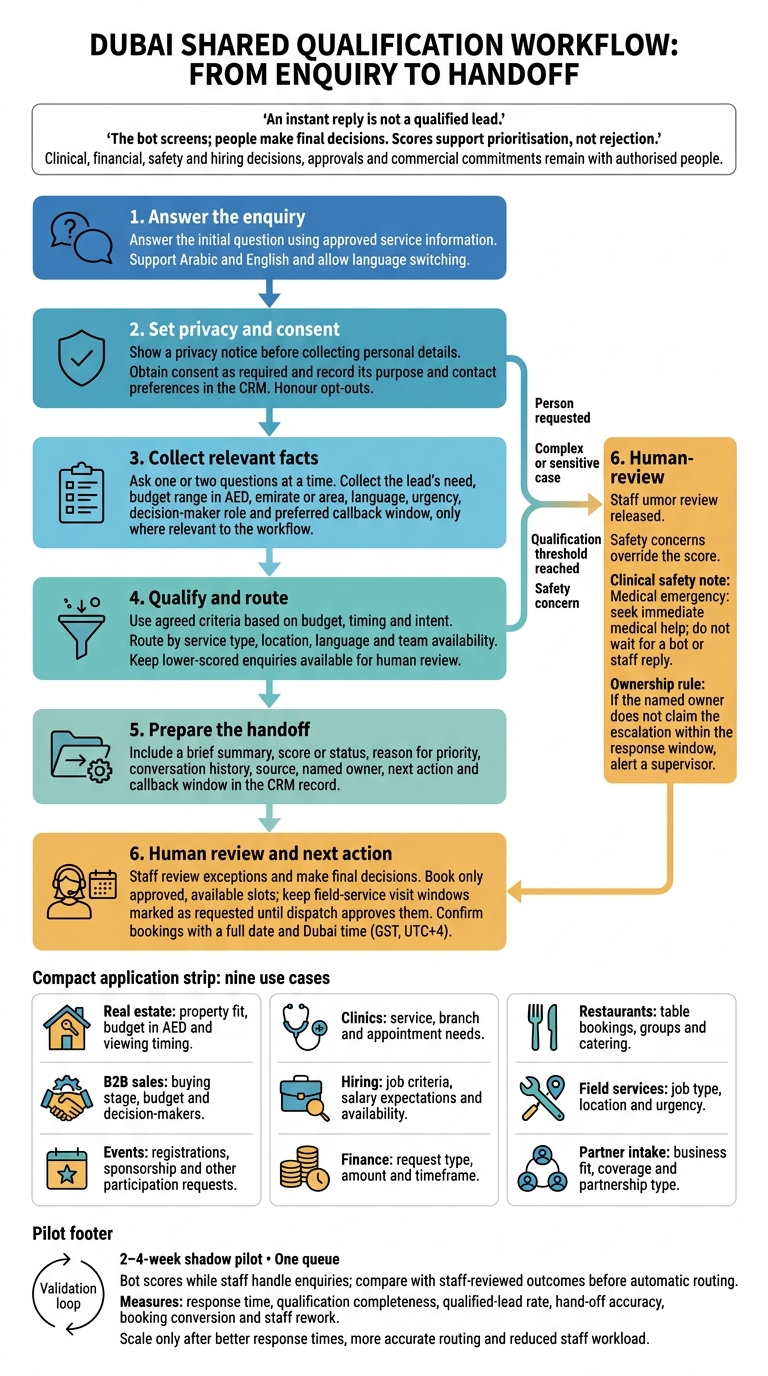
An instant reply is not a qualified lead. I’d start with one workflow: answer the enquiry, collect the facts needed to route it, and assign a named person to follow up.
These nine Dubai use cases cover:
- Real estate: property fit, budget in AED and viewing timing.
- Clinics: service, branch and appointment needs.
- Restaurants: table bookings, groups and catering.
- B2B sales: buying stage, budget and decision-makers.
- Hiring: job criteria, salary expectations and availability.
- Field services: job type, location and urgency.
- Events: registrations, sponsorship and other participation requests.
- Finance: request type, amount and timeframe.
- Partner intake: business fit, coverage and partnership type.
I’d connect the intake to your CRM and live calendars, support Arabic and English, and set privacy and consent rules before collecting personal details. People keep control of sensitive cases and final decisions.
My starting point: a _2–4-week shadow pilot_ on one queue. Check routing accuracy and staff rework, alongside response time and bookings, before adding another workflow.
What a Lead Qualification Bot Should Collect
Collect the lead’s need, budget range in AED, emirate or area, language, urgency, decision-maker role and preferred callback window. Ask one or two questions at a time. These answers feed the routing rules below.
For property leads, also record whether they’re a cash buyer or mortgage buyer. Tag their timing as this week, this quarter or later.
Before launch, set routing rules by service type, location, language and team availability. Use the answers to assign a status or score based on budget, timing and intent, not enthusiasm or message length. Keep lower-scored enquiries available for human review.
Hand over when someone asks to speak to a person, the conversation becomes complex or sensitive, or the agreed qualification threshold is reached.
Include a brief summary, score or status, conversation history, source, owner and next action in the handover. Add the callback window and any available campaign or landing-page details. Save the outcome in the CRM record so the next person can continue the conversation.
Language, Consent and Scheduling in Dubai
Support Arabic and English, detect the lead’s language automatically, and let them switch mid-chat.[4][5] Once the language is set, show a privacy notice before collecting personal details or requesting consent.
Use +971 for phone numbers, AED for amounts, and metric units and °C where relevant.[2][7][9]
Obtain consent as required under the UAE Personal Data Protection Law. Record consent, its purpose and contact preferences in the CRM. Honour opt-outs across channels and follow WhatsApp Business messaging policy.[1][3][4] After consent, move straight to booking and callback timing.
Confirm bookings with a full date and label the time as Dubai time (GST, UTC+4).[5]
26 October 2026
Connect calendars so the bot offers only live slots, then check local working hours before confirming a booking.[2][4][5]
Keep outbound contact within both the lead’s preferred window and the team’s actual business hours. Update availability for Ramadan and UAE public holidays before offering callbacks or appointments.[9]
1. Real Estate Buyer and Tenant Enquiries
Required intake fields
Answer the property question first, then qualify the enquiry by property fit, financing readiness and viewing urgency.
Collect the community, property type, bedroom count, buy or rent intent, budget in AED and timeline. Ask buyers whether they’ll pay cash or use a mortgage, and whether they’re buying for personal use or investment. Ask tenants for their move-in date. For owners and landlords, confirm whether they want to sell, let or request a valuation.
Qualification signals
Look for a named building or project, a viewing request, mortgage pre-approval and a clear purchase deadline. A tenant moving within 30 days needs different follow-up from someone searching for next year.
Use mortgage readiness to route the enquiry, not to reject it. These signals help direct the lead to sales, leasing or mortgage support.
Human hand-off triggers
Hand over when someone asks for an agent or viewing, or meets the agency’s budget and urgency criteria. Route the enquiry by community, transaction type and preferred language.
Pass the requested viewing time to the specialist for confirmation. The specialist then confirms availability, sends listings or books the viewing.
Staff-ready output and next action
Send the specialist a summary covering contact details, enquiry source, role, property criteria, budget in AED, financing, timeline and preferred viewing time.
Include why the enquiry takes priority and a clear next action: confirm a viewing, send matching listings or discuss mortgage readiness.
2. Clinic Appointments and Service Enquiries
Use the bot to collect booking details. Leave diagnosis and medical advice to staff.
Required intake fields
Collect the service, preferred branch, appointment timeframe, insurance provider, and preferred date and time. Ask only for the contact details needed for follow-up, and keep intake brief.
Qualification signals
Booking readiness is not a medical assessment. A named service, chosen branch, and request for a same-week slot indicate readiness to book.
Insurance details should prompt a coverage check, not a promise of cover. A costly procedure does not make a case urgent.
Human hand-off triggers
Route clinical questions, complex treatment enquiries, and sensitive cases to qualified staff. If someone asks to speak to staff, transfer the request immediately.
Never diagnose or give personalised medical advice. Any sign of an emergency calls for immediate medical help, not a wait for the bot or a staff reply. The bot handles intake; staff make medical judgements.
Staff-ready output and next action
Send reception the contact details, service, branch, timing, insurer, and reason for hand-off. Reception checks availability and insurance cover; clinical staff answer medical questions.
3. Restaurant Bookings and Group Dining
Required intake fields
Collect the branch, date, time in GST (UTC+4), party size, indoor or outdoor seating preference, occasion, dietary or accessibility requirements, and contact details. Ask only for missing booking fields, rather than repeating questions.[3][8]
These details help the bot decide whether to confirm a table, route a group enquiry or seek approval.
Qualification signals
Classify each request as table bookings, corporate groups, private dining or catering. For groups and events, also collect the budget in AED and identify the approver.[3][4][8]
Use this classification to decide whether reservations can confirm the request or the events team needs to review it.
Human hand-off triggers
Send private dining, catering and requests needing approval to the manager or events coordinator. For incomplete bookings, send one follow-up, then escalate unresolved cases to a supervisor.[3][6][8]
Staff-ready output and next action
Send reservations or events the booking details, enquiry type, budget, decision-maker and outstanding questions via WhatsApp or the CRM. Flag requests needing approval for follow-up.[3][4][5]
Share only pre-approved package prices in AED, and offer alternatives when the requested slot is full. Confirm only against live availability, then send the next action to reservations or events.[3][4][5]
4. B2B Sales Enquiries
Required intake fields
B2B enquiries need a clear split between research and active buying.
Collect the company name, sector, solution need, emirate or area, current systems, procurement stage and target timing. Check scale through headcount, fleet size, number of users or locations.
Qualification signals
Ask whether the need is for this week, this quarter or research only. Score the enquiry by buying stage, budget and urgency.
The requester may not make the buying decision. Identify the end user, budget holder, technical evaluator and procurement contact so sales can route the lead by account and buying stage.
Human hand-off triggers
Send high-intent enquiries with a clear budget range and urgent deadlines to sales. Hand over direct requests for a person, unclear cases and technical questions the bot cannot answer with confidence.
Keep legal commitments and final approvals with authorised staff.
Staff-ready output and next action
Create a CRM summary in Zoho or Odoo with the need, location, timing, buying committee and current systems. Include the score, the reasoning in plain language and key messages.
Route the enquiry by sector, territory or account owner. Assign a next action: a booked calendar appointment, a WhatsApp hot-lead alert to the assigned rep or a follow-up sequence for lower-priority leads.
5. Hiring and Candidate Intake
Required intake fields
Keep applicants, recruitment agencies and employer requests on separate intake paths. Direct agencies to partner intake and employers to the B2B flow.
For applicants, use job-approved questions to collect the role, relevant experience, emirate or area, notice period or earliest start date, UAE right to work, monthly salary expectations in AED, and preferred work mode: on-site, hybrid or remote.
Qualification signals
Score every applicant against the same criteria: skills, experience, salary fit and availability. Record factual matches and gaps with a short reason. Don’t judge applicants by their enthusiasm or tone.
Human hand-off triggers
Send suitable profiles to a recruiter for review, along with borderline matches, unclear right-to-work answers and sensitive cases. Use the score only to route the lead; recruiters make the hiring decision.
Staff-ready output and next action
With consent, log the candidate’s vacancy, score, reasoning and transcript in Zoho for recruiter handover. Route by department and language. Offer a recruiter call or interview slot, then send a calendar invitation once confirmed.
For field-service requests, follow the same qualification pattern: collect the job, area and urgency, then hand off to dispatch.
6. Field Service Requests
For on-site work, the bot needs to qualify the job before dispatch, not just collect contact details.
Required intake fields
Collect the emirate, area, service type, asset, fault or issue, urgency, access needs and preferred visit window. Classify the request as emergency, routine maintenance, warranty or quotation.
Request photos only through a PDPL-compliant flow. Mask personal details before model calls, and define rules for access, retention and deletion.[1][3]
This gives the bot enough information to route the job before a dispatcher checks capacity.
Qualification signals
Check whether the job falls within your service area and trade capability, then check staff availability and language needs. Give urgency and fault severity more weight than eagerness to book.
A routine repair and a renovation enquiry need different routing.
Human hand-off triggers
Safety concerns always override the score. Escalate safety issues, unclear faults, complex diagnosis, large-project quotes and any request to speak to a person.
Staff should review safety, confirm the diagnosis and set manual pricing. The bot must not present its assessment as a confirmed fault.
Staff-ready output and next action
Create a dispatch brief with the facts, category, priority, reason, site contact or decision-maker, source channel and transcript. Send it to dispatch and assign a named owner based on area and capability.
Keep the visit window marked as requested, not confirmed, until dispatch approves it.
7. Event Registration and Sponsorship
Required intake fields
Identify the role first: attendee, exhibitor, sponsor, speaker, media or supplier. Collect the event, organisation, group size, participation goals and response deadline. Ask sponsors, exhibitors and corporate groups for their budget in AED; speakers for their topic; media for their outlet; and suppliers for their service category.[3][8]
Qualification signals
Separate standard registrations from commercial enquiries, and individual registrations from corporate group bookings. A single-ticket enquiry can follow the standard registration flow.
Group attendance, company-level requirements, a clear budget and decision-making authority call for staff review. Prioritise enquiries by budget, clarity on the decision-maker and deadline.[1][5][8]
Human hand-off triggers
Route sponsorship and exhibitor enquiries to sales, corporate groups to group sales, speakers to programming, media to PR and suppliers to operations. Escalate requests involving negotiated terms, legal commitments or unclear requirements. Transfer anyone who asks to speak to a person.[1][3][10]
Staff-ready output and next action
Prepare a brief covering the role, headcount, goal, decision-maker, budget in AED where relevant, deadline and named owner. Include the priority, the reason for it and the chat transcript.
Route each lead to the correct team with a clear next action. Do not promise tickets, exhibition space or sponsorship terms before staff confirm availability and terms. Send individuals to the registration/payment link. For group or commercial enquiries, the assigned owner reviews the requirements and confirms the next step.[3][4]
8. Finance and Funding Requests
Required intake fields
This workflow screens finance leads. It does not provide advice or approvals.
First, identify the request type: business finance, trade finance or funding support. Collect only the relevant business details or employment status, the amount in AED where relevant, the purpose, timeline and preferred contact method. Explain that screening is non-binding and is neither financial advice nor final approval.[3][4]
Qualification signals
Route requests by service type, stated amount, urgency and the team’s pre-set eligibility rules. Assign a priority band with a short reason, not a verdict.[1][3]
Human hand-off triggers
Pass requests for regulated financial advice, complaints, sensitive information and cases with uncertain eligibility to authorised staff. Finance staff handle eligibility, advice and approvals. If documents or private identifiers are needed, move the request to a secure human channel rather than collecting them in chat.[1][3][4]
Staff-ready output and next action
Send the assigned finance or funding team a concise brief covering contact details, relevant business details or employment status, the AED amount, purpose, timeline, a short summary and the routing reason. Flag unresolved questions, then book a call or assign a named owner. Do not promise approval or eligibility.[3][4]
9. Partner, Supplier and Reseller Enquiries
Keep channel and supply-side leads separate from customer sales leads. The same bot can screen these enquiries and route them to the right commercial owner.
Required intake fields
Ask for the timeline first, then collect the organisation’s legal name, what it offers, target industry, UAE coverage and partnership type. Beyond these fields, ask only for details needed for that partnership type. This flow screens business relationships, not buyer enquiries.
Qualification signals
Screen each enquiry by partner type:
- Tech partners: API fit.
- Suppliers: specifications, pricing and delivery capacity.
- Referral partners: customer base and compensation model.
- Distributors: licence, logistics coverage and territory.
- Alliances: business fit and decision-making authority.
Use the answers to assess fit, coverage, capability and urgency. Then route the lead to partnerships, procurement, channel sales or technical review.
Human hand-off triggers
Escalate high-value opportunities, unclear fit, legal or jurisdictional questions, and requests to negotiate with a person. Staff own commercial terms; the bot makes no commitments.
Staff-ready output and next action
Send the assigned owner a short brief covering what the organisation wants, its UAE coverage and timeline, and the reason for routing it to them. Assign enquiries by partner type and commercial owner:
- Technical packs: technical staff.
- Supplier files: procurement.
- Commercial leads: channel sales.
- Strategic opportunities: partnerships lead.
Offer a review call without making commercial commitments, then let the assigned person take over the negotiation.
What the Bot Handles and People Decide
Across these workflows, from real estate to partner intake, the bot screens; people make final decisions. The bot answers approved questions, collects key details and passes exceptions to staff.
| Workflow | Bot-handled tasks | Human-owned decisions |
|---|---|---|
| Routine FAQs | Share approved service details, opening hours and locations. | Complex questions and exceptions |
| Intake | Collect relevant contact details, needs, location and timing. | Sensitive disclosures and exceptions |
| Completeness checks | Flag missing fields and ask for clarification. | Ambiguities and conflicts |
| Rule-based qualification | Check service fit and assign priority using agreed criteria. | Clinical, financial, safety and hiring decisions |
| Scheduling and reminders | Offer available slots and send agreed reminders or follow-ups. | Exceptions and approval changes |
| Summaries and hand-offs | Record answers, missing details and reasons for priority in the CRM. | Review, negotiate and approve |
These rules need to connect to routing, CRM updates and calendar access. Judgement stays with staff. Scores support prioritisation, not rejection.
Assign each escalation to a named owner. If nobody claims it within the response window, alert a supervisor. Route out-of-scope requests to a person rather than let the bot guess.
The next section shows how to connect these rules to WhatsApp, your CRM and calendars so hand-offs happen automatically.
Connect the Bot to Your Business Tools
Once qualification rules are set, connect them to your CRM and calendar. Define the workflow first. Map intent, emirate or area, timing, budget and decision-making authority to CRM fields. Document scoring criteria, owners, escalation deadlines, supported languages and approval points. Route enquiries by territory, product line, language preference or workload, and store the reason for each score in the CRM.
Choose which CRM or ERP will serve as the system of record. Check existing phone numbers and email addresses before creating new contacts [4][6]. Set limits on what the bot can update, which calendars it can read and who receives alerts. This keeps hand-offs linked to live records rather than a separate inbox.
Uklad AI can work across WhatsApp Business, Telegram, email and calls, with connections to Odoo, SAP, Zoho, Microsoft 365 and Google Workspace.
For UAE and KSA deployments, verify where data is stored and processed. Have staff check sector rules in both countries, not just data residency requirements. The bot collects and routes information; people control sensitive access, compliance and final decisions.
For clinic and finance enquiries, limit access by role and collect only the fields needed for intake. Agree retention and deletion rules before launch. Log the facts, the reason for the score and the routing action. Before sensitive data enters the workflow, confirm masking arrangements and third-party model retention terms.
Test the Bot and Measure Results
Once routing is connected to your CRM and calendars, run a 2–4-week shadow pilot on one high-volume workflow from the article before go-live. Let the bot score enquiries while staff handle them as usual, then compare its decisions with staff-reviewed outcomes before switching on automatic routing. Repeat the pilot on the next channel once the rules hold.[1]
Test Arabic and English, including language switches mid-chat.[4][5] Check unclear answers, missing required fields and cross-channel duplicates. Ambiguous replies should go to human review; duplicates should link to the correct existing record.[1][3][4][6]
Test escalation under actual working conditions. Simulate an unavailable owner and an after-hours enquiry, then verify reminders, rerouting to a backup owner, supervisor escalation and next-business-day follow-up.[3][6] Check that the customer receives a clear timeframe for a person to respond.[3]
Use the pilot to set your baseline for response time, qualification completeness, qualified-lead rate, hand-off accuracy, booking conversion and staff rework.[1][3][4][6]
| Metric | Measure |
|---|---|
| Response time | Receipt to first reply |
| Qualification completeness | Enquiries with required intake facts ÷ total enquiries |
| Qualified-lead rate | Qualified enquiries ÷ total enquiries |
| Hand-off accuracy | Routing matches against reviewed decisions |
| Booking conversion | Confirmed bookings ÷ qualified enquiries |
| Staff rework | Corrections to records, scores or routing |
Keep these definitions consistent when comparing channels and campaigns.[3]
During the first month, review false positives and check the low-scored queue for missed fits. Record each disagreement, adjust the rule and retest.[1][3] A higher qualification rate alone does not prove improvement if staff have to correct more records or suitable customers are being excluded.[1][3]
Conclusion: Start with One Workflow
All nine workflows follow one rule: qualify first, route second. The bot answers first, collects only the facts needed to qualify the lead, then hands it to a named owner.[3][5]
Start with the highest-volume workflow, not every department at once. Set a clear boundary before launch: the bot collects facts and books approved slots; staff handle exceptions, sensitive cases and final decisions.[3][4][9]
Scale only when the pilot shows better response times, more accurate routing and reduced staff workload.[1][3] Then apply the same workflow to the next queue.
FAQs
How much does a lead qualification bot cost in Dubai?
Setting up a lead qualification bot in Dubai typically costs AED 3,000 to AED 5,500 for a standard workflow [1]. Beyond setup, the total cost of ownership includes model usage, hosting and any human review needed [2].
To judge whether it pays for itself through more efficient work and faster conversion, account for the cost of delays too, including revenue lost when leads wait too long for a response [1].
Which enquiry workflow should I automate first?
Slow manual replies can cost you leads. Start with one high-volume, rules-heavy enquiry workflow across your website, WhatsApp or social media. Automate the first reply, ask consistent qualification questions and route enquiries by priority.
For UAE businesses, run a 4–8-week pilot around one measurable workflow. Define what counts as a qualified lead from the outset, then measure response times and manual data entry to assess ROI.
How can I calculate the bot’s return on investment?
Your lead qualification bot’s return on investment depends on how its work connects to advertising performance and sales results. Connect it to your existing systems so you can trace qualified leads back to the campaigns or channels that brought them in.
Track cost per qualified lead, hours saved on routine enquiries, conversion rates against your historical baseline, and lead routing accuracy. Review logged qualification answers and decisions to see which enquiries turn into business.