CRM vs AI Platform: What Your Sales Team Actually Needs
Most sales teams do _not_ need to replace their CRM. They need to fix one bottleneck: manual follow-ups, late notes, slow lead response, or messy work across CRM, WhatsApp Business, email, and ERP.
If I cut the article down to one point, it is this:
- Use CRM only if your team keeps data clean, updates deals on time, and can handle inbound without delays.
- Use CRM with built-in AI if you already have tools like HubSpot Breeze, Salesforce Einstein, or Zoho Zia and your team needs help with scoring, drafting, and forecasts inside that system.
- Use CRM plus an AI layer if work moves across WhatsApp Business, calls, email, Microsoft 365, Google Workspace, ERP, and CRM and reps are still doing handoffs by hand.
This matters more in the UAE and GCC because the day-to-day work is not just inside one tool. You have AED reporting, TRN and billing data, English and Arabic work, WhatsApp follow-up, and in some cases UAE or KSA data residency, audit logs, and access controls.
A few facts make the trade-off plain:
- 70% of CRM projects fail due to poor process mapping or bad data, not the CRM brand.
- Reps spend 60% of their time on non-selling work like admin and finding documents.
- AI can help most when it handles the next step, not just the record of the step.
In other words: CRM is your system of record. AI is for the work around it. If there is no clean CRM or ERP underneath, adding AI will not fix the mess.
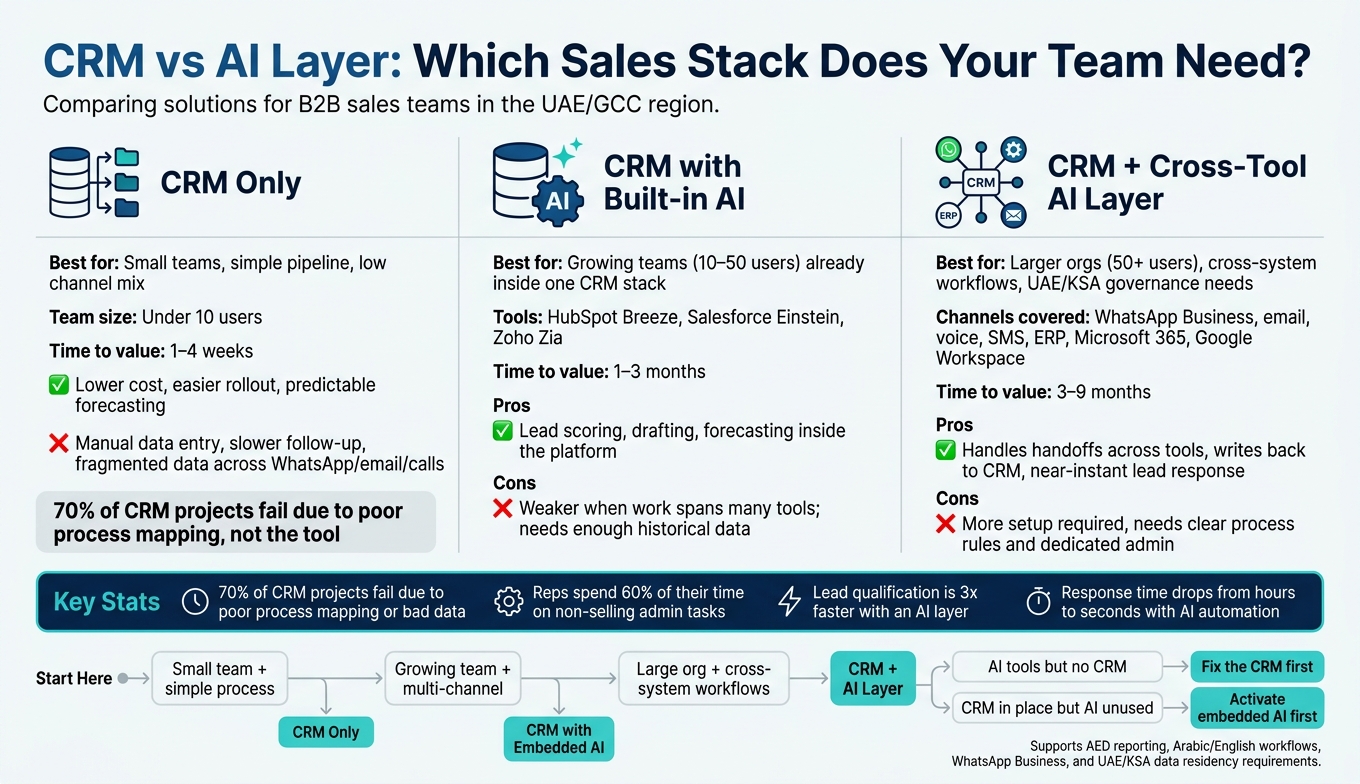
Quick comparison
| Option | Best for | Main upside | Main limit |
|---|---|---|---|
| CRM only | Small teams, simple pipeline, low channel mix | Lower cost, easier rollout | More manual work, slower follow-up |
| CRM with built-in AI | Growing teams already inside one CRM stack | Scoring, drafting, forecasting inside the platform | Usually weaker when work spans many tools |
| CRM + AI layer | Larger teams, cross-system workflows, governance needs | Handles handoffs across tools and writes back to CRM | More setup, needs clear process rules |
Before you pick a tool, I would check five things:
- Where do leads start: web form, WhatsApp Business, calls, email?
- How many systems does one deal touch before close?
- How much rep time goes into admin?
- Are built-in AI features already included but still off?
- Do you need regional hosting or tighter controls for UAE/KSA work?
Pick the simplest setup that fixes today’s workflow problem. If you want, I can turn this into a shorter LinkedIn post, email draft, or landing page intro next.
What a CRM does well - and where it still creates manual work
A CRM keeps the pipeline in order. The sales team still handles a lot of the work around it.
It acts as the system of record for pipeline data: contacts, deal stages, and activity history in one place. For sales managers in the UAE, that structure helps with forecast views in AED, region-level reporting, and a clear audit trail for leadership. CRM data often feeds invoicing and ERP systems too, so TRNs and billing addresses need to stay clean.
What CRMs do well for pipeline control and reporting
Platforms like Salesforce, HubSpot, Zoho CRM, and Odoo give management a steady record of sales activity, with role-based permissions and multi-currency reporting in AED. That is the CRM’s main job.
Gaetano Castaldo, Founder & CEO at Castaldo Solutions, says: _"Choosing the tool matters, but what decides the success or failure of the project is the processes and the data, not the logo on the CRM."_ [7]
Where sales reps still work outside the CRM
This is the friction point: the CRM records work, but it does not do much of the work itself.
After a call, reps still type notes by hand, log WhatsApp conversations through third-party integrations, and draft follow-ups and documents on their own [2]. In UAE teams, that shows up most in WhatsApp follow-ups, bilingual notes, and post-call updates.
| What a typical CRM handles well | Where AI adds value |
|---|---|
| Contact and account records | Manual data entry and enrichment after calls or research |
| Pipeline stages and deal tracking | Updating deal status after a WhatsApp chat |
| Email logging and basic templates | Call summaries and personalised follow-up drafting |
| Historical dashboards and forecast views | Spreadsheet-based forecasting outside the system |
| Rule-based automation | Multi-step workflows across CRM, ERP, and messaging apps |
| Quote approval workflows | Re-entering data across CRM, ERP, and WhatsApp |
That does not mean the CRM is broken. Or put another way: the issue is less the tool, more the workflow around it.
The data backs that up. 70% of CRM projects fail not because of the tool itself, but because of poor process mapping or dirty data [7]. That’s the gap where AI starts to help.
What AI platforms and AI sales assistants actually automate
CRM is good at recording activity. It usually stops there. AI handles the messy handoff work that reps still do by hand: capturing leads, qualifying them, routing them, drafting follow-ups, and updating records across tools.
Here’s a plain example. A lead comes in on WhatsApp. AI can capture it, qualify it, route it by territory or language, draft the reply, and update the CRM. That’s the gap: not just logging work, but doing the next step.
Built-in CRM AI versus a cross-tool AI layer
CRM-native AI, such as Einstein, Zia, and Breeze, helps _inside_ the CRM. It supports lead scoring, forecasting, and next-step suggestions. A cross-tool AI layer works across CRM, email, documents, ERP, and WhatsApp Business.
| Built-in CRM AI | Cross-tool AI platform / agents | |
|---|---|---|
| How it works | Suggests actions | Completes workflows across tools |
| Channels | Primarily email and web forms | WhatsApp Business, email, voice, SMS [5][2] |
| Integration scope | Single CRM ecosystem | Works across CRM, ERP, Microsoft 365, Google Workspace [3][2] |
| Data handling | Structured CRM data only | Handles unstructured data such as call summaries, chat logs, and sentiment [1][5] |
| Governance | Vendor-managed | Permission-based access, audit logs, custom controls |
| Implementation effort | Low; often enabled within an existing plan | Moderate; requires workflow mapping over existing systems [1] |
That gap matters most when sales work lives across more than one system. If the workflow starts in WhatsApp, moves to email, touches ERP, and ends in CRM, suggestions inside a single tool won’t carry the whole load.
Where AI adds value in UAE sales workflows
For Gulf teams, three use cases stand out.
- WhatsApp Business follow-up: In many GCC sales teams, this is the main follow-up channel. AI that detects incoming leads, pulls out next actions, and triggers the next workflow step cuts a big manual bottleneck. In other words: faster responses, fewer dropped handoffs, less admin drag.
- Bilingual sales work: English and Arabic, including MSA and Gulf dialects, are part of daily work in the UAE. AI that drafts follow-ups or summarises calls in both languages saves reps from writing the same message twice.
- Automatic notes and updates: Reps on the move often leave meeting notes and deal updates until later. AI can capture those items as they happen, which keeps records current without extra chasing.
None of this works well with messy inputs or vague rules. The stack needs clean data, clear workflow rules, permission-based access, and audit logs. When teams operate across UAE or KSA compliance needs, permission controls, audit trails, and regional hosting matter even more.
Once the workflow spans more than one system, the real question shifts. It’s no longer just whether the CRM has AI. It’s whether the AI can sit above the workflow and keep the whole process moving.
CRM only, AI only, or a combined stack: how to decide
The hard part isn't what AI _can_ automate. It's whether your team needs it now, or whether a well-run CRM still does the job.
When CRM alone is enough
A CRM on its own works when sales activity is simple, response times are still under control, and the team keeps records clean without extra automation. That's the real test: can your team keep the CRM up to date on its own?
CRM-only works when a few basics are in place:
- Disciplined pipeline stages
- Consistent data entry
- Weekly manager review
If those start to slip, the case for AI gets stronger.
| CRM-only stack for sales | |
|---|---|
| Pros | Cons |
| Lower software cost and simpler rollout | Manual data entry and document retrieval |
| Easier for teams with limited process maturity | Slower response to inbound leads; dependent on rep availability |
| Predictable, human-controlled forecasting | Fragmented data when work spans WhatsApp, email, and calls |
| Clear accountability for every action | Poor documentation of meeting context and verbal agreements |
When adding an AI layer makes sense
An AI layer starts to make sense when three things show up at once.
First, inbound volume is high and delays in response are easy to spot. Second, meetings are poorly documented, with notes written hours later and deal updates lagging behind. Third, work crosses more than one system, like when a lead comes in through WhatsApp, pricing sits in an ERP, and the deal lives in a CRM.
In that setup, a cross-tool AI layer can handle handoffs across CRM, email, WhatsApp Business, ERP, and work suites without forcing a platform migration. The CRM remains the source of truth. AI handles capture, qualification, summarisation, and follow-up.
For Gulf teams with compliance requirements, especially those working across the UAE and KSA, the AI layer also needs permission-based access controls, audit logs, and regional data residency. Those are not nice-to-haves. They're the baseline for working responsibly across jurisdictions.
One more point matters here: if the AI layer can't write back into a structured CRM, the upside stays limited.
| Before AI layer vs after AI layer | ||
|---|---|---|
| Metric | Before AI layer | After AI layer |
| Lead qualification | Manual and slow | Three times faster and more data-driven [1] |
| Admin hours | High; reps spend 60% of their time on non-selling tasks such as manual data entry and finding pitch decks [6] | Reduced through automatic capture and summarisation |
| Response time | Dependent on rep availability | Near-instant, in seconds [8] |
| Quote preparation | Manual data gathering across systems | Automated through cross-system workflows |
| Meeting follow-up | Often delayed or incomplete | Instant, high-quality summaries captured as they happen [4] |
Why AI without a solid CRM usually fails
AI only helps when it can act on data you trust and record the result cleanly. It falls apart when there is no clean source of truth, no traceable history, and no structured place to write results back to.
Without a structured CRM under it, AI can't qualify, track, summarise, and update in one traceable flow. Forecasting turns into guesswork. Measuring ROI becomes impossible.
The minimum bar is simple: at least one central system, either a CRM or an ERP, that holds leads and accounts in a consistent structure so actions stay traceable. AI amplifies what's already there. If the base is clean data and a clear process, it helps. If the base is fragmented and noisy, it makes that worse.
Stack patterns and a final decision checklist
3 stack patterns that fit most teams
Once the CRM-vs-AI split is clear, the next move is simple: pick a stack shape that matches your team size and how messy the workflow is. Most teams land in one of three patterns.
Pattern 1: Basic CRM-centric works for small teams with steady relationships and tight budgets. Tools like Zoho CRM Standard or HubSpot Starter usually do the job well. Setup is mostly self-serve, and many teams are up and running in one to four weeks.
Pattern 2: CRM with embedded AI makes sense for growing teams with 10 to 50 users working across several channels, like email, WhatsApp Business, and calls. In this setup, built-in tools such as Zoho Zia or HubSpot Breeze can cut down admin work. That said, embedded AI only starts to settle for scoring and forecasting when there’s enough past data behind it [3][6].
Pattern 3: CRM plus a cross-tool AI layer fits larger organisations with workflows that run across systems like Odoo, SAP, Microsoft 365, or Google Workspace. Here, the AI layer sits across the stack and handles lead capture, meeting summaries, follow-ups, and handoffs between systems. This setup tends to work best when you have a dedicated internal admin or an implementation partner in the mix. If your team has UAE or KSA data residency rules, check regional hosting before you move ahead.
| Stack pattern | Team size | Process maturity | Integration complexity | Data residency needs | Time to value | Implementation effort |
|---|---|---|---|---|---|---|
| Basic CRM-centric | Under 10 users | Low | Basic (email/calendar) | Varies by vendor; check UAE/KSA hosting | 1–4 weeks | Low |
| CRM with embedded AI | 10–50 users | Medium | Native (WhatsApp, social media) | Often global | 1–3 months | Medium |
| CRM plus cross-tool AI layer | 50+ users / complex workflows | High | Deep (ERP, SAP, Odoo, multiple systems) | Local UAE/KSA options available | 3–9 months | High |
Decision checklist and conclusion
Use the checklist below to match your current workflow - pipeline updates, lead qualification, follow-ups, meeting summaries, and sales execution - to one of these three patterns.
- Which tools do reps use every day - CRM, ERP, Microsoft 365, Google Workspace, WhatsApp Business?
- How many channels does a deal pass through before it closes?
- What share of rep time goes to admin instead of selling?
- Does your current CRM already include embedded AI features that are still switched off?
- Do you need cross-tool workflows that move data between your CRM, ERP, and messaging channels on their own?
- Do UAE or KSA security rules - data residency, audit logs, permission-based access - apply to your sales data?
CRM stores the truth; AI executes the work.
| Your situation | Recommended approach |
|---|---|
| Small team, simple process, low complexity | CRM-first |
| Growing team, multi-channel, some admin pressure | CRM with embedded AI |
| Large organisation, cross-system workflows, governance needs | CRM plus cross-tool AI layer |
| AI tools in use but no central CRM | Fix the CRM first |
| CRM in place but AI features unused | Activate embedded AI before adding a new layer |
Pick the simplest stack that fixes today’s workflow bottleneck.
FAQs
How do I know if CRM alone is enough?
A traditional CRM may still be enough when your sales process is linear and standardised, your team is still finding product-market fit, or your budget doesn’t leave room for AI.
It also makes sense when you need full manual control, don’t have the technical resources to set up AI, or your customer relationships are stable and simple. If your team can keep up with data entry and follow-ups without slowing deals or letting opportunities slip, CRM alone can still give you a solid base.
When should we add an AI layer instead of using built-in CRM AI?
Add an AI layer when your CRM’s built-in AI stops short of the work your team actually does - but only if your CRM data is already clean and reliable.
This works best when you need specialised automation, need to connect tools like email, calendars, and WhatsApp Business, or want lead qualification _before_ a record is created in the CRM.
It can also cut manual entry and improve forecasting when the main problem is an integration gap, not the CRM itself.
What should we fix before adding AI to our sales stack?
Fix your underlying data first. If the records are stale, duplicated, or half-filled, AI will just make the mess move faster.
Audit the data. Remove duplicates, verify email addresses, standardise formats, set mandatory fields, and add validation rules so phone numbers and email addresses stay consistent.
Your sales process also needs to be steady before you automate it. If the workflow is still changing every week, automation usually leads to more rework and more cost.
Bring email and calendar systems into the setup early. Manual entry is one of the main reasons data quality slips over time.