The Complete Guide to AI Integration With ERP and CRM
Most AI projects fail for a simple reason: the model is not the main problem. Bad data, loose approvals, and messy workflows are.
If I strip this down to what matters, the article says four things:
- Put AI inside ERP and CRM workflows, not in a separate chat window
- Start with one low-risk, high-volume process like invoice extraction or lead qualification
- Keep humans on approvals, especially for finance, payroll, contracts, and bank details
- Measure ROI early, because invoice costs can drop from AED 47–73 to AED 9–15, and mid-market ROI often lands in 3–6 months
In other words: _AI helps when the workflow already makes sense_. It can read emails, PDFs, scans, and notes, turn them into structured records, and write back into systems like SAP, Odoo, Dynamics 365, Salesforce, or HubSpot. But if your master data is messy, AI will spread those errors at scale. The article flags that 67% of failed deployments link back to poor ERP data quality.
What I’d take from it is simple:
- Use native AI when you need in-system help and a short setup path
- Use external agents or middleware when work crosses systems or includes unstructured inputs
- Use a private RAG layer when data location, policy lookup, or internal document control matters
- Start read-only first, then allow write-back in steps
A few use cases stand out:
- Invoice extraction and matching for cost and time savings
- Lead qualification and follow-up drafts to cut sales admin time
- Report summarisation for manager time savings
- Demand forecasting for stock planning
And a few should stay under strict human control:
- Payroll approvals
- Payments
- Bank detail changes
- Contracts
- Tax filings
- HR record changes
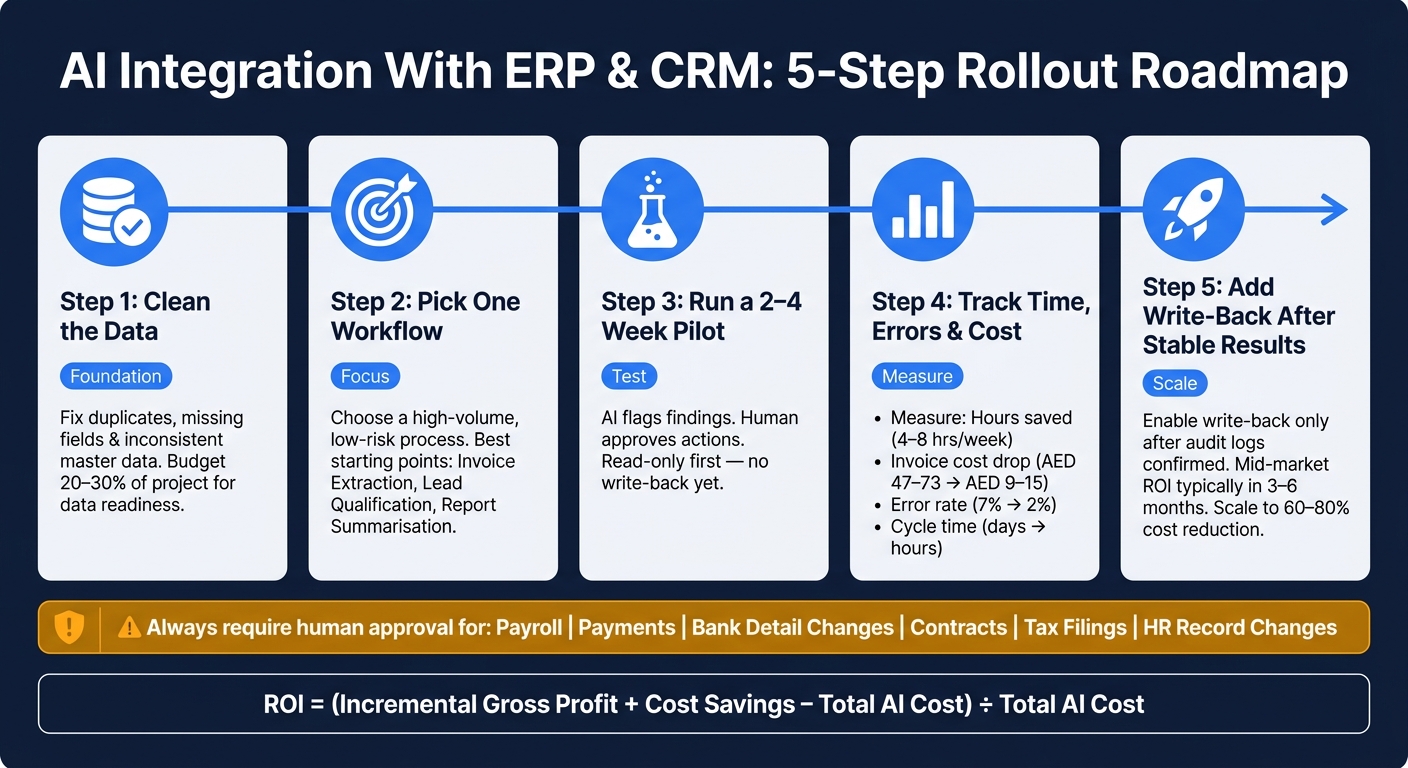
If I were starting, I would keep the rollout tight:
- Clean the data
- Pick one workflow
- Run a 2–4 week pilot
- Track time, error rate, cycle time, and cost
- Add write-back only after stable results and audit logs are in place
| Area | Best starting point | Human role | Typical result |
|---|---|---|---|
| Sales | Lead qualification | Review final outreach | Less drafting time |
| Finance | Invoice OCR + matching | Approve exceptions | Lower cost per document |
| Management | Report summaries | Review summaries | 4–8 hours/week saved |
| Inventory | Demand forecasting | Review large decisions | Better stock planning |
_Or put another way:_ don’t buy “AI”. Fix one workflow, connect it to live data, keep control tight, and prove the numbers first.
Connect Claude AI to Your ERP & CRM with MCP - Live Demo for Mid-Market Businesses
Where AI Adds Value Inside ERP and CRM Workflows
The best gains don’t come from plugging AI into everything. They come from repeatable workflows with clean inputs, clear outputs, and a human who can step in when needed.
Once AI is tied to live ERP and CRM data, that’s where the work starts to move.
Sales, Marketing and Customer Support
Inside CRM workflows, the fastest payback usually comes from lead qualification and follow-up. AI can use lead score, deal stage, and past interaction history to draft follow-ups and route tickets.
In systems such as Odoo 19, AI-enabled lead qualification can score incoming leads based on conversion likelihood, and AI-generated follow-up drafts can cut drafting time from about 20 minutes to two minutes [5][3]. AI agents connected to WhatsApp Business can also capture and qualify leads, then write qualified lead data back into the CRM [3].
Customer support follows the same logic. Ticket classification, sentiment analysis, and suggested replies help teams spend less time on routine queries and more time on messy cases that need judgment.
Use AI to:
- draft replies
- classify tickets
- route requests
Keep the final action with a human.
The same model carries into back-office work. If documents, matching, and approvals drive the process, AI can take the first pass and hand over the edge cases.
Finance, Inventory, Operations and Document Processing
In finance, invoice processing is often the best first move on ROI. AI-powered OCR turns unstructured PDFs, scanned documents, and email attachments into structured ERP records. From there, it can trigger three-way matching between invoice, PO, and GRN, and write extracted invoice data back into invoice, PO, and GRN records.
The cost shift is hard to ignore. AI-powered processing reduces cost per document from roughly AED 47–73 to AED 9–15, while accuracy improves from about 94% to 96%–98% [5].
Inventory and operations also get a lift. Instead of relying on static reorder rules, AI can use historical demand patterns to improve replenishment accuracy and working capital efficiency [3].
That said, human approval should still apply for large purchase orders. AI can guide the process. It shouldn’t own the final call.
How to Choose the Right First Use Cases
Don’t start with the noisiest process. Start with the one that runs often, uses data you already trust, and ends in a clear decision.
Use volume, data quality, and approval risk to choose the first pilot. Look at workflows inside SAP, Odoo, Dynamics 365, Salesforce, or HubSpot that already have clean records and clear approval paths.
A strong first use case usually has three traits:
- it runs hundreds of times a month
- it uses data already inside your ERP or CRM
- it has a clear outcome
That’s why invoice extraction, lead qualification, and report summarisation are good starting points. Payroll approvals and exceptions are not. The compliance risk and accountability requirements still need human sign-off [6].
A sensible rollout path is simple: start with low-risk search and summarisation, then move to OCR and matching, then to forecasting and anomaly detection [5].
There’s one warning worth taking seriously. 67% of AI deployment failures trace back to poor underlying data quality in the ERP [4]. If vendor master data, customer records, or item catalogues are inconsistent, AI will push those inconsistencies through the workflow at scale and with confidence.
Clean the data first. Then connect the AI.
| Use Case | Process Volume | Decision Clarity | Expected ROI |
|---|---|---|---|
| Invoice extraction (OCR + matching) | High | High | High - immediate cost reduction [5][7] |
| Lead qualification | High | Moderate | High - faster sales velocity [3] |
| Report summarisation | Moderate | High | Moderate - manager time savings [5] |
| Demand forecasting | High | Moderate | High - inventory optimisation [3] |
| Payroll approvals and exceptions | High | High | Low - compliance risk outweighs automation gain [6] |
Integration Models: Native AI, Middleware, Agents and Private AI Layers
Once you’ve picked the first use case, the next call is simple but important: how will AI connect to your ERP or CRM? That choice shapes speed, control, and whether the system can write data back or just suggest the next step.
There are four practical paths. The right one depends on your team size, how clean your data is, and how much control you want over the workflow.
The 4 Common Integration Patterns
Native AI is the easiest place to start. Platforms such as Odoo 19 and SAP Joule already include AI features, so setup work is light or not needed at all. The downside is range. Vendor-built features are often narrower, and they can trail standalone models when it comes to reasoning depth [2][3].
API-based connections and middleware push your ERP or CRM further. A direct API link connects the system straight to the AI model. Middleware sits in the middle and moves data between systems that were never built to work together. If your ERP already has clean API access, direct connections tend to work well. If you’re dealing with a legacy ERP, middleware is often the more practical route [2][3].
AI agent layers go a step further. Instead of only answering questions or drafting text, an agent can read messy inputs like emails and PDFs, make a context-based call, and write data back into the ERP or CRM. That makes agents a good fit for exception handling and other judgment-heavy tasks. But there’s a catch: they need monitoring, clear write-back rules, and supervised delegation for anything that has real business impact [2][8].
How Each Model Fits SMBs vs Larger Organisations
For smaller teams, the best move is usually to start with the tools already in place. Keep the workflow clean first. Then add more moving parts only when there’s a clear reason.
For mid-market projects, native ERP automation often lands at around AED 110,000 to AED 550,000, with time to ROI of three to six months [4]. Before adding an agent layer, standardise the workflow. If the process is messy, AI will just move the mess around faster.
Larger organisations, or firms working across several departments, regulated sectors, or GCC markets, usually need tighter control over data location and who can act on AI output. In those cases, a private AI layer built on Retrieval-Augmented Generation (RAG) is often the better fit. RAG grounds responses in your own documents, such as contracts, SOPs, and internal policies, instead of generic internet data. That cuts down hallucinations [3][8].
Or put another way: an intelligent layer won’t repair a broken process. It will scale whatever is already there.
Architecture Comparison Table
| Model | Setup Speed | Control | Write-Back | Data Residency Options | Typical Use Cases |
|---|---|---|---|---|---|
| Native AI | Very fast (built-in) | High - vendor-managed | Limited, human-triggered | Cloud-dependent | Report summaries, basic search, simple OCR |
| Middleware / API | Moderate | High - custom rules | Moderate | Flexible | Custom workflows, legacy connectivity |
| AI Agent Layer | Days to weeks | Moderate - requires external governance | High - autonomous potential | Hybrid cloud | Exception handling, invoice matching, cross-system routing |
| Private AI (RAG) | Weeks to months | Very high - private data silo | Moderate - mostly retrieval | On-premises or private cloud | Internal knowledge queries, contract review, SOP lookup |
In practice, many firms use more than one model at the same time. A common setup looks like this:
- Native AI for structured reporting
- An agent layer for exceptions
- A RAG assistant for internal policy and document queries
Before rollout, map permissions, approvals, and audit logging. That part is not admin overhead. It’s what keeps the workflow usable once AI starts acting inside live systems.
Security, Governance and Data Readiness Before Deployment
Most deployments don’t fail because the model is weak. They fail because the underlying ERP or CRM data is messy, permissions are loose, or no one can prove what the system did.
Once the integration model is set, success comes down to data quality, access control, and audit discipline.
Data Quality, Permissions and Safe Write-Back Rules
Most AI deployment failures start with bad ERP or CRM data. Duplicates, missing fields, inconsistent naming, and stale master data break forecasts, workflows, and analysis. That’s the point where AI stops being a neat prototype and starts causing problems in production.
The safest path is simple: start read-only.
Let the AI flag exceptions before it changes anything. If a read-only pilot produces steady, accurate output, then bring in write-back step by step:
- Start with low-risk actions, like updating a CRM field
- Then move to drafting ERP documents
- Only after that, allow actions that touch finance or HR records
High-risk actions need a hard stop. Payments, bank details, contracts, payroll, postings, filings, and configuration changes must always go through a named human for review and approval [6].
UAE Data Residency, Audit Trails and High-Risk Approvals
For organisations operating in the Gulf, data location is not a side issue. Sensitive finance, HR, and customer records need to be stored and processed in-region before go-live, especially when external models or APIs are part of the setup.
Every AI action must be logged. That means immutable, timestamped records showing what data the AI retrieved, which rule it applied, and what output it produced [8].
Approval records also need a clear human owner. If the action is sensitive, the record should show exactly who approved it.
A practical way to manage this is to assign each use case a risk level:
- Assist
- Recommend
- Decide
- Execute
Then map each level to a fixed approval rule. Low-risk tasks like search and document retrieval can run with light oversight. Anything in the Execute category needs a named, accountable human sign-off every time [5][6].
These controls are often the line between a pilot that stays stuck in test mode and one that can move into production.
Security Controls Comparison Table
| Control Dimension | Native ERP/CRM AI | External AI Integration Layer |
|---|---|---|
| Data Exposure | Lower - data stays within the vendor's ecosystem | Higher - requires API data transfer to external models |
| Residency Control | Dependent on ERP vendor's regional data centres | Can be configured for private or in-region inference |
| Auditability | Integrated into native ERP audit logs | Requires custom middleware to sync logs back to ERP |
| Access Control | Uses existing role-based permissions (RBAC) | Requires separate permission mapping and token management |
| Approval Workflows | Uses native ERP approval chains | Often requires human-in-the-loop UI overlays |
| Operational Risk | Lower - limited to vendor-supported features | Higher - risk of model drift or API changes |
Safety comes from controls, not architecture alone.
With those controls in place, the next move is a narrow pilot: one workflow, one owner, and one measurable outcome.
Implementation Plan and ROI: How to Start Small and Scale
Most AI rollouts don’t fail because the model is weak. They fail because the workflow is messy, the data is patchy, or nobody owns the outcome.
With the right controls in place, start with one workflow, prove the result, then expand. The best place to begin is a workflow with clear owners, clean data, and an output you can measure.
A 3-Step Path From Pilot to Scale
A lot of companies get stuck at the pilot stage. The practical fix is simple: pick one workflow and roll it out in stages.
Step 1 - Diagnose. Audit ERP and CRM usage to find one repetitive workflow. Then fix missing or inconsistent data before any model work starts. A good test is this: can you map the current manual steps from start to finish? At this stage, ownership usually sits with operations and finance leaders. Budget 20–30% of the project for data readiness and cleanup before model work begins [4].
Step 2 - Pilot (2–4 weeks). Run a tight pilot on that single workflow. Invoice matching is a practical place to start [4][5]. The AI flags findings, and a person approves the action. That human-in-the-loop setup builds trust without adding operational risk [8]. If the pilot stays accurate, the next move is controlled write-back into the ERP or CRM.
Step 3 - Scale and expand. Expand only when the output is accurate and audit trails are stable. Add write-back later. Mid-market ERP automation often hits ROI in three to six months [4].
For Gulf deployments, set up data residency and audit trails during the pilot phase, not after [6].
How to Measure ROI in ERP and CRM Use Cases
If you don’t set the baseline early, ROI turns into guesswork.
A simple formula keeps things honest:
ROI = (Incremental Gross Profit + Cost Savings − Total AI Cost) ÷ Total AI Cost
Track the same metrics from day one so you can compare pilot results against the current baseline.
| KPI Category | What to Measure | Realistic Benchmark |
|---|---|---|
| Time saved | Hours per manager per week | 4–8 hours/week [5] |
| Cycle-time reduction | Days to process invoices, leads, or reports | From days to hours [5][7] |
| Error reduction | Processing errors or exception rate | Invoice error rates from 7% to 2% [8] |
| Cost savings | Per-invoice processing cost | Up to 80% lower invoice-processing cost [7] |
Costs depend on scope. A single-workflow agent can start at AED 2,750. Mid-market automation often runs AED 110,000–550,000. You should also budget 15–20% per year for monitoring and retraining [1][4][5].
Conclusion: Start With Process, Keep Control, Measure Results
The main lesson from ERP and CRM AI deployments is blunt: the tech is rarely the bottleneck. The real issue is process clarity, data quality, and governance discipline.
AI works best when it sits inside a workflow that already makes sense, where each action can be checked. In other words: don’t ask AI to fix a broken process. Fix the process first, then add AI where it can do useful work.
The strongest early wins usually come from repetitive tasks like invoice matching, lead qualification, and report summarisation. These are low-risk, high-frequency, and easy to measure. Your architecture choice - native AI, middleware, or an external agent layer - should follow your control and security needs, not the other way around.
The table below sums up what to expect at each stage:
| Dimension | Pilot Deployment | Scaled Deployment |
|---|---|---|
| Investment | AED 2,750–30,000 [1] | AED 300,000+ [4] |
| Risk | Minimal - information only | Moderate - operational dependency |
| Speed to launch | 2–4 weeks [8] | 6–18 months to full maturity [4] |
| Human role | Direct oversight of every output [5] | Exception-based review (3–5% of volume) [8] |
| Expected return | 4–8 hours saved per manager per week [5] | 60–80% cost reduction in targeted tasks [8] |
Start with one process. Protect the data. Prove the value. Then scale.
FAQs
How do I choose the first AI workflow to automate?
Start where the work is repetitive, measurable, and full of unstructured data. Think documents, emails, or conversations. Those are the places where manual handling slows down human judgement and eats up time.
Skip high-risk autonomous decisions at the start. That means areas like financial approvals, tax compliance, or payroll.
First, get the basics in order:
- Clean ERP data
- Documented processes
- A clear way to measure success
Then run one 90-day pilot with a tight scope. Good starting points include invoice processing or anomaly detection.
What data needs cleaning before AI connects to ERP or CRM?
Before AI touches your ERP or CRM, fix the data first. If the source is messy, the output will be messy too.
Start with master data: customers, vendors, products, and other key records. Clean up duplicates, align naming, and standardise formats so matching works the way it should.
Then look at the fields that drive day-to-day decisions. That includes invoice data, PO, GRN, and GL or cost-centre mappings. If those fields are inconsistent, the workflow will drift fast.
A few basics matter here:
- Validate document intake so the system reads the right data from the start
- Apply access controls to sensitive transaction, employee, and customer data
- Fix inconsistencies that can throw off routing, matching, or approvals
In other words: don’t wire AI into broken inputs and hope for the best. Clean records and controlled access give it a fair shot at doing useful work inside the workflow.
When should AI be allowed to write back into the system?
AI works best when the process is structured, follows clear rules, and carries low risk. It also fits well when it prepares drafts for a person to check and approve.
In other words, let AI handle the first pass. Let people make the call.
In critical areas like financial approvals, tax filings, payroll, and system configuration, AI should never act on its own. These tasks need human oversight because they require an audit trail, clear accountability, and proper sign-off.
The line should be clear:
- Automate rule-based, low-risk steps
- Keep human sign-off for actions tied to control, compliance, or financial impact
That kind of governance matters. Without it, teams don’t just risk errors; they risk confusion about who approved what, and when.