How to Automate Follow-Ups Without Losing the Human Touch
Most follow-up automation fails for one reason: it sends the wrong message at the wrong time. If you want better reply rates without sounding cold, the fix is simple: _automate routine follow-ups, review mid-risk drafts, and keep sensitive messages with people._
Here’s the short version:
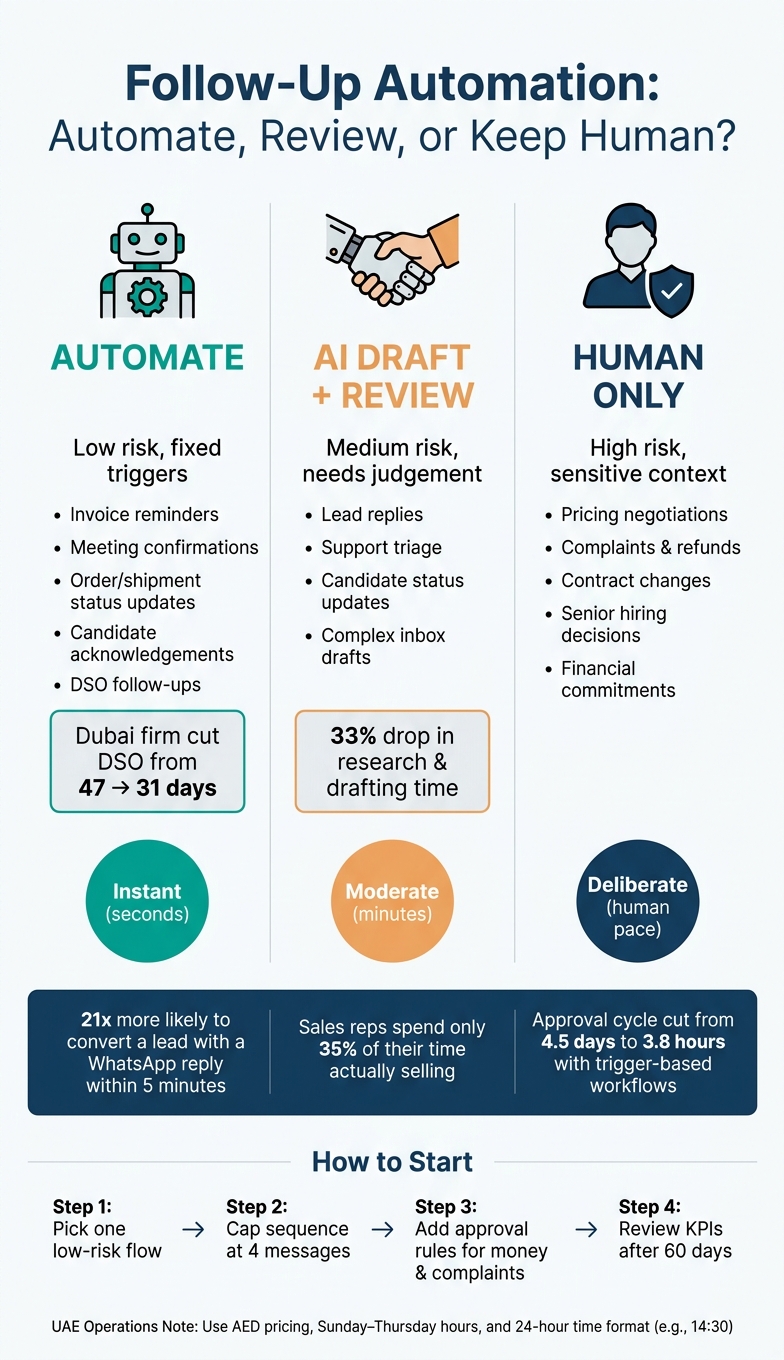
- Automate reminders, confirmations, status updates, and invoice chasing
- Use AI drafts with review for lead replies, support follow-ups, and candidate updates
- Keep human-only for complaints, refunds, pricing, contracts, and senior hiring
- Build inside your current stack like Zoho, Odoo, Microsoft 365, Google Workspace, and WhatsApp Business
- Set local rules for UAE business hours, Ramadan timing, AED pricing, and 20 July 2026 date format
- Track hard numbers like reply time, DSO, close rate, no-show rate, and staff hours saved
A few numbers make the case. A WhatsApp reply within 5 minutes can make a business 21x more likely to convert a lead. One Dubai firm cut DSO from 47 days to 31 days after automating invoice follow-ups. In other words: the win is not “more automation”. The win is better workflow control with the right human handoff.
If I were setting this up, I’d start with one low-risk flow, cap each sequence at 4 messages, add approval rules for money and complaints, and review results after 60 days before expanding.
30 Days to Automate Your Business (Without Losing the Human Touch!)
sbb-itb-c83bf24
Step 1: Decide Which Follow-Ups to Automate and Which to Keep Human
Most teams start in the wrong place. They ask, “What can we automate?” The better question is: what can stay impersonal without causing damage?
That’s the line to draw first. Sort each follow-up by its trigger, the level of risk, and how much judgement it needs. If a message comes from a fixed trigger and the recipient’s situation is low-sensitivity, automation is usually fine. If money, complaints, or sensitive people issues are involved, keep a person in the loop.
Do this split before you build templates, rules, or approvals.
Automate Reminders, Confirmations, and Routine Status Updates
The safest starting point is routine follow-up. That includes lead follow-ups, meeting confirmations, invoice reminders, shipment updates, and candidate acknowledgement messages.
These messages need two things:
- Speed
- Consistency
That matters because sales representatives spend only 35% of their time actually selling [7]. If routine follow-ups run on their own, your team gets time back for work that needs a real conversation.
A Dubai accounting firm automated WhatsApp invoice chasing for AED 3,200 and cut DSO from 47 days to 31 days. [1]
Keep Negotiations, Complaints, and Sensitive HR Messages Human
Automation is fine for repeat work. It is not a substitute for judgement.
Pricing negotiations, complaints, refunds, contract changes, and senior hiring need human accountability and context. In relationship-led markets, these are the moments where tone, timing, and nuance matter. A sequence won’t handle that well.
Route financial commitments, apologies, and serious complaints to a person.
Use a Three-Part Workflow: Automated, AI-Drafted with Review, Human-Only
A simple three-path setup works well in UAE operations:
| Follow-Up Type | Path | How It Works |
|---|---|---|
| Invoice reminders, meeting confirmations, order status | Fully automated | Triggered by CRM or ERP data; sends without review |
| Lead replies, support triage, and inbox drafts | AI-drafted for review | AI drafts from context; a team member approves before sending |
| Pricing negotiations, complaints, senior hiring, refunds | Human-only | Automation stops; immediate handover to a named person |
For most teams, the biggest gain sits in the AI-drafted for review lane.
Here’s why: the system can read a meeting recap, pull lead history, or sum up a support thread, then produce a solid first draft in seconds. A person checks the tone, fixes the details, and sends it. That’s where people and AI agents work well together inside a live workflow.
Or put another way: don’t aim for full automation by default. Build every workflow with a human handoff.
That classification becomes the base for the CRM, inbox, and WhatsApp workflows in the next step.
Step 2: Build Follow-Up Workflows Inside the Tools You Already Use
A follow-up system fails when it lives outside the team’s daily tools. Once you’ve sorted follow-ups by lane, put them inside the CRM, ERP, inbox, and messaging stack your team already works in. Each lane needs one trigger and one delivery path.
Set Triggers in CRM, ERP, and Inbox Workflows
Every follow-up should begin with a clear trigger. That means a specific event in a system kicks off the next action on its own, with no one chasing it manually.
Triggers can come from:
- Internal events: a pipeline stage change in Zoho, a document approval in Odoo or SAP, or a meeting marked complete in Google Workspace or Microsoft 365
- External events: no reply within 24 hours, or a keyword match in a WhatsApp thread
A freight-forwarding company in the Jebel Ali Free Zone cut its approval cycle from 4.5 days to 3.8 hours using trigger-based workflows. [8]
The table below shows how common triggers connect to follow-up actions across systems.
| Trigger | System Source | Follow-Up Action |
|---|---|---|
| Pipeline stage changed | Zoho / CRM | Send WhatsApp brochure & booking link |
| No reply within 24 hours | Microsoft 365 / Google Workspace | AI-drafted reminder email |
| Document approved | Odoo / SAP | Auto-generate and send PDF confirmation |
| Interview completed | HR system | Send candidate "next steps" message |
| Negative sentiment detected | Sentiment check | Immediate handoff to a human supervisor |
Once each follow-up has a trigger, pick the channel that matches the message.
Choose the Right Channel: Email, WhatsApp Business, or Internal Alerts
Channel choice matters just as much as timing. WhatsApp Business works well for fast, relationship-led outreach: appointment reminders, order updates, payment follow-ups, and short check-ins. Responding within five minutes makes a business 21 times more likely to convert that lead [4][3].
Use email for formal follow-ups, VAT-compliant invoices, and longer documents. Use internal alerts in Microsoft Teams, Slack, or Odoo Helpdesk to tell a sales rep when a lead is qualified, flag an overdue approval, or push a complaint to a named person.
In other words: don’t send every message through the same pipe. Match the channel to the job.
Adjust Timing and Formatting for UAE Operations
This part gets missed all the time. A workflow can fire on time and still feel off.
Many UAE teams work Sunday to Thursday. Ramadan and public holidays need a different cadence. Messages should use AED, the 20 July 2026 date format, and 24-hour time such as 14:30.
AI can also switch between English and Arabic, including Khaleeji dialect, based on the recipient’s preference. That matters in the UAE, where the wrong language register can feel impersonal even if the message itself is correct [3][5].
With the trigger, channel, and timing set, the next move is to draft the message with AI and check it with a human before it goes out.
Step 3: Use AI to Personalise Messages Without Losing Control
The hard part isn’t sending a follow-up. It’s sending one that sounds like your team, matches the last interaction, and doesn’t send staff back into the CRM to piece everything together.
Once a follow-up is triggered, use AI to draft context-aware messages from the last interaction. Skip generic templates. The draft should reflect what actually happened.
Draft Messages from Meeting Recaps, Lead History, and Candidate Status
After a sales call logged in Zoho, the AI can pull the prospect’s history and meeting recap into a follow-up that points to the discussion. The same goes for recruitment: it can draft a status update from the latest record instead of a flat “we’ll be in touch.” Teams using AI agents for this type of drafting report a 33% drop in time spent on research and content creation [2].
Pull only from verified meeting notes, CRM records, and product documents. That keeps the draft specific without making it feel scripted.
“we’ll be in touch.”
Set Guardrails for Tone, Context, and Approval
Personalisation needs limits. If an AI references too much detail, it can feel intrusive. If the tone slips, it can damage a relationship your team spent months building.
Set pause rules for:
- complaints
- payment disputes
- unclear intent
Require human approval for high-stakes messages, including high-value accounts, sensitive HR cases, and anything involving money or contracts [1]. Use one tone policy for each workflow. If language changes, the AI can detect the incoming language and draft in that language, so the team doesn’t need to pick from manual language menus [6].
Use Uklad AI as an Operating Layer Over Existing Systems
Uklad AI sits over your CRM, ERP, inbox, and WhatsApp Business. It doesn’t replace them.
For follow-up workflows, the AI reads meeting notes, pulls lead history, drafts the message, and queues it for review. No system switching. No copy-pasting data by hand.
Every action carries an immutable audit trail. Data stays inside the company perimeter, with regional data residency available for the UAE and KSA on request. That matters for teams handling personal data [1][8]. It also gives you the audit trail needed to track speed, consistency, and risk.
Step 4: Measure Results, Manage Risk, and Scale Safely
If you can't show the result, don't scale it. Step 3 gave you the logs. Now use them to prove ROI, spot problems early, and decide what earns a bigger rollout.
Track Response Speed, Consistency, and Conversion by Workflow
Start with the basics:
- reply time
- resolution time
- lead progression rate
- manual-entry error rate and audit compliance score
- staff hours saved per week
- customer or candidate satisfaction scores
Then add workflow-specific metrics. For sales follow-ups, track sales cycle length and close rates. For finance workflows, watch Days Sales Outstanding (DSO). For appointment-based workflows, monitor no-show rates.
A Dubai-based accounting firm that automated invoice chasing via WhatsApp Business API reduced its Days Sales Outstanding (DSO) from 47 days to 31 days within three months, while the finance lead saved 11 hours per week. [1]
That's the before-and-after view you want from day one.
Use this table to link each workflow to the KPI it should move.
| Manual follow-up | AI-drafted (human review) | Fully automated sequence | |
|---|---|---|---|
| Speed | Slow (hours/days) | Moderate (minutes) | Instant (seconds) |
| Consistency | Low (human error) | High (template-based) | Highest (rule-based) |
| Personalisation | High (but unscalable) | Very high (AI-tailored) | Moderate (dynamic tags) |
| Risk | Low (human oversight) | Low (human review) | Moderate (needs guardrails) |
| Best use case | Negotiations, complaints | Complex sales, HR replies | Reminders, status updates, DSO chasing |
Once the KPIs are set, sort out access and escalation before you expand. That's where many teams slip.
Add Security and Escalation Controls from Day One
Permission-based access is a must. Only people who need to change a workflow or view sensitive customer data should have that access.
Every agent action should go into an immutable log. If a message misfires, you need to see what triggered it, what data it used, and who approved it.
Set escalation rules before go-live. If the system spots frustration, a question it hasn't seen before, or a low-confidence case, it should stop and hand off to a human with full context. Not a bland reply. Not a guess.
Poor response times, more escalations, or compliance misses should stop expansion.
For UAE operations, keep personal data in-region where possible and anonymise any data sent outside the region. Local infrastructure such as AWS me-central-1 or Azure UAE North can support that approach. [1][8]
Conclusion: Automate the Routine, Protect the Relationship
The rule is simple: automate what is predictable, keep humans on what is sensitive.
Routine reminders, status updates, and DSO follow-ups are safe places to start with automation. High-value negotiations, complaints, and anything tied to contracts or money still need a human in the loop. AI-drafted messages, reviewed before sending, sit in the middle. You get speed and personalisation without giving up judgement.
Start with one low-risk workflow. Run it for 60 days. Expand only when the KPIs move in the right direction. Scale after the pilot shows faster response, cleaner handoffs, and no drop in trust.
FAQs
How do I decide what to automate first?
Start with low-risk, high-ROI workflows that don’t need much integration. Invoice chasing is often a smart first step. You can measure the return, it usually only needs email, CRM, and WhatsApp tied together, and if something goes wrong, the result is more likely to be an awkward message than a broken contract.
Once that’s steady, move to lead routing and document parsing. Focus on high-volume, repetitive work with structured data. Keep people involved for disputes, high-value negotiations, and edge cases.
When should a human approve an AI draft?
Human approval matters most when the stakes are high and the cost of a wrong move is more than a minor slip. Before any external action, a person should sign off on regulated, sensitive, or high-risk matters.
That includes:
- procurement approvals
- financial transactions such as refunds or invoice payments
- contract negotiations
- hiring decisions
- disciplinary actions
Human review is also needed when the AI is unsure. In plain terms, if confidence is low, don’t let the system act on its own.
This usually applies when:
- the intent falls outside scope
- customer frustration is detected
- the enquiry is complex
For day-to-day communication, AI can draft the response. A human should still review it, edit it, or reject it before it goes out.
Which KPI should I track first?
If you’re new to automation, start with an invoice-chasing flow.
It’s a good first KPI-led project because the payoff is easy to track, the setup between email, CRM and WhatsApp is fairly simple, and the operational risk stays low if something slips.
Let it run for 60 days and make sure it’s stable. After that, move into more complex work like lead routing or automated document parsing.