AI Pilot Readiness for SMBs: 5 Risk Checks
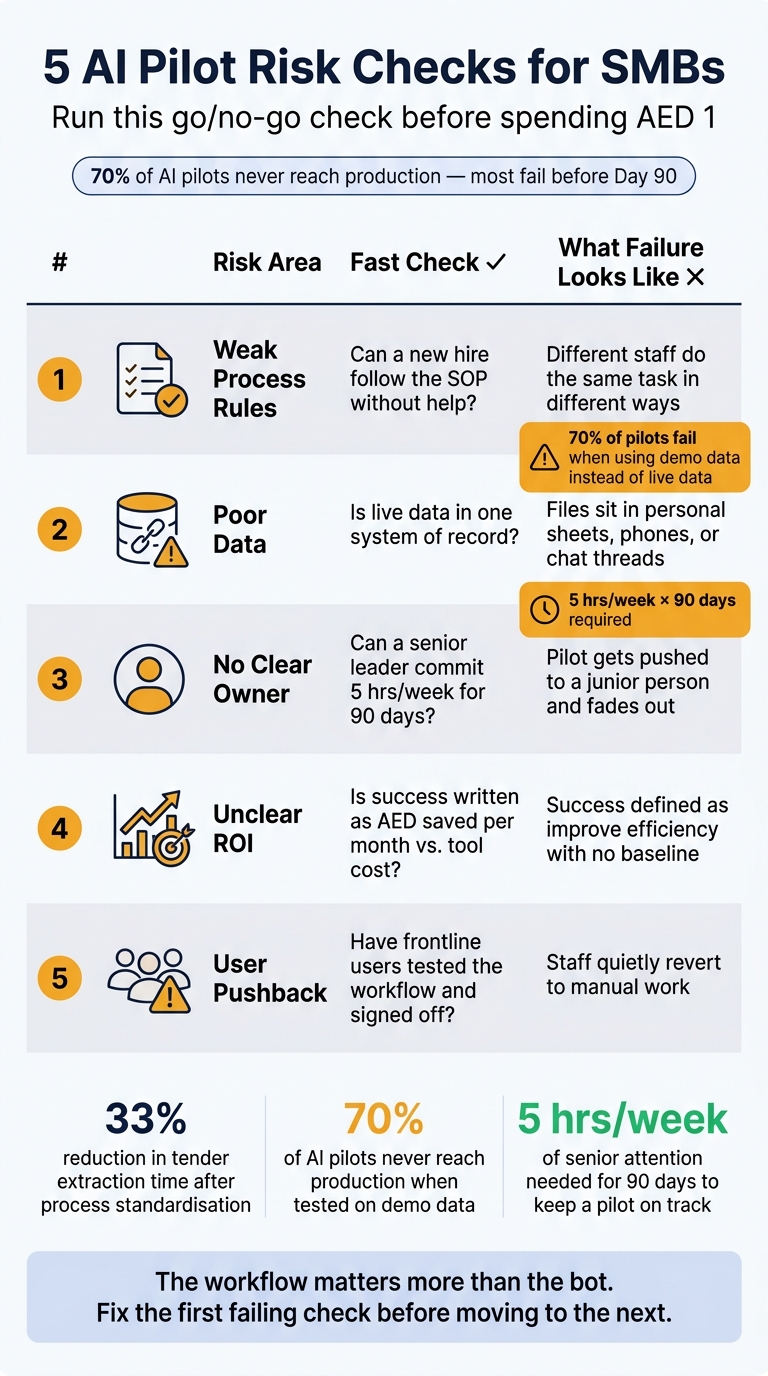
Most SMB AI pilots stall before day 90 for five plain reasons: the workflow is unclear, the data is messy, no one owns the pilot, success is not tied to AED, or staff work around the tool.
If I were screening a pilot today, 03 September 2026, I would check these five things first:
- Process rules: Can someone write the task as simple step-by-step logic in one page?
- Data quality: Is there one live source of truth, not scattered sheets and chat files?
- Ownership: Is one senior person giving 5 hours a week for 90 days?
- ROI: Is success written as saved hours and AED per month against tool cost?
- User fit: Will people use it inside the tools they already work in, like Microsoft 365, Google Workspace, CRM, ERP, email, or WhatsApp Business?
A few numbers make the point clear:
- 33% cut in tender extraction time came only after the intake process was standardised first
- Around 70% of AI pilots in mid-sized firms do not reach production when teams test on demo data instead of live data
- A first pilot needs about 5 hours per week of senior attention for 90 days
In other words: the workflow matters more than the bot.
The screen is simple:
- Weak process rules
- Poor data
- No clear owner
- Unclear ROI
- User pushback
I would treat this as a go / no-go check before spending AED 1. If one area fails, I would stop there and fix that first. That is usually cheaper than forcing a pilot into a messy workflow and calling the model the problem.
| Risk | Fast check | What failure looks like |
|---|---|---|
| Process rules | Can a new hire follow the SOP without help? | Different staff do the same task in different ways |
| Data | Is live data in one system of record? | Files sit in personal sheets, phones, or chat threads |
| Owner | Is one named senior owner in place? | The pilot gets pushed to a junior person and fades out |
| ROI | Is success tied to hours saved and AED/month? | “Improve efficiency” with no baseline or stop rule |
| User fit | Have frontline users tested the workflow? | Staff quietly go back to manual work |
Or put another way: don’t start with prompts or tools. Start with one workflow, one owner, one data set, one scorecard, and one user group.
That is the shortest path to a pilot you can scale, pause, or stop with a straight face.
Why AI Pilots Stall Before They Scale
The first week usually looks fine. Then live work hits. A messy CRM export, uneven tender documents, missing fields, odd file names - and the agent starts producing noisy results fast [9][7].
The main issue is isolation. If the AI tool sits outside the systems where work already happens - email, WhatsApp Business, Odoo, SAP, Microsoft 365, Google Workspace - it adds friction instead of improving the workflow [9].
People do what works under pressure. They skip the extra step and go back to the tools they already use. Once that happens, ownership becomes the next weak spot.
Pilots often fail because no senior owner is clearly named, and no one is assigned to handle exceptions [1]. A first AI pilot needs about five hours a week of senior attention for 90 days to work well [1][4]. If nobody is there to deal with model exceptions and keep the agent inside the day-to-day workflow, it slowly fades into the background.
ROI is also hard to prove without a baseline. If the team never tracked task time and total staff cost before the pilot began, there’s nothing solid to compare once it goes live [4][9]. No baseline means weak proof. Weak proof means budget support starts to slip.
Channel fit matters just as much. If the pilot is built for email but the team actually works in WhatsApp Business, they’ll bypass it completely [1][4].
Next, test whether the process rules are clear enough for an agent to follow. First up: weak process rules.
1. Weak Process Rules
AI follows the workflow you give it. If the process sits in people’s heads or handoffs are loose, the pilot slows down fast.
Start with the workflow. If people use different rules for the same job, the agent will do the same.
What It Looks Like
Weak process rules tend to show up in ordinary ways: two team members do the same task differently, approvals happen over chat or in the hallway, or the “right way” lives with one person.
Meridian Building Services, a 55-person mechanical and electrical contractor, ran into this exact issue. Tender package formats varied, and there were no shared templates, so the AI could not pull information in a steady way. After a four-week readiness phase to standardise tender intake protocols, the team cut tender extraction time by 33%. That is the test that matters: fix the workflow before you automate it. [7]
The Warning Signs
A workflow is not ready for an AI agent if the task cannot be explained in plain “if X and Y, do Z” logic. [6] If a new hire cannot follow the SOP without help, the process is not steady enough to automate. [8][10]
"AI automates documented processes; if a process exists only in one employee's head, document it before buying any tool." [1]
What to Check Before Launch
Run a simple readiness check across five areas before the pilot starts:
| Check | What to Confirm |
|---|---|
| Documentation | Can a stranger follow the SOP without help? |
| Repetition | Does the task happen 20+ times per week? |
| Consistency | Is it done the same way by every team member? |
| Handoffs | Are handoff points between steps clearly defined? |
| Exception handling | Is there a documented path for edge cases? |
If any row fails, fix it before the pilot starts, not during.
Who Fixes It
Document the workflow, standardise handoffs, and test one repetitive task before you widen the scope. If you cannot document it in one afternoon, it is probably too complex for a first AI pilot. [1][4] Start with one repetitive task first.
Once the process is stable, the next step is checking whether the data is clean enough for the agent to use.
2. Poor Data
Most pilots don’t fail because the model is weak. They fail because the data is a mess.
Scattered files, conflicting records, or data locked away in private tools will stall a pilot before it gets a fair test. In plain terms: if the team can’t point to one source of truth and feed the pilot live production data, the pilot isn’t ready.
What It Looks Like
Poor data in an SMB pilot usually shows up in familiar ways. Customer records sit across personal spreadsheets. There are three versions of the same price list. Key details live on an employee’s phone instead of a shared system.
Then there’s the demo data trap. The pilot looks fine on clean sample files, then falls apart when it hits live inboxes or actual CRM exports. Roughly 70% of AI pilots in mid-sized businesses never reach production when teams rely on demo data instead of production data. [9]
If the pilot needs to read Arabic and English invoices or customer names, test both before launch. If you skip that step, the errors show up live, after launch, when the team is already under pressure. [2]
The Warning Signs
The first red flag is simple: no one can name the system of record. If the answer is “Ahmed's Excel” or “it depends on the team,” the pilot is not ready. [1]
The next issue is compliance. Under the UAE Personal Data Protection Law (PDPL), teams need to confirm where an AI vendor stores and processes data before the first prompt is run. Miss that step, and the whole project can stop. [2]
What to Check Before Launch
| Check | What to Confirm |
|---|---|
| Data location | Is all relevant data in one accessible system, not personal files or chat apps? |
| Conflicting sources | Is there one agreed version of key records, such as price lists or client details? |
| Data residency | Has the vendor confirmed where data is stored and processed? |
| Sensitive data | Are Emirates ID copies, salary records, or medical data excluded from the pilot scope? |
| Bilingual fit | Has the tool been tested with real Arabic examples from the business? |
If any row fails, sort it out before the pilot starts. Building the model first and trying to fix data quality later, under deadline pressure, is an expensive way to learn the wrong lesson.
The workflow owner should own the job of finding and consolidating the data. A senior leader - in businesses with under 30 people, that usually means the founder - needs to put in about five hours a week to make sure those fixes happen, not just get talked about. [1][4]
For the first 30 days, the goal is simple: connect the agent to live production data, not a cleaned-up demo set. That’s how the team sees what it’s dealing with inside the actual workflow before the pilot moves any further. [9]
If that part still feels fuzzy, stop there. Fix the data first. Then put one person in charge of keeping the pilot moving.
3. No Clear Owner
Even when the data issue is sorted, a pilot still lives or dies on one thing: one person owns it. If nobody owns it end to end, it usually doesn’t drift. It breaks early.
What It Looks Like
The most common pattern is junior delegation. The pilot gets pushed to the most junior person on the team, and no senior person checks in on it.
"Every failed SME pilot I have seen shares one feature: it was delegated to the most junior person and never reviewed by a senior person." [1]
That senior review matters because it keeps the pilot tied to day-to-day operations. Without a named owner, even a good model ends up with no one to review mistakes, track results, or keep the workflow running.
There’s another pattern too: treating the AI tool as if it owns the work. It doesn’t. An agent can’t judge its own mistakes, decide when to stop, or take responsibility when a bad output reaches a customer. A human needs override authority for any high-risk output. [3] If that person isn’t clear, the pilot usually stalls within the first few weeks.
The Warning Signs
Three signs tend to show up fast:
- The “owner” is a department, not a person
- No one can produce a pilot report in under 30 minutes
- The agent was turned off after one error and never switched back on
What to Check Before Launch
| Check | What to Confirm |
|---|---|
| Owner | One named person owns monitoring, approvals, and reporting. |
| Time | That person has five hours a week blocked for 90 days. [1][4] |
| Human handoff | It is written down which tasks must go to a human, and who that human is. |
| Kill criteria | A written threshold is signed before day 15, such as: “If savings fall below 2× tool cost by day 90, we cancel.” [1][4] |
| Shutdown rule | A human can shut the agent down in under five minutes if needed. [3][9] |
In firms with fewer than 30 people, the founder should own this role.
Once ownership is clear, the next question is whether the pilot can prove value.
4. Unclear ROI
Once ownership is clear, the next job is simple: define success in numbers. If you don’t, the pilot drifts and starts leaking budget [1]
What It Looks Like
After naming an owner, success needs a hard target. Goals like “improve efficiency” sound fine in a meeting, but you can’t measure them. As Sawan Kumar, AI Agency Founder, puts it:
"Improve efficiency" is not measurable, so it can never fail - which means it can never succeed either. [1]
If success isn’t defined, there’s no finish line.
The other red flag is motion without change: a trial running without a clear problem to fix [5][7]
How It Delays Rollout
Even with one owner in place, weak ROI is often what stalls a pilot next. No baseline means no comparison after 90 days. Teams then spend the whole period arguing about whether the tool is helping, instead of making a call on scaling it. The rollout slows because no one can show the savings [1][4]
There’s also a sunk-cost trap. If kill criteria aren’t written down before the pilot starts, stopping becomes a political call, not a factual one. Subscriptions keep billing, and weak pilots stay alive longer than they should [1][4]
The Warning Signs
Watch for these before launch:
- Success is framed around the word “AI” instead of a specific workflow change [5]
- No one can say the monthly savings in AED [1][2]
- The team is testing more than one workflow at the same time [4]
- There’s no written threshold for cancellation [1][4]
What to Check Before Launch
Before spending a single dirham, write one sentence:
_"This pilot succeeds if it saves \X] staff-hours per month, worth [Y] AED, against [Z] tool cost per month."_ [[1]
Then log two weeks of actual timesheet data for the manual process. Don’t use rough guesses. Use loaded labour cost, not salary alone, when building the savings case [4]
| Check | What to Confirm |
|---|---|
| Baseline | 14 days of actual time data recorded before the pilot starts [4] |
| Loaded cost | Salary + housing, visa, gratuity, and medical insurance ÷ working hours [4] |
| Kill criteria | Written threshold: e.g., "cancel if savings are below 2x tool cost by day 90" [1][4] |
Who Fixes It
The named owner owns the ROI case. Finance confirms the loaded cost. The team lead records the baseline. The senior owner signs the kill criteria before day 15 [1][4]
If that document doesn’t exist, the pilot has no end condition.
Once ROI is locked, the next risk is user pushback.
5. User Pushback
A pilot can look solid on paper and still go nowhere. If people work around the tool, usage drops, nothing changes in the workflow, and the rollout stalls. Even if the pilot works from a technical point of view, it still fails when staff avoid it.
What It Looks Like
The most common pattern is silent failure. No one says they’ve stopped using the tool. They just stop.
Another risk is fragmented usage. A small group uses the agent, while everyone else ignores it. Under pressure, that can lead to approvals that are faster but weaker.
Mixed Arabic-English teams need an error-reporting route they will actually use. [2]
How It Delays Rollout
Pushback slows rollout in plain ways:
- Usage falls
- Approvals take longer
- The pilot never becomes the default way work gets done
Warning Signs to Watch Before Launch
Watch for sceptical compliance leads, no error-reporting route, and no agreed rule for what the AI will not do.
What to Check Before Launch
Check adoption before launch, not after users have already gone back to manual work.
| Concern | Pre-Launch Check | Responsibility |
|---|---|---|
| Job impact | Document which manual steps will disappear for each role | Leadership / Founder |
| Accuracy | Run a human-in-the-loop approval phase for the first 2–4 weeks [6] | Workflow Owner |
| Trust | Involve frontline users in testing early drafts before company-wide rollout | Team Lead |
Who Fixes It
Senior leadership owns adoption. IT and HR support the rollout.
A pilot people avoid will not scale, no matter how good the model is. Or put another way: the workflow matters more than the bot.
Treat sceptics as workflow testers, not blockers. Sceptics often expose the process gaps that make the pilot unusable. [7]
Risk Snapshot: A Quick Reference for SMB Teams
Pilots usually don’t fail for one big reason. They get stuck because one basic thing is missing, and the team keeps moving anyway. This table is a fast gate. If one check fails, fix that first.
| Risk | Common Symptom | Likely Timeline Impact | Fastest Early Check |
|---|---|---|---|
| 1. Weak Process Rules | Process exists only in one employee's head | Pilot stalls early | Can you write the steps on one page in an afternoon? |
| 2. Poor Data | Critical data lives in scattered spreadsheets or on personal devices | Can delay launch until data location and access are cleared | Is your data in a CRM, and is it hosted in an approved data-residency region? |
| 3. No Clear Owner | Pilot delegated to the most junior person; no senior review | Project stalls fast | Can a senior leader commit five hours a week for 90 days? |
| 4. Unclear ROI | Success is defined as improving efficiency rather than a number | Pilot stalls without a measurable target or stop rule | Write a success metric defined in AED per month |
| 5. User Pushback | Team finds out about the pilot via a forwarded email or message | Staff revert to manual work | Ask: have frontline users tested the workflow and signed off on it? |
Two blockers tend to show up first: the first process gap and the first owner gap. In practice, No Clear Owner is the fastest killer. Stop there until one senior person can commit five hours a week for 90 days [1][4].
Or put another way: don’t jump to tools, prompts, or automations yet. Use the table to spot the first blocker before moving to the workflow-layer approach.
How a Workflow-Layer Approach Lowers Pilot Risk
Start with the blocker, then pick the deployment model that lowers that risk. In other words: the model is part of the risk check, not just a tech decision. For many SMBs in the UAE, the lower-risk move is to scope AI to one existing workflow instead of pushing through a broad system overhaul [4].
A workflow-layer approach puts AI on top of the tools you already use. Say an agent handles first-response replies in WhatsApp Business while your team keeps working in Odoo. The team stays inside familiar tools, and the AI takes the repetitive part.
"AI requires a workflow to plug into. In the absence of one, it becomes another ad hoc tool and another source of noise that the team quietly learns to work around." [7]
Keep the scope small. A smaller workflow is easier to test, monitor, and unwind if things go sideways.
Scoping AI to one workflow also narrows the PDPL review. But data residency still needs to be checked before launch.
For the pilot, run AI alongside the manual process for 5–10 days. Cut over only if accuracy and kill criteria are met. If the pilot fails this test, stop there before scaling.
This model fits tools such as Odoo, SAP, Zoho, Microsoft 365, Google Workspace, WhatsApp Business, email, and calls.
Conclusion
AI projects don’t fail because the idea sounded bad. They fail because the workflow wasn’t ready.
Readiness is workflow-specific: one process, one owner, one data set, one ROI test, one user group. That’s why the five checks matter before launch, not after.
The goal isn’t to prove AI is useful. The goal is to prove one workflow can run better. Teams that test those five checks early tend to launch faster and reach day 90 with evidence. Then the team can make a clean call: scale, pause, or stop.
Written kill criteria keep the pilot disciplined. If the pilot clears the threshold, scale it. If it misses the threshold, stop and redeploy the budget.
The prep work sounds dull: documenting the process, cleaning the data, naming an owner, and setting an AED baseline. But that work decides whether an AI project ships, scales, or quietly dies in committee [8].
FAQs
How do I choose the best first AI pilot?
Start with the workflow, not the vendor pitch and not a pile of “AI ideas”.
Pick one workflow that is repetitive, high-volume, and low-risk. It should be something you can document, test, and measure without guesswork. Best case, it uses structured inputs, because that makes the pilot easier to track and compare.
Before you buy anything, confirm data access and data location. That includes PDPL and data residency. If the data can’t be used the way you need, or it can’t stay where it must stay, the pilot will stall fast.
Bring in the person who’ll feel the change most in day-to-day work. Also assign one named owner with protected time. If nobody owns it, it drifts. If the owner is squeezed between ten other jobs, it drifts even faster.
Set success in terms that matter:
- AED saved
- Actual hours saved
- A clear budget cap
Then write the kill criteria before purchase and before day 15. Be blunt about it. What would make you stop? What result is too weak? What risk is too high? That part matters because it keeps the pilot honest.
After that, run a 90-day pilot.
What if our data is spread across several systems?
Don’t lump it all into one dataset. Start with a data audit.
Map out:
- what data you have
- where it sits
- who owns it
- which fields contain personal data
- whether it meets UAE PDPL and Saudi PDPL residency rules
This part matters more than most teams think. If you skip it, the pilot can look fine on the surface while bad data, missing fields, or residency issues sit underneath.
Then check integration readiness. Your AI agents need to read from and write to core systems in a stable way, without brittle manual glue code holding the whole thing together.
For the pilot, keep the scope tight. Pick one narrow workflow and run it with real sample data. Add logging and rollback from day one so you can spot data-quality gaps early and back out cleanly if something breaks.
How do I measure AI pilot ROI in AED?
Set a clear AED baseline before you spend a single dirham. If you skip that step, every result later turns into a fuzzy debate about “efficiency” instead of a straight business call.
Track actual value, not vague claims, with this formula:
Monthly saving = (baseline hours − current hours) × loaded hourly cost − tool costUse observed data from your own team.
- Record weekly process hours for two weeks
- Calculate the loaded hourly cost
- Subtract monthly tool costs
- Set a stop rule before the pilot starts
The stop rule should be blunt: if saved loaded hours are not at least 2x the monthly cost by day 75, end the pilot.
That keeps the test honest. No hand-waving, no “it feels faster”, no dragging a weak pilot along because people got attached to the tool.