AI Inventory Loss Monitoring for GCC Restaurants
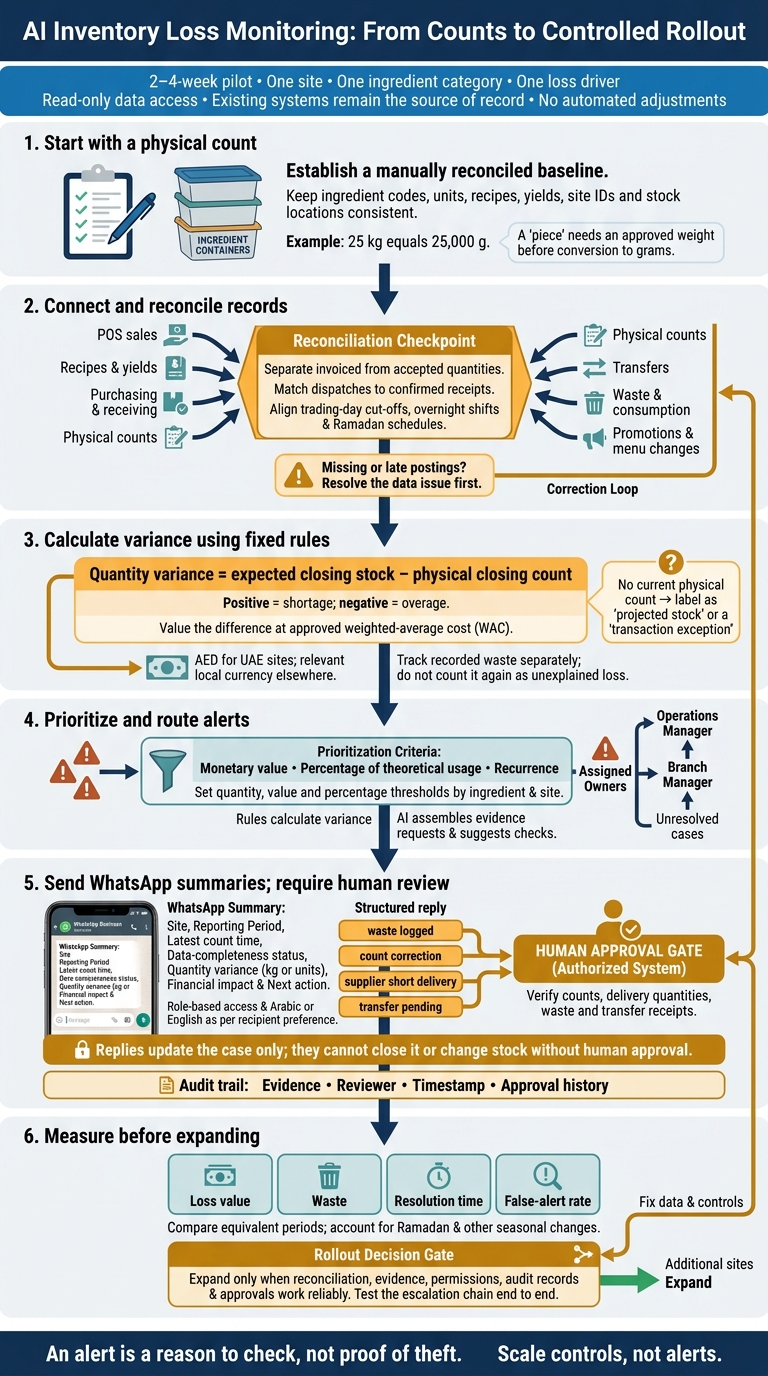
I would start with a physical count, not an AI alert. For a GCC restaurant, I recommend a 2–4-week pilot at one site, covering one ingredient category and one loss driver, before adding more locations.
My approach keeps your existing systems in place:
- Check the data: match sales, recipes, accepted deliveries, transfers and recorded waste to physical counts.
- Investigate the gap: use fixed calculation rules, then let AI gather records and route checks to the right person.
- Keep people in control: send role-based WhatsApp summaries, track replies and require approval before stock changes.
- Measure before expanding: track loss value in AED for UAE sites, waste, response times and false alerts.
An alert is a reason to check, not proof of theft. I would keep the pilot _read-only_ and expand only when counts, permissions, audit records and approvals work as intended.
2. Connect and Check Restaurant Data
Map the data before automating variance checks. Identify each source: POS, purchasing, inventory and spreadsheets. Connect them through APIs or webhooks, while keeping the existing system as the source of record.
Assign each central kitchen, warehouse and restaurant its own site ID, adding stock-location codes where needed. Link each POS to the stock location it deducts from. Use the checks below to close gaps before the first automated variance run.
Map Data Sources and Gaps
| Data source | Control question | Risk if missing |
|---|---|---|
| POS sales | Are sales tracked by item, site, shift and channel? | Incorrect theoretical depletion and hidden overnight losses. |
| Recipes and yields | Do recipes include gross and net weights and cooking-loss coefficients? | Unreliable theoretical usage and variance calculations. |
| Purchasing and receiving | Are invoiced and accepted quantities recorded separately? | Supplier overpayments and inflated stock records. |
| Physical counts | Are counts tagged with site, location and unit? | Actual and expected stock cannot be matched reliably. |
| Transfers | Are dispatches matched to confirmed receipts, with stock held in transit until receipt? | Transfers mistaken for consumption or loss. |
| Waste and consumption | Are staff meals, breakage and spoilage recorded with reason codes? | Recorded consumption mistaken for unexplained loss. |
| Promotions and menu changes | Are discounts, refunds and promotions linked to ingredient deductions? | False loss spikes during promotions or menu changes. |
Standardise Recipes, Units and Reporting Periods
Map each POS dish to an approved recipe and yield, including gross and net weights. Standardise ingredient codes and metric conversions:
25 kg equals 25,000 g; a “piece” needs an approved weight before conversion to grams.
Verify conversion factors before monitoring starts so daily alerts flag real variances rather than data errors.
Align sales, counts and transfers with each site’s trading-day cut-off. Check overnight shifts and Ramadan schedules explicitly.
Keep site reports in local currency. For group totals in AED and SAR, standardise valuation and exchange-rate rules.
3. Set Up Daily Variance Alerts
After cut-off, import POS sales, accepted receipts, transfers and recorded waste. Check missing and late postings first. Incomplete data is a data issue, not a loss. Trigger ingredient-level alerts only after reconciling the data. [3][7]
Set Alert Rules by Ingredient and Site
Apply the section 1 stock formula, then calculate quantity variance as expected closing stock minus physical closing count. A positive result means a shortage; a negative result means an overage. Value the difference at the approved weighted-average cost (WAC), using AED for UAE sites and the relevant local currency elsewhere. Without a current physical count, label the result projected stock or a transaction exception. [3][7]
Set quantity, value and percentage thresholds for each ingredient and site. Rank alerts by monetary value, percentage of theoretical usage and recurrence. Treat waste as a separate control issue so it isn't counted again as unexplained loss. [3][7]
Flag repeated discrepancies, unusual shift patterns, negative projected stock, safety-stock breaches and waste spikes. [3][7]
Define Alert Severity, Evidence and Escalation
Route each alert by severity, owner and response time.
Example alert bands for routing issues and requesting evidence: [3][7] | Severity | Triggering rule | Owner | Response time | Required evidence | | --- | --- | --- | --- | --- | | Critical | Negative stock or >15% variance on high-value items (e.g., Wagyu, Saffron) | Operations Manager | Within 4 hours | Physical count, delivery notes, waste photos | | High | Repeated discrepancy (>3 days) or safety-stock breach | Branch Manager | Within 12 hours | Transfer records, recipe adherence check | | Medium | Unusual shift pattern or >5% variance on standard ingredients | Kitchen Supervisor | Within 24 hours | Shift logs, production prep sheets | | Low | Minor variance (<2%) or slow-moving stock | Storekeeper | Weekly review | Movement history log |
Let AI assemble evidence requests and suggest checks. Keep variance calculations rule-based. The assigned owner must verify counts, delivery quantities, waste and transfer receipts before confirming a shortage or adjusting stock. [3][6][7]
Escalate unresolved cases to the branch manager, then the operations manager. Record corrections and approvals in an audit log. [3][6][7]
4. Send WhatsApp Reports and Track Responses
Once daily variance alerts are ready, send the case summary through WhatsApp Business. Use it only for daily summaries and follow-up. Keep stock records, adjustments and approvals in authorised systems.
Before deployment, check each recipient’s site access and reporting permission, along with the WhatsApp Business messaging rules that apply.
Build Daily Reports by Role
Start each daily exception summary with the site, reporting period, latest count time and data-completeness status. Show the top ingredients with quantity variance in kg or units, financial impact in AED and the next action.
Match the remaining detail to each role. Site managers need count checks and waste queries; finance and operations leaders need exposure, trends and pending approvals. Set Arabic or English to each recipient’s preference.
Link Replies to Evidence and Approvals
Use structured replies:
“waste logged”, “count correction”, “supplier short delivery” and “transfer pending”.
Link every reply to its source record, reviewer and approval status in the authorised system. Replies update the case only: they cannot close it or change stock without human approval.
Keep the response, evidence, timestamp and approval history in the audit trail. Test this same reply-and-approval flow in the pilot before rolling it out to more sites.
Assess Uklad AI for Implementation
Uklad AI can coordinate agents through WhatsApp Business and existing tools such as Odoo, SAP, Zoho, Microsoft 365 and Google Workspace, without replacing the inventory system.
Check connectors, reconciliation logic, role-based reports, approval controls, permissions, audit logs and retention. Confirm UAE and KSA data residency for both message content and supporting evidence.
Use this flow in the pilot to test message delivery, reply handling and approval turnaround.
5. Pilot Without Replacing Existing Systems
Test daily alerts and WhatsApp reporting in a controlled pilot once they’re running. Keep the existing system in place, use read-only data access and make no automated adjustments.
Run a 2–4-Week Pilot
Limit the pilot to one site, one category and one loss driver. Keep a controlled master list of ingredients, units, recipes and site locations within that scope.
Manually reconcile stock movements during the pilot to establish a baseline. Use it to check whether alerts match actual stock movements.
Validate exports against source records first. Then run blind cycle counts during service hours.
Assign Owners and Measure Results
Use the alert-and-response chain from the previous section, limited to the pilot site. Assign one owner to each control area: kitchen records, receiving, site approval and finance review.
Name a data-quality owner to resolve missing records and mapping errors. Log every approved adjustment with its evidence and approval.
Track loss value, waste, resolution time and false-alert rate. Compare equivalent periods, accounting for seasonal changes such as Ramadan. Expand only when reconciliation, evidence and approvals work reliably.
6. Conclusion: Check Controls Before Scaling
Scale controls, not alerts. Keep the pilot in shadow mode: alerts only, with no automated purchase orders or stock changes. Treat AI alerts as prompts to investigate, not proof of loss.[1][3][5]
Before expanding beyond the pilot, check that POS, supplier and inventory feeds are stable and available in one live view. Counts, recipes, gross/net weight conversions and units must be consistent. Track every transfer through request, approval, dispatch and confirmed receipt.[2][3][4][5] Scale only when AI agents consistently monitor movements, flag variances and route issues for human review.
Test the escalation chain end to end. Run a mock low-stock or waste-spike alert through the WhatsApp or dashboard escalation path, checking each step from the WhatsApp alert to manager approval.[6] Verify role-based access, audit logs and approval controls. Require manager approval for adjustments, and retain each reason code, staff name and timestamp.[3][4][5][7]
Before adding sites, confirm that alerts are useful, response times have shortened and variance is falling.[2][7] Finance should review results in AED at weighted average cost.[7][3] Use these checks as the gate for rollout beyond the pilot sites.
FAQs
How can I distinguish over-portioning from stock loss?
Compare theoretical usage (POS sales multiplied by recipe ingredient quantities) with actual consumption, calculated using opening and closing stock counts, purchases and transfers. Categorise all recorded waste, including spoilage and breakage, and account for it in the variance.
An unexplained gap often points to over-portioning or inconsistent recipe adherence. Track individual ingredients over time to check whether portion sizes have drifted.
How often should we count high-value ingredients?
Pair spot checks for high-value ingredients with scheduled full inventory counts and rolling counts by category [1]. Even if your system deducts ingredients automatically with each sale, physical counts still confirm what’s on the shelf and flag discrepancies [1][2][3].
Check variances against receiving records, waste logs and recipe usage to keep stock records accurate without overhauling the whole system [1].
What savings would justify expanding our pilot?
Look for measurable cuts in food waste and earlier detection of inventory variances. GCC-focused inventory AI tools report around 28% less waste within 90 days and 15% monthly savings through real-time visibility across outlets [1].
To estimate payback, track waste and inventory variance alerts ahead of stockouts. Compare theoretical and actual food costs weekly at each site [2][3].