AI Implementation Checklist for Operations Leaders
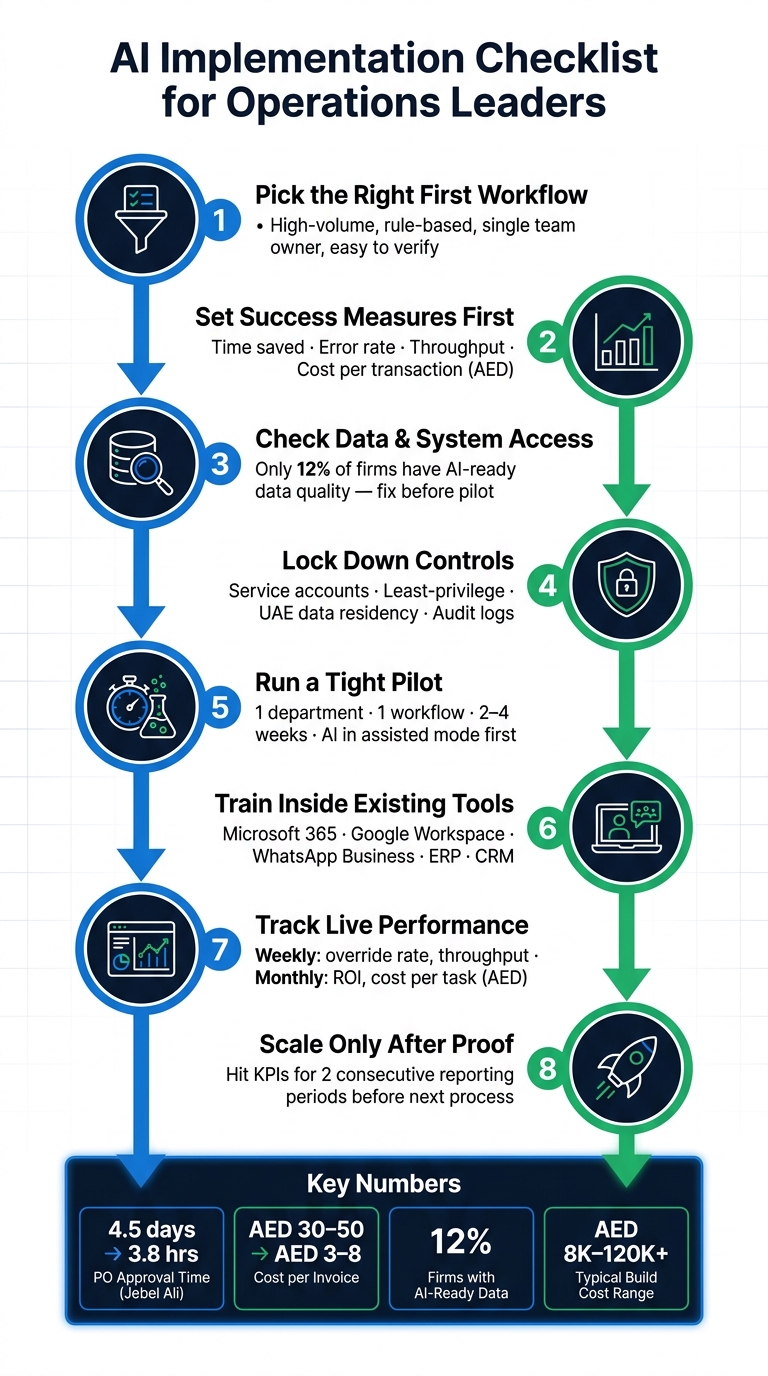
Most AI projects fail at handoff, not at demo stage. If I were leading ops, I’d start with _one low-risk workflow_, set KPIs before buying anything, keep human approval in place, and only scale after two straight reporting periods of stable results.
Here’s the article in plain terms:
- Pick the right first workflow: high-volume, rule-based, easy to check, and owned by one team.
- Set success measures first: time saved, error rate, throughput, and cost per transaction in AED.
- Check data and system access early: if the data sits in scanned PDFs, old inboxes, or mixed Arabic-English inputs, fix that before the pilot.
- Lock down controls: service accounts, least-privilege access, audit logs, UAE data residency, and approval thresholds.
- Run a tight pilot: one department, one workflow, 2–4 weeks, with AI in assisted mode first.
- Train people inside the tools they already use: Microsoft 365, Google Workspace, WhatsApp Business, ERP, and CRM.
- Track live performance weekly and monthly: override rate, ROI, spend caps, audit logs, and drift.
- Scale only after proof: hit KPIs for two consecutive reporting periods before moving to the next process.
A few numbers stand out:
- One freight-forwarding team in Jebel Ali Free Zone cut PO approval time from 4.5 days to 3.8 hours.
- Invoice handling can move from AED 30–50 per invoice to AED 3–8.
- Only 12% of firms have data quality ready for AI use.
- First builds often cost AED 8,000–25,000. Production rollouts can reach AED 40,000–120,000+.
Or put another way: this is not about dropping a bot into the business. It’s about putting people and AI agents into the same workflow, with clear rules, named owners, and hard stop points.
If I were using this checklist, I’d ask four questions before approving any pilot:
| Check | What I’d want to see |
|---|---|
| Use case fit | Repeatable workflow, clear owner, low error risk |
| Data readiness | Clean inputs, API access, mixed-language handling tested |
| Control setup | Human approval limits, audit trail, UAE hosting review |
| Scale gate | KPI hit rate, training completion, support and compliance sign-off |
Bottom line: start small, keep approvals tight, measure from day one, and don’t scale on hype.
How to Build an AI Implementation Plan That Actually Gets Executed
1. Select the Right Use Cases and Define Success Metrics
The first mistake is easy to make: trying to automate the wrong workflow first. That’s how a pilot turns into an expensive distraction.
The best starting points tend to look the same. They’re high volume, rule-based, spread across systems, and easy to recover from if something goes wrong. That’s the filter.
Choose Workflows with Clear Inputs, Outputs and Owners
Before approving any AI tool, check that the process passes four basic tests:
- It runs again and again on a predictable schedule.
- It follows defined rules with little room for interpretation.
- One team owns it end to end.
- A human can catch an error before it creates loss or rework.
Workflows that often fit this profile include invoice processing, lead qualification and routing, employee onboarding, and purchase order matching [5][7][8].
A good local example comes from Jebel Ali Free Zone. A freight-forwarding team cut monthly PO approval time from 4.5 days to 3.8 hours by automating 300+ purchase orders [7].
Don’t start with regulated compliance decisions, final legal approvals, or high-value payment releases. If a human can’t catch the error before it matters, don’t use it as the first pilot [1].
Once the use case is repeatable and low risk, set the success measures before you pick the tool.
Define KPIs Before Approving Any Tool
A good use case can still fail if there’s no baseline. Set baseline-to-target metrics before tool selection [7][3][8].
| Process | Manual Baseline | Automated Target |
|---|---|---|
| PO Approval Cycle | 3–5 days | 2–4 hours |
| Cost per Invoice | AED 30–50 | AED 3–8 |
| Data Entry Error Rate | 4–6% | <0.1% |
Start with the current annual cost of the process: monthly manual hours × hourly staff cost × 12 [1].
Then define the numbers you’ll use to judge the pilot:
- Time saved per task
- Error rate
- Throughput
- Cost per transaction in AED
If you can’t name those figures before launch, the use case isn’t ready.
After that, decide who approves each AI action.
Set Human Approval Boundaries from Day One
AI should begin in assisted mode. It drafts or suggests actions, and a human confirms before anything goes live [1]. That matters most in workflows tied to money or employee actions.
Set approval tiers from day one. Start with manager approval under AED 5,000, director approval from AED 5,000 to AED 25,000, and VP Finance review above AED 25,000 [7].
Use the same logic across finance, HR, and operations. Outside the money thresholds, set confidence rules too. If the AI’s certainty drops below the set level, the task should escalate to a named owner instead of moving ahead on its own [8].
The aim is clarity. These boundaries shape the pilot design in the next phase.
2. Check Data, Systems and Security Readiness
A lot of AI work breaks down here, not at the model stage. The use case may look good on paper, but if the data, access, or controls aren't in place, the pilot will stall fast.
Once the use case is chosen, check that the organisation can run it safely before building the pilot. If the workflow fails this test, stop before design or vendor selection.
Verify Data Quality and System Access
Start by mapping every data source the pilot workflow touches. In most cases, that includes ERP systems such as Odoo or SAP, CRM platforms like Zoho, email environments in Microsoft 365 or Google Workspace, shared drives, and communication channels such as WhatsApp Business.
For each source, confirm:
- whether the data is structured or unstructured
- whether the system has a documented API
- whether the AI can reach the data it needs
This sounds basic, but it's where teams get stuck. A workflow may look simple until you find the data sitting in scanned PDFs, old inboxes, or a shared folder no one has cleaned in years.
Unstructured inputs such as scanned PDFs, WhatsApp images, handwritten notes, or mixed Arabic-English inputs need extra prep before AI can act on them with any consistency. Digitise paper-based and informal steps before approving the pilot. Test with production data before go-live, then fix data issues before launch.
Only 12% of organisations currently have data of sufficient quality to support AI applications [2]. That one stat is enough to rule out some use cases and force changes to others.
Only workflows with clean, reachable data should move to legal and hosting checks.
Confirm Data Residency, Privacy and Audit Requirements
For UAE-based operations, check whether the workflow handles employee records, customer PII, or financial data that must stay within the region. Common UAE hosting options include AWS me-central-1 and Azure UAE North [5].
If data leaves the UAE for LLM processing, de-identify or tokenise it first [5].
Then check the legal side. Review the UAE PDPL, DIFC Data Protection Law, and ADGM Data Protection Regulations before deployment [4]. Sector rules sit on top of that. Healthcare workflows must follow Dubai Health Authority policy. Financial workflows must meet Central Bank of the UAE (CBUAE) or VARA requirements.
Before any tool goes live, document:
- what data the AI will touch
- how long that data is kept
- how each action is logged
Every AI action should produce a full audit trail, including inputs, outputs, timestamps and reasoning [6].
Once data handling is clear, move to how the workflow connects to live systems and permissions.
Review Integration and Permission Architecture
Finish with access control. AI agents should run on dedicated service accounts with the minimum permissions needed for the workflow. They should not have broad admin access across the rest of the system.
Give each service account a named owner. Document who approves access changes. Set where logs are reviewed.
Check every integration path before any budget is committed. If a target system doesn't have a documented API, the integration is more brittle and more expensive to maintain [6]. All AI actions should feed into a centralised audit log [6].
3. Design a Controlled Pilot and Fit AI into Existing Workflows
The hard part isn’t picking an AI use case. It’s keeping the pilot tight enough that the team can learn something useful from it.
At this stage, make the pilot concrete: one workflow, one team, one fixed time window. Use the same approval limits and KPIs already set for the use case.
Scope One Department, One Workflow and One Pilot Window
Scope creep starts when nobody writes the edges down. So do that before kick-off.
Pick one department only, such as Finance, HR or Customer Support. Inside that team, choose a single workflow and set clear start and end dates in DD/MM/YYYY format, for example, 03/08/2026 to 28/08/2026. For most low-risk pilots, 2 to 4 weeks is enough [1]. Good first options include meeting notes, lead qualification, or invoice routing.
Before the pilot begins, record the baseline:
- who does the task now
- how many hours it takes each week
- what the errors cost
That baseline is your reference point at the end. Without it, the pilot turns into opinion.
For the first 1 to 2 weeks, run the AI in parallel with people. The AI suggests actions, while humans still do the task. Only move past that stage once accuracy stays above 85% [1].
Then turn the pilot into written rules, including what happens when things don’t go to plan.
Write the Workflow Rules, Prompts and Exception Paths
Write the workflow rules before go-live. Be plain about what the AI reads, what it outputs, and what it cannot do by itself.
Each rule should read like: if X, then Y, unless Z [3]. For example: if a lead has a valid TRN, route it to sales; if the TRN is missing, flag it for human review. The AI should also log why it suggested each action, such as noting that an invoice quantity is above PO tolerance [4].
Set escalation triggers before the pilot starts. Common triggers include low confidence scores, inputs in an unexpected format, or any action tied to money, contracts, or employee records. For teams in the UAE working across English and Arabic, the rules also need to cover mixed-language inputs, TRN checks, and Emirates ID fields where needed [3].
Route unclear cases to a named reviewer, not a shared inbox. Shared inboxes blur ownership, and that’s where delays creep in.
Set a human override rate limit as well. If the team rejects or rewrites more than 10% of outputs, treat that as an early warning sign. Usually, it means the rules or the data don’t line up, and the pilot should pause before scaling [12].
Once those rules are in place, compare the pilot options side by side.
Compare Candidate Pilots Before Seeking Approval
Before asking for approval, compare the shortlisted use cases against each other.
The table below looks at four common pilot options using the criteria that matter most at this point.
| Candidate Pilot | Impact | Data Sensitivity | Integration Complexity | Oversight Required | Primary Value |
|---|---|---|---|---|---|
| Lead Qualification | High | Low | Low | Low | High - revenue growth [1] |
| Meeting Notes | Low | Medium | Low | Low | Low - time saved [1] |
| HR Ticket Triage | Medium | High | Medium | High | Medium - efficiency gains [5] |
| Invoice Routing (AP) | High | Medium | High | Medium | ~AED 90,000/year savings [1] |
Lead Qualification tends to score well because the data is less sensitive, the system work is easier to handle, and mistakes can usually be fixed. Invoice Routing (AP) can deliver a strong return, but it comes with more system complexity, so it fits teams that already confirmed clean ERP data in the previous checklist step. HR Ticket Triage touches employee data, so it should only move ahead if the data residency and privacy checks from Section 2 are fully cleared.
Pick the use case that best fits your own limits, write down the reason, and take one recommendation to the approval stage.
If the pilot passes, move to owners, budget and go-live criteria.
4. Prepare Teams, Vendors and Controls for Launch
Once the pilot is approved, the job changes. You're no longer testing ideas. You're putting operating controls in place.
Assign Owners, Budget and Go-live Criteria
Before launch, every AI deployment needs four named roles.
- An Executive Sponsor - usually the CEO, Managing Director, or another C-suite leader with budget authority
- An Operational Owner - the person accountable for workflow ROI
- A Technical Owner - responsible for architecture, reliability, and system integration
- A Security or Compliance Lead - responsible for data residency and alignment with the UAE Personal Data Protection Law (PDPL) [1][9][11]
Put the budget range and go-live conditions in writing. Single-process builds often cost AED 8,000–AED 25,000. Production deployments can reach AED 40,000–AED 120,000+ [5][7].
Go live only when the KPI targets set in the pilot are met and exception paths have been tested. Keep human sign-off for payment releases, legal approvals, and any unresolved exception [1][4][5].
One more thing matters here: assign one senior AI champion. That person should coordinate across teams, pressure-test vendor claims, and keep leadership on the same page.
Train Teams on How AI Fits Into Daily Work
Training should follow the job, not the org chart.
Managers need to know when to approve outputs and when to stop the workflow. Frontline staff need to know how to review AI suggestions and escalate errors. Position AI as support for repetitive work, not as a tool for cutting headcount.
Keep the training inside the tools people already use. If the team works in Microsoft 365 or Google Workspace, show how AI outputs appear there: reviewed documents, flagged items, or suggested actions. Don't push people into a separate interface unless there's a clear reason.
For teams using WhatsApp Business, show how AI-assisted replies or escalation triggers show up in the chat flow they already know. That's where adoption lives or dies.
It also helps to include sceptics on purpose. They tend to spot friction that early supporters miss [9].
Once the team understands the workflow, test the tool against the same operating rules.
Use a Vendor and Tool Evaluation Checklist
Before you commit to any tool, run a structured check.
| Evaluation Area | What to Confirm |
|---|---|
| ERP and CRM Integration | Does it connect to your existing stack - SAP, Odoo or Zoho - through documented APIs? |
| Audit Logs | Are all agent decisions traceable with timestamps and user attribution? |
| Data Residency | Is UAE or KSA regional hosting available? Confirm AWS me-central-1 or Azure UAE North options [5][7]. |
| Permission Controls | Can access be limited by role? Does the agent have only the permissions it needs? |
| Arabic and English NLP | Has the tool been tested on actual UAE documents, including TRN fields and mixed-language inputs? |
| Pilot Support | Does the vendor support a limited pilot with defined measurement? |
| Post-launch Monitoring | Are accuracy dashboards, error logging, and fallback paths included, rather than sold separately? |
Be careful with vendors who talk first about model size or benchmark scores. That sounds good in a demo. It tells you far less about whether the workflow will work in practice.
Once the system is live, track accuracy, exceptions, and ROI every week.
5. Monitor Results, Manage Risk and Scale Step by Step
Going live isn’t the finish line. It’s where the work becomes routine. Track the same KPIs on a fixed cadence, and use the baseline, approval limits, and owner set in the pilot to judge live performance. Monitoring, drift checks, and cost controls belong in day-to-day operations, not on a side list.
Track Performance and Financial Return
Measure live performance against the same targets used to approve the pilot. Check technical health daily. Review operational metrics weekly. Review ROI and cost monthly.
Weekly metrics should cover throughput, accuracy, system calls per task, training progress, and human override rate. Monthly metrics should cover financial ROI, cost per task in AED, labour hours reclaimed, staff impact, and customer outcomes [12].
If override rates go above the pilot threshold, treat that as a warning sign for drift or a rule mismatch [12]. Use one ROI formula and stick to it: Annual Benefit = labour hours saved × fully burdened hourly rate + error-cost reduction + incremental revenue [12].
Set a daily spend cap per agent. This should be a hard stop. If the cap is hit, pause the workflow and send it for human review before costs climb [10].
Audit Security, Approvals and Exception Handling
Review permissions, audit logs, and human overrides every month, using the same owners, logs, and approval boundaries already set in the pilot [12][4]. Keep named human approval for payment releases, contracts, and refunds [5][3].
Watch for hidden integration failures. A schema change in a connected system such as SAP can lead an agent to write the wrong data without throwing an obvious error [10]. Integration-contract tests help catch that before it turns into a compliance problem.
Keep model documentation and data lineage records up to date, so audits depend on evidence, not memory [12][4].
Only expand after these controls stay stable in live use.
Scale Only When the Next Process Meets the Same Checklist
Don’t move to the next workflow just because the first one is live. Move only after the current process has hit its KPI targets for two straight reporting periods [12]. Before any new process is approved for automation, it should clear four gates.
| Scaling Gate | Criteria for Advancement |
|---|---|
| Gate 1: Pilot Success | KPIs such as SLA, accuracy and throughput met for two consecutive reporting periods [12] |
| Gate 2: Workforce Readiness | ≥80% training completion; staff understand decision boundaries [12] |
| Gate 3: Compliance Sign-off | Data lineage mapped; model documentation and incident playbooks reviewed [12] |
| Gate 4: Operational Support | Tier 2 support and vendor SLAs active; monitoring dashboards live [12] |
FAQs
How do I choose the best first AI workflow?
Use a prioritisation matrix to score options by ROI, feasibility, risk, and time-to-value.
Start with workflows that are:
- Repetitive
- High-volume
- Measurable
- Recoverable if errors happen
Good early candidates include invoice data extraction, customer enquiry handling, and document intake.
Keep the scope tight so you can show value in 30 to 60 days. Skip broken processes and high-stakes tasks. Also make sure you have:
- a business owner
- a clear baseline
- a human-in-the-loop check for decisions involving money or contracts
What should I fix before starting an AI pilot?
Before starting an AI pilot, get your operation steady first. If the process is messy, the pilot will be messy too.
Pick one high-friction, repetitive manual workflow. Then map it step by step. Include the edge cases, decision points, and every place where a person has to review or approve something.
Your data also needs a proper check. Make sure it’s accessible, clean, and consistent, and confirm that your CRM, ERP, and communication tools can support secure integration.
Set the rules before anything goes live:
- Define data access rules
- Put audit trails in place
- Set role-based permissions
- Assign one owner
- Set measurable KPIs
- Create a reporting baseline in AED and DD/MM/YYYY format
In other words: don’t start with the bot. Start with the workflow, the data, and the people responsible for it.
When is it safe to scale AI to other processes?
You scale AI only after a pilot shows measurable value and the operation can handle it.
If the first project has no clear owner, unstable data, or no defined success metrics, don’t scale it. That’s where teams get stuck. The issue usually isn’t the model. It’s the workflow around it.
Before expanding, make sure:
- the pilot met ROI and outcome targets
- monitoring and governance can be repeated without extra guesswork
- the team is trained for the new workflows
- exception handling and audit trails are documented
Or put another way: if the pilot worked only because a few people were watching it closely every day, it’s not ready to move further.