AI Agent Approval Workflows: Gulf Guide
I would not let an AI agent move money or change access without a named approver and a clear stop rule. Before launch, I would set 3 modes: act alone, notify a person or wait for approval.
For a UAE or Saudi business, I would check:
- Authority: who approves each action, with separate AED and SAR limits.
- Execution: approval covers the exact action; missing checks, expired approvals or changed details stop the run.
- Data and records: where data travels, which privacy rules apply and how each decision and result is logged.
- Recovery: retries cannot duplicate changes, and someone can revoke access and stop execution.
_Local hosting is not proof of compliance._ I would test those controls across the connected systems, including any Uklad AI setup, rather than rely on product claims.
My starting point: one reversible workflow, with time, cost, failures and review effort measured before expanding.
Set Approval Levels and Owners
Assign authority to actions, not agents. Set approval thresholds using impact, reversibility, data sensitivity, regulatory exposure and confidence. Route every action against those thresholds. If prerequisites or the approver’s identity are missing, stop execution.[1][5]
Choose When AI Acts, Notifies or Requests Approval
Apply the same rules across all channels and tools.
| Action type | Risk | Mode | Approver(s) | Threshold | Fallback |
|---|---|---|---|---|---|
| Internal drafts and document classification | Low | Act alone | None; business owner accountable | Pre-approved data and task scope | Hold if scope is unclear |
| Draft replies and summaries | Moderate | Notify | None; notify business owner | Approved wording only | Route exceptions for approval |
| Payment-related actions and refunds | Financial exposure | Request approval | Named approver | Policy limit | Block pending approval |
| Sensitive data workflows and access changes | Sensitive data access | Request approval | Security/CISO + data owner (both) | Any privilege, data-access or data-location change | Keep existing permissions and data location |
| Employment screening and other high-impact decisions | Personal and legal impact | Human approval | Qualified human authority | Every decision with personal or legal consequences | AI prepares evidence only |
| Regulatory submissions and material commitments to customers | Legal or commercial exposure | Request approval | Risk/legal + business owner (both) | Every submission or material commitment | Hold submission or commitment |
Notification is not approval. Any change to a commitment, promise or sensitive disclosure must go through approval.[1][2][5]
Assign Approval Rights by Role
| Role | Approval responsibility |
|---|---|
| Business owner | Owns the workflow outcome and accepts residual operational risk |
| Data owner | Approves source data access, retention and cross-border movement |
| Security/CISO | Reviews agent identity, logging and threat exposure |
| Risk/legal | Reviews regulated impact, material commitments and evidence requirements |
| Platform engineering | Owns deployment, monitoring and emergency kill-switch mechanics |
Name one owner per workflow, even when several functions must approve. That owner remains accountable for the final decision. Use separate identities for generating requests and approving them.[1][2]
Apply role-based permissions and delegated cover through policy-driven routing, not informal message forwarding.[1][2]
Set Separate AED and SAR Limits
Before production, set separate AED and SAR caps for each workflow and record them in policy. Track cumulative spend by workflow to flag anomalies and prevent actions without permission.[6]
Use these thresholds as routing rules in the workflow below.
Build the Approval Workflow
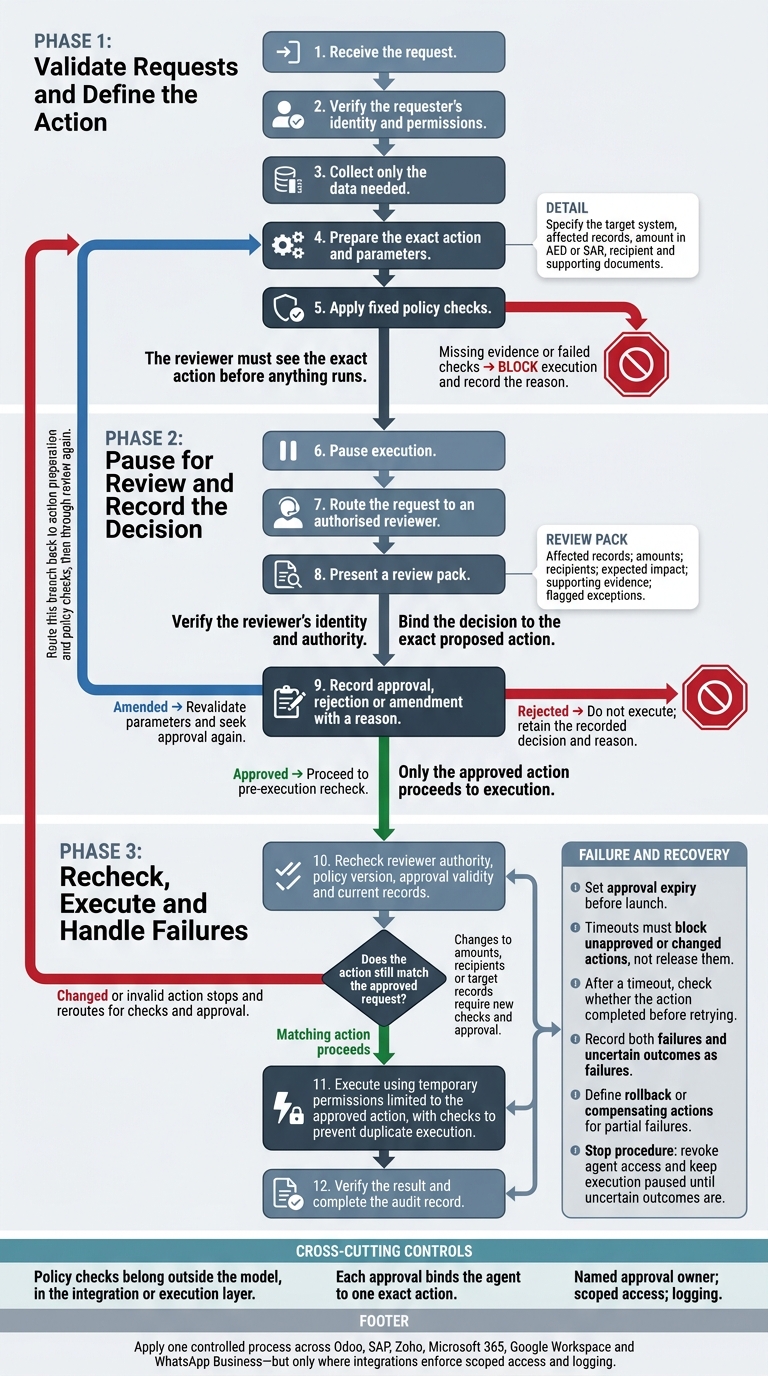
Once roles and limits are set, follow the same sequence every time. Use one controlled process that assigns each approval to a named owner across Odoo, SAP, Zoho, Microsoft 365, Google Workspace and WhatsApp Business, but only where integrations enforce scoped access and logging. Keep policy checks outside the model, in the integration or execution layer. Each approval must bind the agent to one exact action.[1][7]
Validate Requests and Define the Action
Steps 1–5: Receive the request, verify the requester’s identity and permissions, collect only the data needed, prepare the exact action and parameters, then apply fixed policy checks.
Specify the target system, affected records, amount in AED or SAR, recipient and supporting documents. Missing evidence or failed checks must block execution, with the reason recorded.[1][7] The reviewer must see the exact action before anything runs.
Pause for Review and Record the Decision
Steps 6–9: Pause execution, route the request to an authorised reviewer, present a review pack, and record approval, rejection or amendment with a reason.
The pack must show affected records, amounts, recipients, expected impact, supporting evidence and flagged exceptions. Verify the reviewer’s identity and authority, then bind the decision to the exact proposed action. If the reviewer amends the request, revalidate the parameters and seek approval again.[1][2][7] Only the approved action proceeds to execution.
Recheck, Execute and Handle Failures
Steps 10–12: Recheck reviewer authority, policy version, approval validity and current records. Execute using temporary permissions limited to the approved action, with checks to prevent duplicate execution. Then verify the result and complete the audit record.
After a timeout, check whether the action completed before retrying. Changes to amounts, recipients or target records require new checks and approval. If the action no longer matches the approved request, stop and reroute it. Record both failures and uncertain outcomes as failures.[1][2][7]
Set approval expiry before launch. Timeouts must block unapproved or changed actions, not release them. Define rollback or compensating actions for partial failures. Provide a stop procedure that revokes agent access and keeps execution paused until uncertain outcomes are resolved.[1][6][7]
Apply Gulf Data Rules and Audit Controls
Once approval routing is fixed, control where data moves and how the record is preserved.
Map Data Locations and Legal Duties
Approval does not replace a jurisdiction check. Before execution, map personal and confidential data across processing, model endpoints, subprocessors, backups, logs and offshore support access.
Have legal, privacy and security teams check UAE federal PDPL, DIFC or ADGM rules, Saudi cloud controls and sector rules before any approved action reaches production. Cover retention, deletion and cross-border transfers, and assess other Gulf jurisdictions separately.[3][5][8]
Use tenant isolation and least-privilege access. For document retrieval, mirror source-system permissions. Hosting location is one control, not the compliance decision.[3][6][8]
Keep Approval Records That Are Tamper-Evident
Keep one linked record so auditors can reconstruct the exact approval chain. Include requester and agent identities; model, prompt and policy versions; source references; tool calls; retrieved context; reviewer authority; the decision; execution result; errors; and rollback status.
Use local timestamps, such as GST (UTC+4) or Saudi Arabia time (UTC+3).[1][2]
Restrict access and separate log administration from approval duties. Define retention, deletion and immutability controls, then test that alteration or deletion without permission is blocked or detected.[2][7][8]
Verify Uklad AI Controls and Integrations
If Uklad AI is the workflow layer, verify the controls it claims to enforce. It says it supports regional data residency for the UAE and KSA, permission-based access control, immutable audit logs, data kept inside the company perimeter and on-premises deployment on request.
Check those claims through documentation, contracts and live tests, not product descriptions alone. Verify end-to-end data locations, subprocessors, approval routing, exact-action authorisation and coverage for each required integration.
Require evidence that revoked permissions block execution and that changed actions cannot reuse an earlier approval.[3][6][7]
Conclusion: Test and Review Before Scaling
Once the controls and integrations above are verified, pilot one workflow before scaling. Scale only when live tests show that limits, owners, approvals, timeouts, data handling and audit logs work end to end, under both normal and failure conditions.[1][3][7]
Pilot One Workflow
Start with one reversible workflow, such as document classification or internal summaries for human review; name a business owner and a technical owner, set baseline time and cost, and define rollback before launch.[3][4][5][6]
Keep the approval owner, data rules and logging path defined above, including data residency requirements. Specify what the agent may read or change, and what it must never touch.[3][4]
Test unauthorised requests, prompt injection, expired approvals, unvalidated record changes, duplicate execution and rollback. Check that missing evidence or expired approval blocks the action and creates a log entry, and that retries do not duplicate changes.[1][7] Measure accuracy, review time and operating cost in AED.[6]
Review Approval Metrics on a Schedule
After the pilot, review control metrics on a fixed schedule. Track approval, rejection and policy-override rates separately, alongside review time, timeouts, policy breaches, unauthorised attempts, rollbacks and incidents. Break results down by agent and department, and state the denominator for every rate.[6]
Review scope and permissions at least quarterly, and sooner after incidents or unresolved audit findings. Assign workflow changes to the business owner, and access, logging and shutdown controls to the technical owner. Version and test changes to thresholds, permissions and scope.[3][4][6][7]
Expand only when measured value, recorded risk acceptance and tested recovery justify the next workflow. That workflow must pass the same tests, and its controls must hold under review.[3][7]
FAQs
How do we set safe AI approval limits?
Set limits by risk, not capability. Tier 0 logs no-risk internal suggestions. Tier 1 allows automatic execution when an action meets policy; otherwise, a human must step in. Tier 2 requires human approval before high-impact actions, such as financial transactions, record deletion or external communications.
Give reviewers decision tickets with the agent’s rationale, evidence and proposed impact. Log every approval and rejection to support compliance audits and improve the process over time.
Who approves requests when the named approver is unavailable?
For each high-risk or material action type, name a primary approver and a designated deputy. The deputy should approve requests when the primary approver is unavailable.
Rotate coverage so every workflow that needs human intervention has an active on-call path. This keeps work moving and makes accountability clear. Document both roles before any agent goes live.
How can we verify UAE and Saudi data residency?
Require evidence of where personal and production data is stored and processed. Test whether prompts, retrieval, logs and outputs remain within the required jurisdiction. Explicitly document any cross-border inference or retention.
Define agent identities, permissions, risk-based approvals and evidence requirements. Keep audit trails that link retrieved data, proposed actions, approvals, timestamps and outcomes.
Request evidence of provider and cloud tenant responsibilities. Before production, run a proof of concept with minimum permissions. [1][2][3]